How Salon Payroll and Commission Are Calculated
How to calculate salon payroll and commission: salary, net-of-materials rates, progressive tiers, hours, advances, and an auditable monthly pay run.
On this page
At month end, one hairstylist has a salary, another earns commission, the receptionist is paid per shift, and the new colorist crossed a higher tier after a strong week. There is an advance, two refunds, and a service delivered by two people. If all of that is collected from the calendar into a spreadsheet, the argument is rarely about the formula. It is about which visits entered the formula and which rules were applied.
Accurate salon payroll and commission starts with four separate decisions: when an earning accrues, what base the percentage uses, how base pay is added, and when the result becomes fixed as paid.
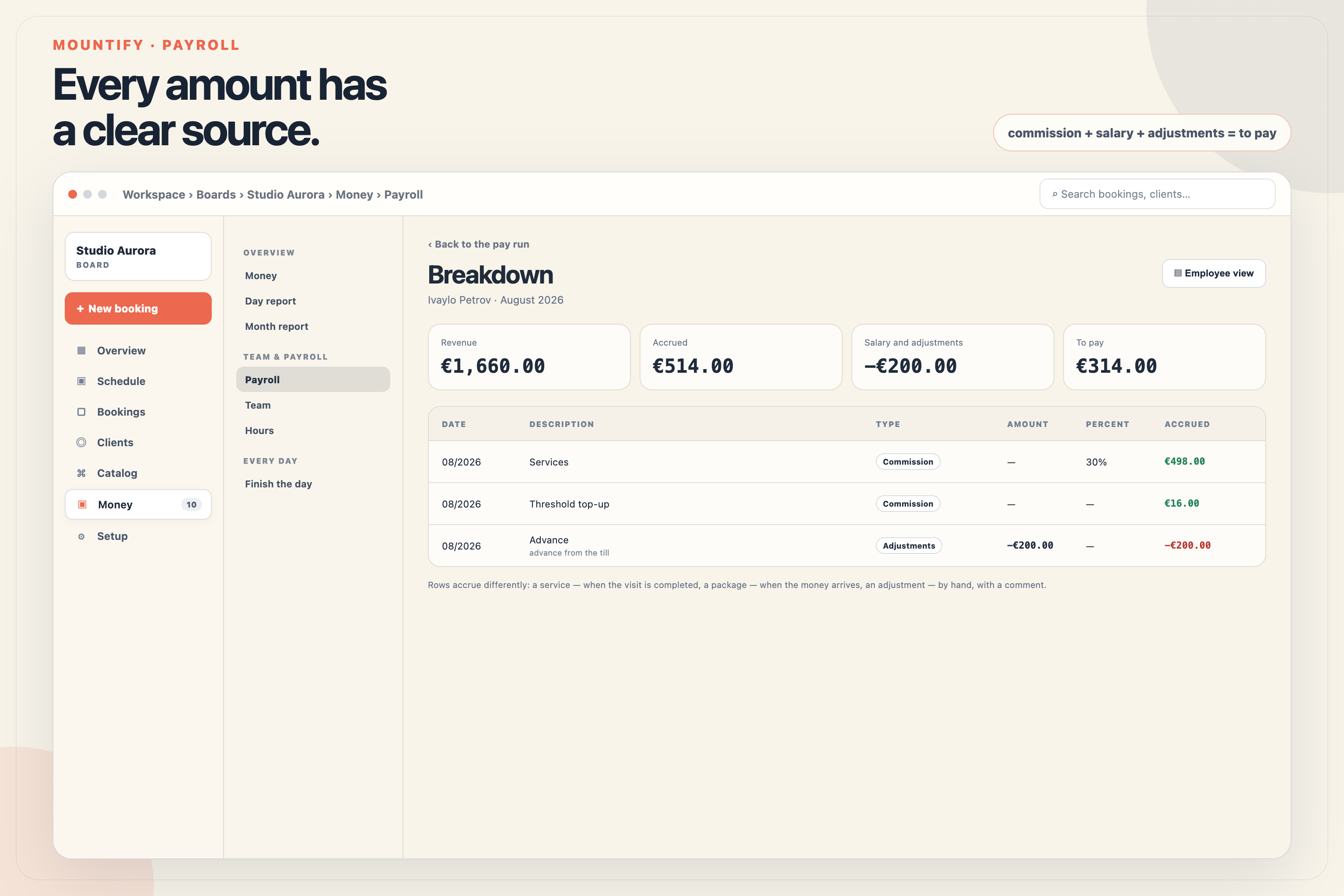
A good pay run is not one final number. It should explain every cent: which service, rate, threshold, or adjustment produced it.
Mountify connects those decisions to real visits, schedules, sales, and payments. That makes the pay run auditable, but it does not turn it into tax or accounting software.
Four models for base pay
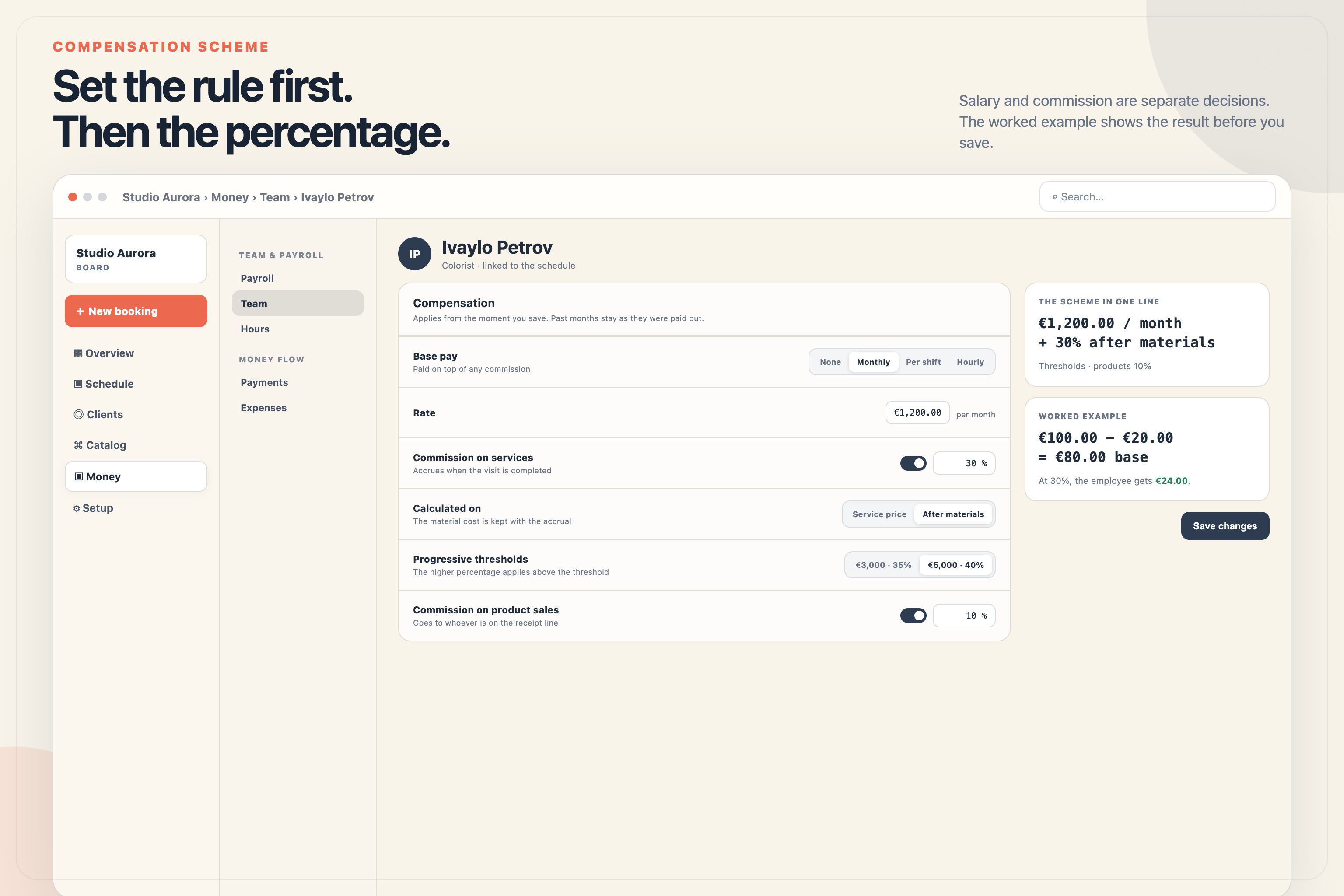
Before setting percentages, choose how each person’s base work is paid. In Mountify, an employee can use one of four modes:
| Model | How the month is calculated | Suitable example |
|---|---|---|
| No base rate | €0 base pay | Commission-only specialist |
| Monthly salary | The fixed monthly rate | Manager or receptionist |
| Per shift | Rate × scheduled working days | Reception with fixed shifts |
| Hourly | Rate × scheduled hours | Assistant with a variable schedule |
A monthly salary is not automatically divided by the number of shifts. If the employee took leave or had unpaid absence, enter the difference deliberately as an adjustment instead of hiding it inside an automatic formula.
For per-shift pay, a working day is one with non-zero scheduled time after corrections. For hourly pay, the system uses scheduled minutes. A day with no schedule column is not the same as a day off with zero hours: it means the basis for calculation is missing and should be fixed.
Exactly when service commission accrues
The most important rule is short:
Commission on a service accrues at Completed status, not at arrival and not at payment.
If a €100 service is completed but the customer has paid only €40, the service commission is still calculated on the full applicable base. The remaining €60 is customer debt; it does not turn completed work into partial work.
The reverse is also true: a prepaid booking does not generate service commission until the visit is completed. This is why the salon daily money report and payroll answer different questions. The first follows when money arrived; the second follows when work was performed.
A complimentary visit can accrue commission by default. A board setting can exclude such visits. Make that a deliberate policy because both choices can be reasonable: the specialist may have performed the work even though the salon chose not to charge the customer.
Full price or net of materials
Each scheme can use one of two bases:
- full price - apply the percentage to the service value;
- after materials - deduct the configured material cost first, then apply the percentage.
Consider a color service priced at €100, with €20 of materials and 40% commission:
| Base | Calculation | Commission |
|---|---|---|
| Full price | €100 × 40% | €40 |
| After materials | (€100 − €20) × 40% | €32 |
The net-of-materials base never falls below zero. If two specialists deliver a service, the price and material base are divided across all participating specialists first. Each employee’s own scheme is then applied.
The gross price, material cost, and commission base are stored with the earning row. If you change a catalog material cost three months later, the old pay run is not silently rewritten.
Overrides handle real-world exceptions
One general rate is rarely enough. Haircuts may pay 35%, color services 30% after materials, and a premium treatment 45%.
Mountify applies rules in a precise order:
- an override for the specific service;
- an override for the service group;
- the employee’s base percentage.
The most specific rule wins. Its base - full price or after materials - travels with the percentage. A 30% net-of-materials override therefore cannot accidentally inherit the full-price base from the general scheme.
Commission cannot exceed 90%. That is a technical safeguard against a data-entry mistake, not a recommendation for what rate to agree with the team.
Progressive commission tiers are marginal
With progressive commission, the higher percentage applies only to revenue above the threshold. It does not retroactively apply to the entire month.
Assume a 30% base rate, 35% above €3,000, and 40% above €5,000. At €6,000 of revenue:
- the first €3,000 stays at 30% = €900;
- the next €2,000 is at 35% = €700;
- the final €1,000 is at 40% = €400;
- total commission is €2,000.
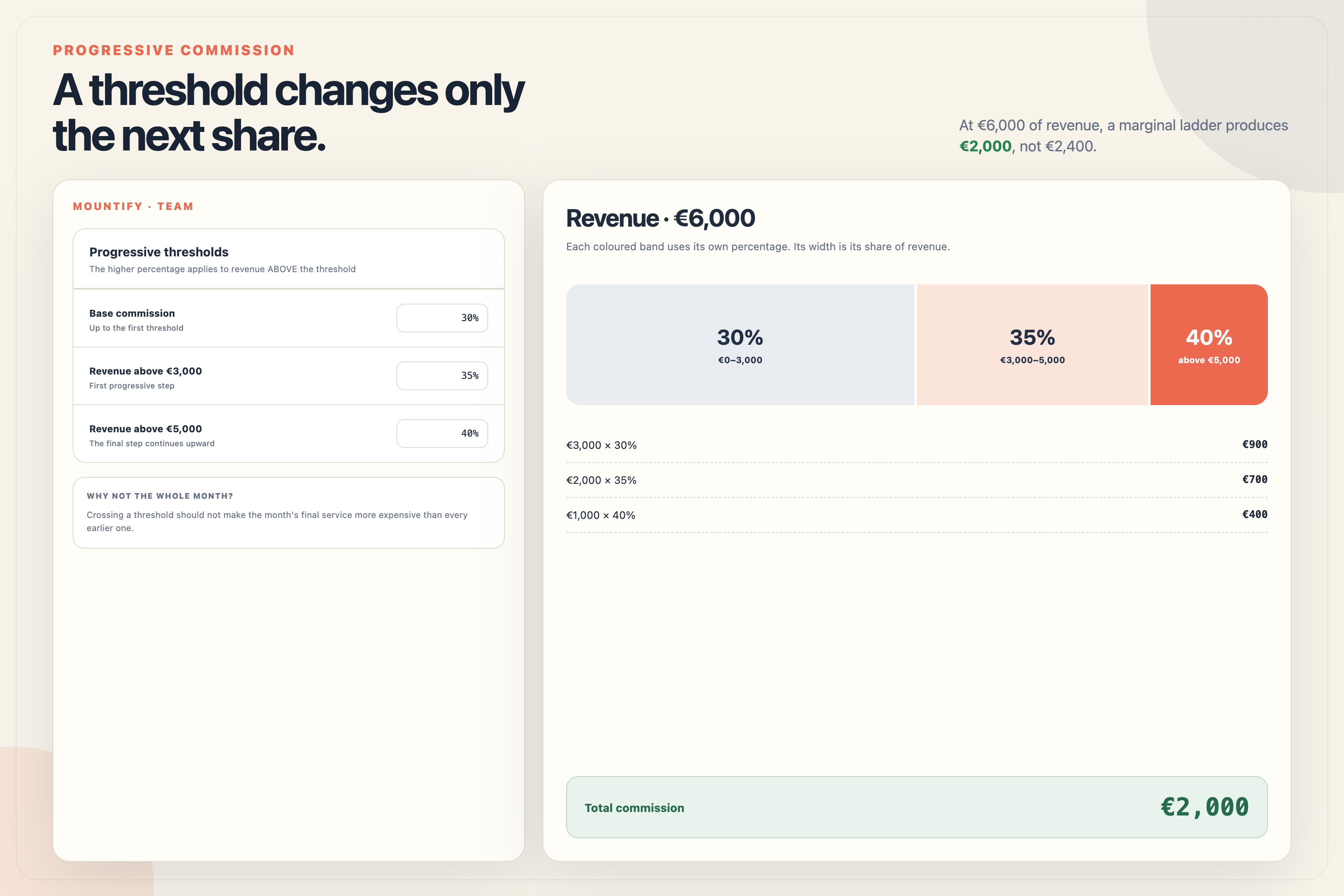
Repricing all €6,000 at 40% would produce €2,400. That would make the final service of the month disproportionately expensive. A marginal ladder removes that jump. You can configure up to four thresholds.
Packages, products, referrals, and refunds
Not every earning follows visit status:
- a service accrues when its visit is completed;
- a package accrues when money from the sale arrives;
- a product accrues to the seller on the receipt, from full price or after the product’s cost;
- a referral bonus is a fixed amount or a percentage of the referred customer’s first completed visit and accrues only once.
Packages have two policies. Commission can go to the seller at sale time or to the specialist when package credit covers a service. The two modes are not applied together because that would commission the same revenue twice.
Discount policy also belongs to the board: commission may use the amount actually paid or the catalog price. Put that choice into the salon’s internal rules. Software can apply the decision, but it cannot negotiate fairness for you.
When money is refunded, Mountify does not erase the old earning. It creates a separate negative reversal proportional to the refunded share. The pay run then shows both the original commission and why it was reversed.
Working hours, overtime, and work on a planned day off
Hourly and per-shift pay comes from the planned schedule. Manual corrections to hours remain visible instead of someone changing the final figure without an explanation.
Overtime can use a daily or monthly threshold. If the same hours cross both, the system takes the larger overtime volume instead of counting both. The rate can be a multiplier on hourly base pay or a custom overtime rate. Monthly and per-shift employees need a custom overtime rate because there is no hourly base to multiply.
Work on a planned day off is tracked separately and is not counted again as overtime.
Advance, bonus, and deduction are different adjustments
The three manual adjustments have different signs and meanings:
- an advance reduces what remains to pay and creates an expense immediately;
- a bonus increases the pay run;
- a deduction reduces the pay run.
Every adjustment has a comment. “−€200” without a reason creates a dispute; “advance from 12 August” can be checked.
From draft to paid pay run
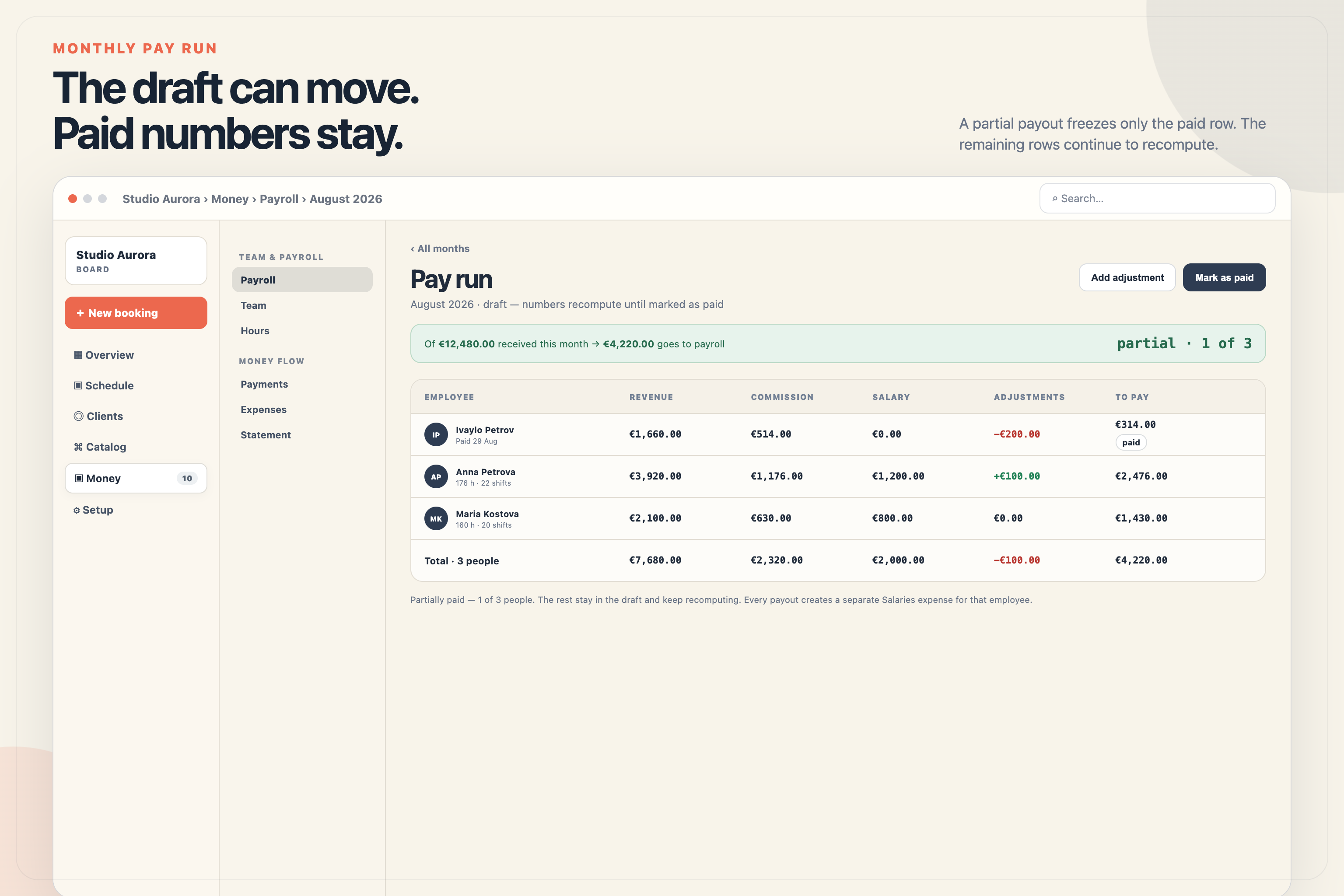
While a pay run is a Draft, it recomputes. If you complete a late visit, add an adjustment, or correct the schedule, unpaid figures update.
You can pay only one person or a selection of the team. Paid rows are stored as snapshots while rows for the remaining people continue to recompute. Once the whole team is paid, the month’s pay run is frozen.
If a backdated payment or another correction appears later, Mountify shows drift against the snapshot. It does not silently rewrite pay that has already been paid. Undoing the payout removes the linked Payroll expense and returns the month to Draft.
Every payout creates a separate Payroll expense for that employee. This is why “in − expenses = left” includes paid payroll without requiring you to enter it again by hand.
Employee review and accountant export
The breakdown shows revenue, earnings by type, salary, adjustments, and the amount to pay. An employee can receive a private My money link that shows only their own earnings and payouts. The link can be rotated or disabled.
There are two exports for work outside the system:
- a standard pay-run CSV;
- a separate CSV for the payroll accountant with days, hours, absences, additional net pay, and advances.
These are inputs for an accountant. Mountify does not calculate tax, social contributions, gross salary, or liabilities to the state. Final statutory treatment remains with an accountant or payroll specialist.
A practical monthly salon payroll process
- Set the base model and commission rate for each employee.
- Add overrides only where the agreement is genuinely different.
- Configure material costs if commission uses a net base.
- Maintain the schedule and complete visits that actually happened.
- Review packages, products, refunds, and manual adjustments.
- Open the breakdown for every unusual row before paying.
- Pay the run and share the private link or export with the right person.
This sequence matters more than the “perfect” percentage. It turns payroll from an opaque final figure into a history that the owner and employee can verify against the same data.
Payroll should follow the work, not the spreadsheet owner’s memory. Mountify connects completed visits, schedules, sales, adjustments, and payouts in one auditable breakdown.
For the wider picture - scheduling, clients, and money - see Mountify for beauty and hair salons.
Frequently asked questions
When does commission on a salon service accrue?
When the visit has Completed status. Full, partial, or missing payment does not change when the earning accrues.
How is net-of-materials commission calculated?
Deduct the configured material cost from the price first, then apply the percentage to the remainder. At €100, €20 of materials, and 40%, the result is €32.
How do progressive commission tiers work?
The higher percentage applies only to the share of revenue above the threshold. The entire month is not repriced retroactively.
Can I pay only part of the team?
Yes. Paid rows are stored while the rows for people who have not been paid yet continue to recompute in the draft.
Is a payroll expense created automatically?
Yes. Paying through the pay run creates a Payroll expense for that employee. An advance also creates an expense immediately and is then deducted.
Does Mountify calculate payroll tax and social contributions?
No. It prepares an operational pay run and exports, but does not replace accounting or statutory payroll software.