Salon Daily Report: Revenue, Expenses and Cash Flow
Track salon revenue and expenses, payments received, unpaid balances, and cash in the till—without double counting or confusing cash flow with profit.
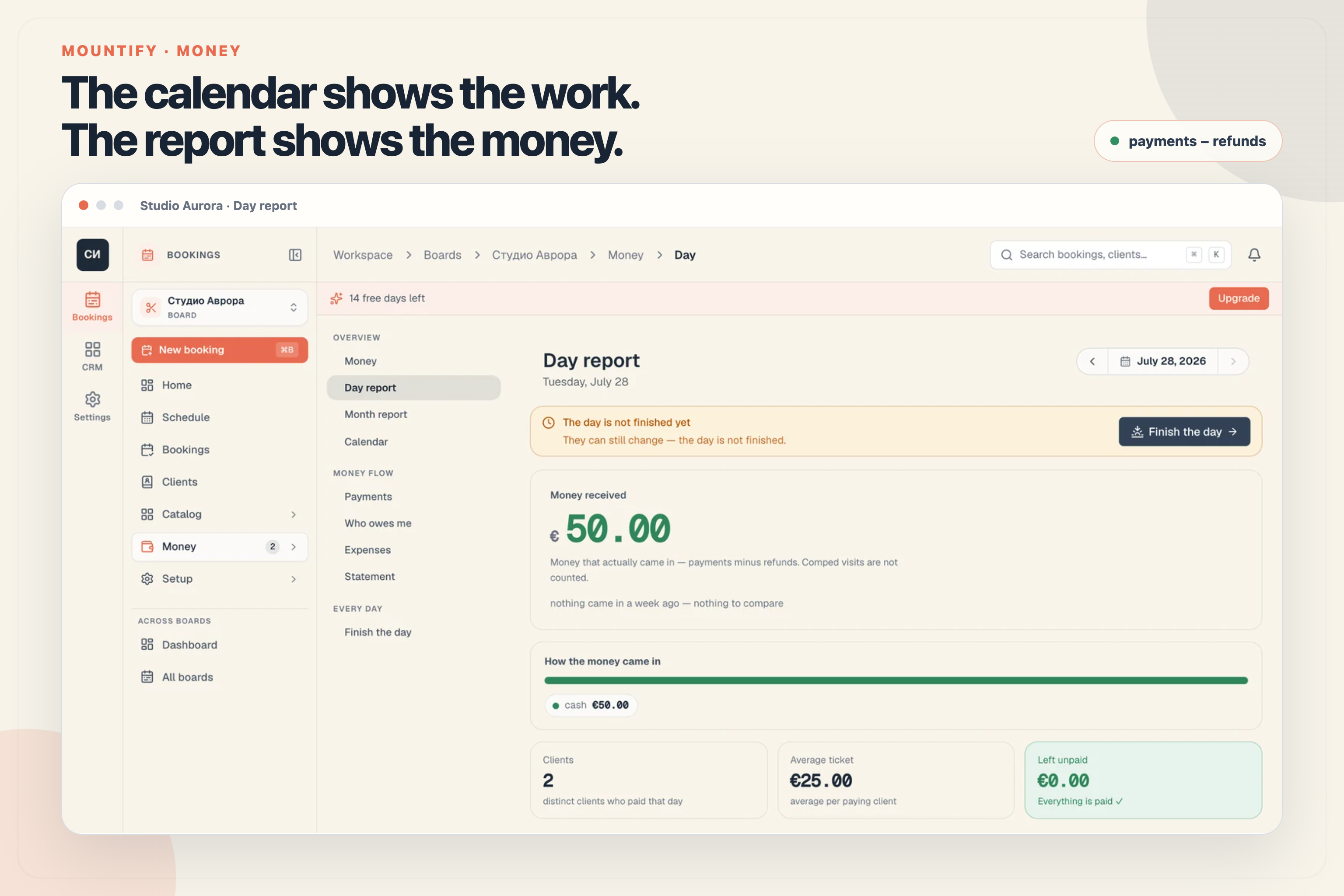
On this page
At 7:12 p.m., the last customer leaves. The schedule looks excellent: almost no gaps, and the strip above it shows €620 of revenue from completed visits.
How much money is in the till?
That is actually the wrong question. Some customers paid by card. One left a deposit three days ago. Another still owes €80. And today you refunded €30 for a cancelled appointment. The drawer holds cash only; card and online payments reached the business by another route. The value of the work completed is a third number.
When those three numbers live in the same spreadsheet column — or in someone’s memory — a full calendar can make a day feel successful when the money does not support that conclusion.
The calendar answers “What work did we finish?” The Day report answers “What money actually came in?” Do not make one number do both jobs.
A salon daily report is not an accounting statement. It is an operating check that separates the value of completed work, payments actually received, and the amount left after recorded expenses.
Three numbers answer three different questions
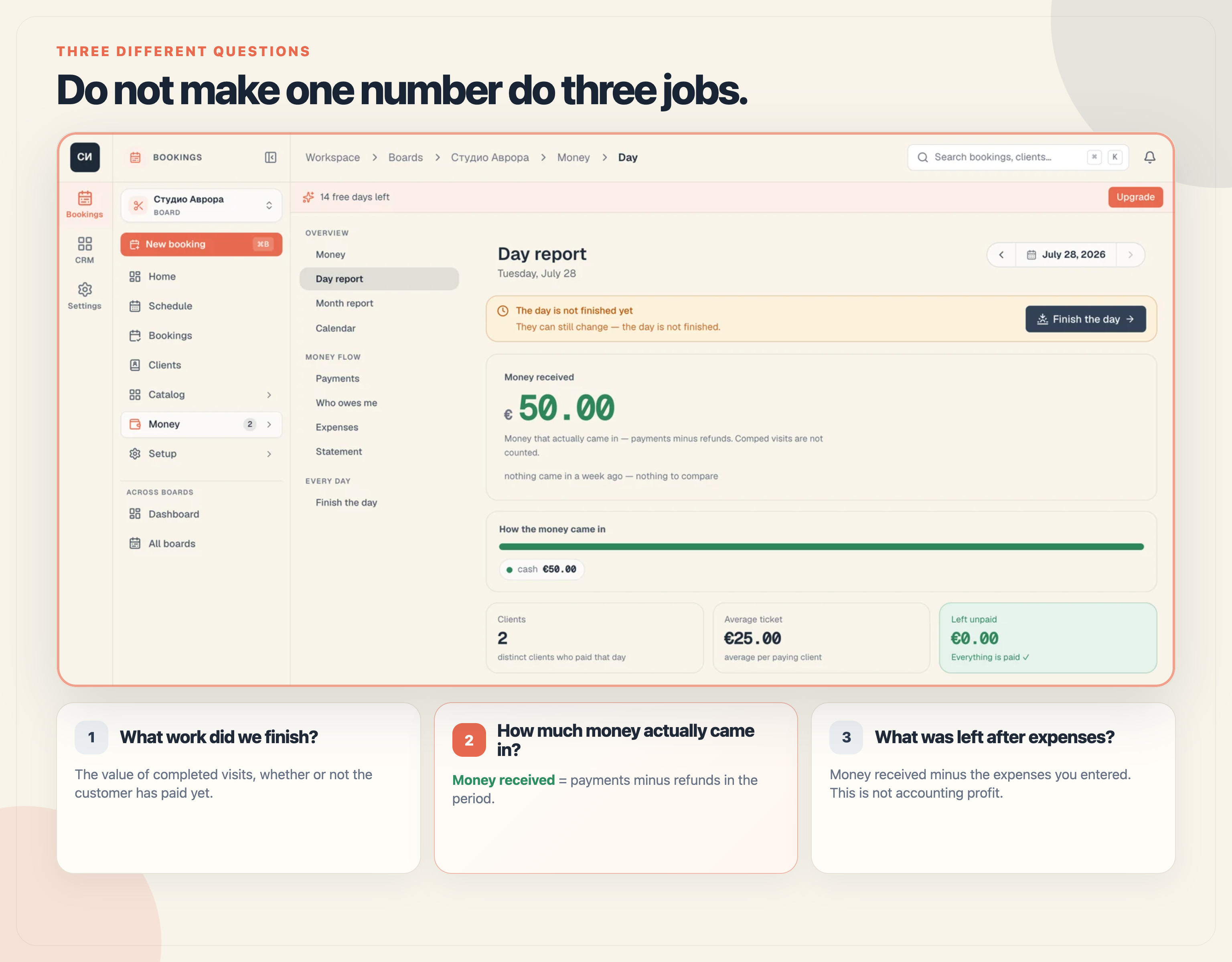
The first figure is Revenue (closed) above the schedule. It measures the value of work marked complete, whether or not the customer has paid yet.
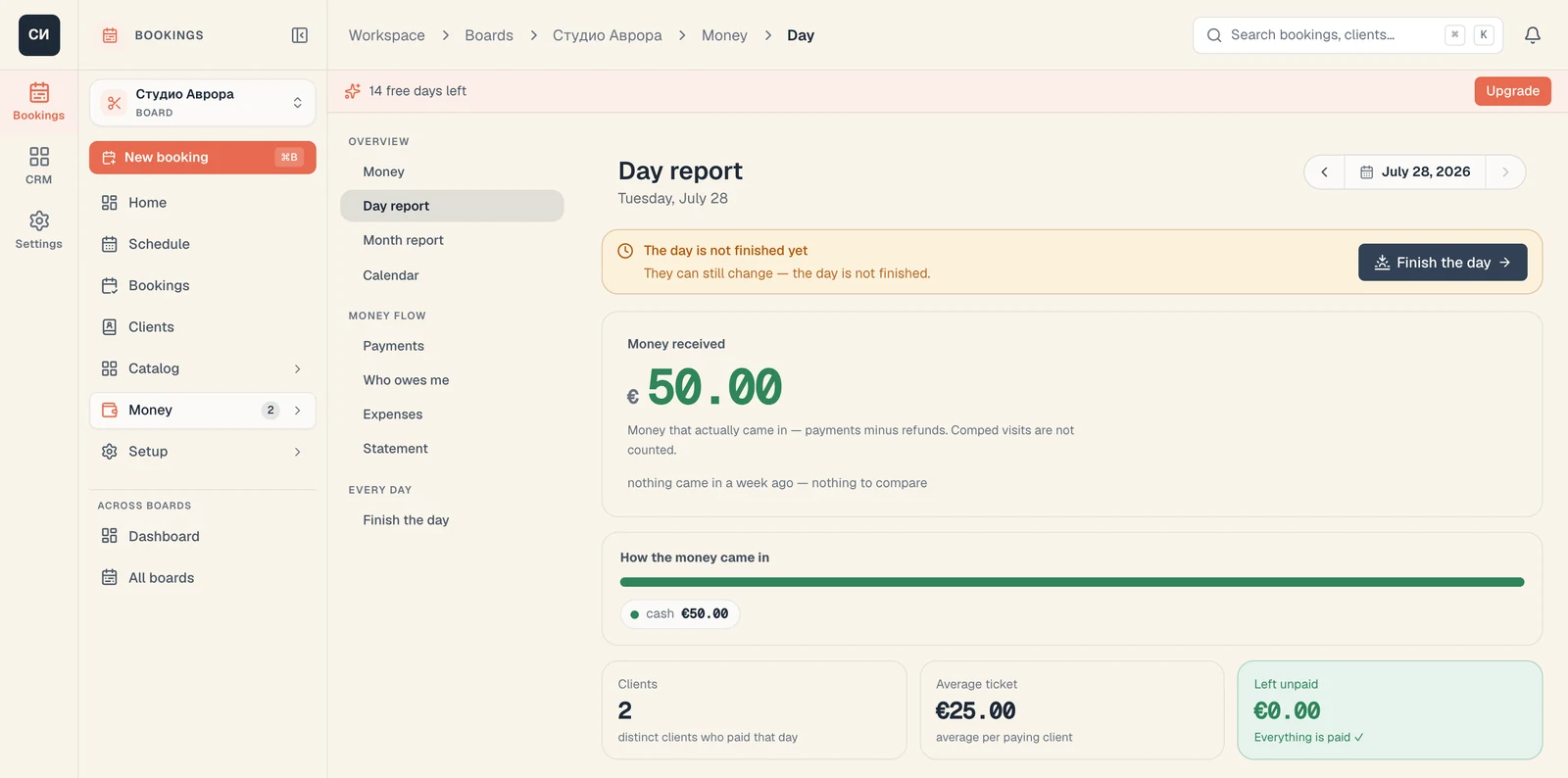
The second is Money received in the Money section. It measures the movements actually recorded as payments in the period, minus refunds.
The third is Left: money received minus the expenses entered for the same period.
| Figure | The question it answers | What it does not prove |
|---|---|---|
| Revenue (closed) | How much work did we finish? | That every visit was paid |
| Money received | How much actually came in during the period? | That all of it is cash in the drawer |
| Left | What remains after entered expenses? | That this is accounting profit |
This is not an accounting technicality. It determines whether you find an unpaid visit tonight or three weeks later.
What exactly counts as “Money received”
Mountify uses one concrete rule:
Money received = visit payments + paid package sales + standalone product sales − refunds in the period.
The day follows the board’s timezone. If a deposit is paid on Tuesday for a Friday visit, it is counted on Tuesday. If an old debt is paid today, that payment sits in today’s report. If you issue a refund today for last week’s appointment, the refund reduces today’s money received; it does not silently rewrite the old day.
Several rules prevent double counting:
- a visit covered with package credit does not create a second payment; the money came in when the package was sold and paid;
- a product added to a visit receipt is a slice of the amount already received, so it is not added again;
- a standalone product sale has its own money movement;
- a visit marked “on the house” is reported separately, but is not money received;
- a voided payment does not count, while a refund is subtracted.
The How the money came in breakdown shows cash, card, online, and the other available methods. It is gross: when a refund exists, the refund is shown separately and has already been subtracted from the large net figure. That is why the method pills can occasionally add up to more than Money received. This is expected rather than a calculation error.
The same day can look four different ways
Take a €90 service. Here is what happens to the figures depending on the real event:
| What happened | Completed visits | Money received | Unpaid |
|---|---|---|---|
| The service was completed and paid today | +€90 | +€90 today | €0 |
| The service was completed, but the customer still owes | +€90 | €0 | +€90 |
| A €30 deposit was paid earlier and the €60 balance today | +€90 when completed | +€30 on the deposit day, +€60 today | €0 |
| The visit was covered by an already-paid package | +€90 when completed | €0 new money on redemption | €0 |
The report can therefore be lower than the value of completed visits because there is a debt or package coverage. It can also be higher because you sold a package for future visits today or collected an old balance.
This is where Who owes me is more useful than a note beside the card terminal. A confirmed appointment that is still in progress does not become a debt simply because it has not been paid yet. The Day report’s Left unpaid tile only includes visits marked Completed, No-show, or Walk-in. The separate debt book can also catch an unpaid booking from a calendar day that has already passed, even if its status was never corrected.
“Finish the day” is a control procedure, not a decorative button
A report is only as accurate as the statuses and payments behind it. Mountify therefore has a separate evening routine: Finish the day.
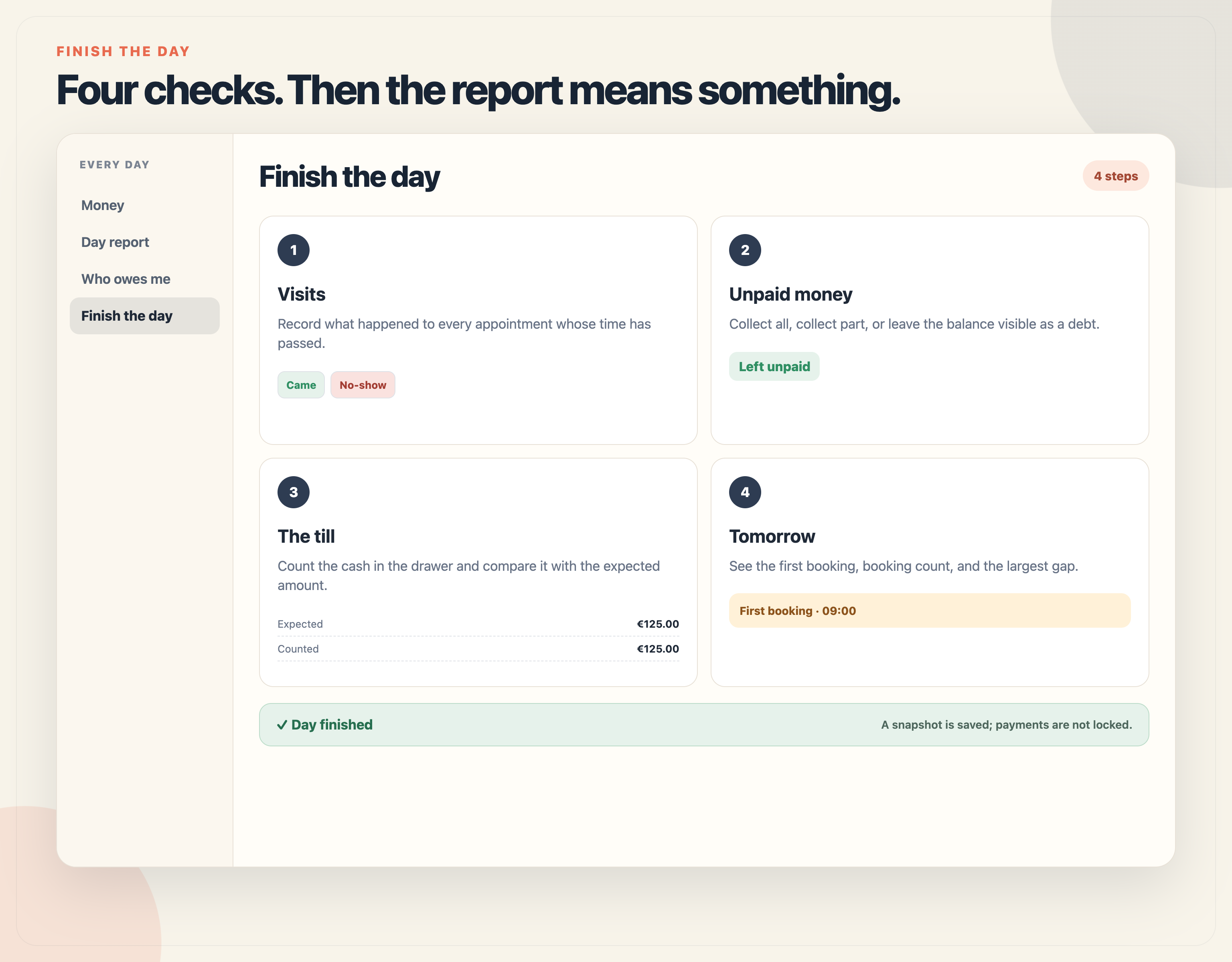
1. Record what happened to the visits
An expired confirmed appointment should not remain “Confirmed” forever. Mark Came or No-show. That separates work performed from a missed visit and tells the system which visits are now eligible to carry an unpaid balance.
2. Deal with the unpaid money
For visits with a balance, you can record the full amount, a partial payment, or leave the balance visible in Who owes me. One tap can record a full cash payment; card and partial amounts use the normal payment sheet.
Mountify lets you finish a day with remaining items after explicit confirmation. Nothing disappears: unpaid money stays as debt, and the visit keeps its status.
3. Count the physical till
Expected cash is not the same as all money received. Only cash movements belong in the drawer calculation:
Opening balance + net cash received + cash in − cash out − expenses paid from the till.
Card and online payments are reconciled with the payment provider, not with the drawer. Mountify calculates a discrepancy only between expected and counted cash. A normal evening with many card payments therefore does not look like a shortage.
4. Look at tomorrow
The final step shows tomorrow’s first booking, booking count, and largest gap. It does not alter the money; it simply turns day close into a useful handover to the next day.
At the end, Mountify stores a snapshot. It records how the day looked at close, but it does not lock payments like an accounting period. If you later correct a movement assigned to that day, the live report may differ from the snapshot. A payment collected today against an old debt belongs to today’s report, not to the date of the visit.
How to read the Day report in two minutes
Do not begin with the chart. Begin with five checks:
- Money received. This is the net amount after refunds.
- How it came in. Compare cash with the till, and card or online payments with the payment provider.
- Clients and average ticket. Clients are distinct payers during the day; a payment for a visit without a client record is counted on its own. Average ticket is money received per payer, not average booking price.
- Left unpaid. Open the debt list while the team still remembers the day.
- In − expenses = left. Check that today’s expenses were recorded and correctly marked as paid from the till or bank.
Expenses use five clear categories: Rent, Supplies, Salaries, Marketing, and Other. Monthly rent can repeat automatically. Supplies is where a delivery payment belongs; if you use stock tracking, the material movement itself should not be entered again as another expense.
One warning matters: Left is not profit. It is an operational figure — money received minus expenses entered. Tax, depreciation, a fee, or payroll that has not been recorded cannot appear in it by magic.
A month reveals the pattern that one day can hide
One day may look weak because rent landed on the first, or strong because a package was sold. The Month report adds context:
- money received by day;
- which services brought in the most net money;
- expenses by category and what was left;
- unpaid balances and operating indicators for the period;
- paid packages and deposits as obligations to future customers.
That final point matters. A sold package is money now and a promise of services later. A healthy bank balance does not necessarily mean every euro is free to spend.
If one period contains movements in multiple currencies, Mountify does not convert them. The report warns that the combined figure is approximate. The cleanest operating practice is to keep one real currency per board.
One habit that takes less time than recovering a lost debt
At the end of each working day:
- complete or mark as no-show every visit whose time has passed;
- record payments with the correct method;
- review Who owes me;
- add expenses and where they were paid from;
- count the till and finish the day.
At month end, review the trend and export a Statement for your accountant. It can contain the period’s movements as CSV or XLSX. It is an operating export, not a replacement for bookkeeping, invoices, or fiscal receipts.
You do not need to wait for month end to learn that the money does not reconcile. Mountify’s Money section keeps payments, debts, expenses, and day close around the same movements.
Try Mountify free for 14 days → · See how the Money section works
For the wider picture—scheduling, clients, and online booking—see Mountify for beauty and hair salons.
Frequently asked questions
Why does the Day report differ from “Revenue (closed)” above the schedule?
“Revenue (closed)” counts the value of completed visits whether or not they have been paid. The report counts visit payments, paid package sales, and standalone product sales minus refunds on the selected day.
Does a visit covered by a package count as money twice?
No. The money is counted when the package sale is paid. Redeeming its credit against a visit does not create a new payment.
Does “Left” mean profit?
No. It is money received minus the expenses you entered. It does not automatically include tax, depreciation, or unrecorded costs.
What does “Finish the day” do?
It checks ended visits, unpaid balances, the physical till, and tomorrow’s schedule. It saves a snapshot without locking future corrections.
Can I send the report to my accountant?
The Statement can export movements for a period as CSV or XLSX. The screen is an operational report, not an accounting system.