Everything for bookings and money — under your brand
Mountify is an online booking platform with a fully branded booking page, strong loyalty and packages/memberships for appointment businesses in Bulgaria, from a single specialist to chains with several locations — beauty salons, barbershops, sport studios (pilates, yoga), pools and courts, plus tattoo studios, kids centres and rentals. One place for your calendar, a branded booking page, payments, a client record (a light CRM behind the calendar) — and for the money: the day report, who owes you, expenses and team pay, plus products and stock.
Your brand, no “powered by”
The booking page dresses in your brand, not ours: mood themes, accent color, font, light or dark theme, corner rounding and your own booking address — with no “powered by” line. The product speaks Bulgarian, English and Turkish: each person on your team picks their own admin language, the client switches the booking page themselves, and confirmations and reminders go out in their language, not yours. And when you come from another system, Excel/CSV import of clients and bookings moves your data cleanly: upload a file, map the columns and preview before you save — you start with your history, not from zero.
- Mood themes, accent color, font, light/dark — no “powered by”
- Your own booking address and corner rounding, on your brand
- Bulgarian, English and Turkish — admin, booking page and emails
- Excel/CSV import of clients and bookings
Loyalty, built behind the calendar
Loyalty is built behind the calendar, not a separate tool. You launch promo codes with real rules — percentage or amount, per-client limit, validity window — and show them as promo banners right on the booking page. Punch-card logic like “5th visit −50% or free” keeps clients coming back, with progress they can see for themselves. Price modifiers by day and hour work on percentage rules: mornings cheaper, Saturday night pricier, dead hours filled with an incentive, without touching your base price. Everything is tied to the specific service and client, so the discount applies itself at the right moment, and you see what each promotion brings in.
- Promo codes with real rules + promo banners
- The discount applies automatically per service and client
- Punch-card (“5th visit −50% or free”)
- Price modifiers by day and hour (percentage rules)
Packages and memberships that spend themselves
You sell prepaid packages and memberships that deduct automatically on every visit — the client pays once, and the credit draws down on its own at booking, with no manual counting. Every package has a validity window and a remaining balance the client can see. For group classes (yoga, pilates, fitness) this is key: a “10 sessions” pass covers booking a class with a seat limit and a waiting list. Package credit is also a payment rule — a service can require drawing from an active package instead of a new card every time.
- Prepaid packages and memberships with automatic deduction
- Validity window and a visible remaining balance
- Class passes for group sessions — seat limit + waiting list
- Package credit as a payment rule for a service
- Per-guest pricing — two on a massage pay their own rate, not ×2
A calendar that blocks double-booking
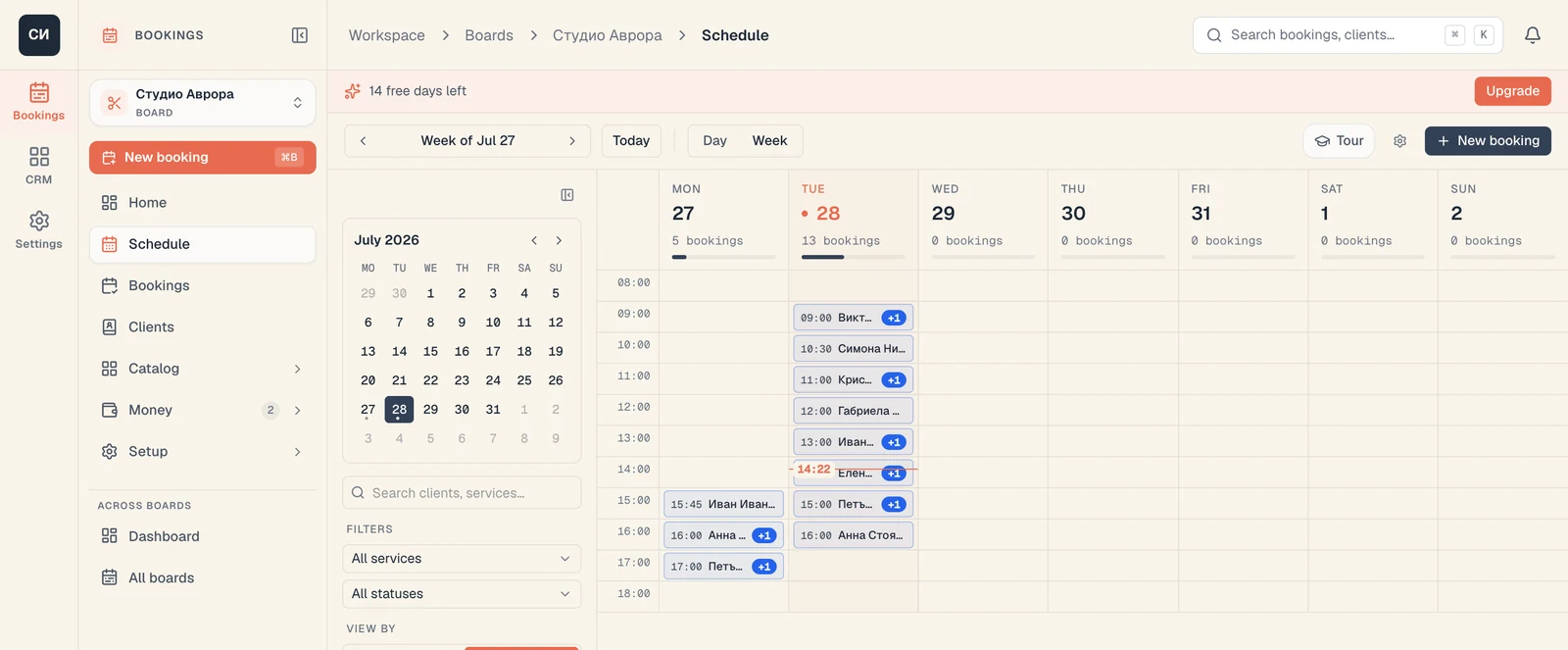
The calendar shows the day in columns — by staff member or by resource — with drag & drop, a weekly view and clear statuses on every booking. One view holds people, rooms and equipment: a resource can be a person, a place or a thing, and a slot only opens when everything needed is free — which is why a double-booking is technically impossible. Service duration is flexible, not chopped into fixed slots, so a 20-minute and a 2-hour service live in one schedule without gaps. It supports 1:1, group classes with a seat limit and a waiting list, and hourly rentals. And when one visit is several treatments in a row — sauna, then jacuzzi, then massage — a service package lines them up back to back and holds a different resource at each step; the client picks who takes them on every one of them. Move a booking to another time, staff member or day in one gesture — the client gets an updated email confirmation automatically.
- Columns by staff or resources, drag & drop, weekly view, statuses
- People + rooms + equipment in one calendar, with double-booking protection
- Flexible service duration instead of fixed slots
- 1:1, group with a limit and a waiting list, hourly rental
- Service packages: several treatments in one visit, a specialist per step
You sell entry, not a time slot
Not every business sells an hour with a particular person. A pool, a spa, a gym floor, a beach, a coworking space sell the day — the client arrives when it suits them and leaves when they decide. A day pass is exactly that: a ticket for a date, with no time to pick and no staff member to pick. On the client's side the steps drop from three to two — service and day, and that's it. A pass holds no resource, so it eats none of your schedule columns and never collides with appointments — the two live on the same board. Set a daily quota (say 100 people) and selling stops on its own once the day fills up; the quota counts guests, not bookings, so a family of four is one booking and four places.
- A ticket for a date — no time slot and no staff member to choose
- Holds no resource: eats no schedule columns, joins no conflicts
- A daily quota that counts guests, not bookings
- The window comes from the venue's opening hours, not from a duration
Your page, not a marketplace listing
The booking form is your branded page, not a listing in someone else's marketplace — you share it from Google, Instagram or your site with a single link. The client picks a service, staff member and time right on the page, without downloading an app and without registering; they come back for a new time in seconds. When unsure what they need, the built-in AI assistant (beta) asks a few simple questions and guides them to the right service and a free time, instead of leaving them to guess. Add custom fields to every booking — preferences, hair length, level, desired result — and apply tags you later see in the client record. The form is mobile-first, because that is where most bookings come from.
- Your own branded page, shareable anywhere with one link
- Pick a service / staff / time without an app and without registration
- AI assistant (beta) guides the client to the right service
- Custom fields and tags on every booking
The money comes straight to you
Payments run through your own Stripe account, not an imposed wallet — the money comes straight to you, with Apple Pay and cards right on the booking page. For each service you set a payment rule separately: a deposit, full prepayment, drawing credit from a prepaid package, or “pay later” on site. Deposits are built for long and expensive slots — they lock the time and cut no-shows, without scaring the client with the full amount up front. The rules are flexible: one service can require a deposit, another full prepayment, a third nothing. All of it happens in a single payment step, with no redirect to a scary blue gateway, so the client doesn't drop off at the last step.
- Your own Stripe account + Apple Pay — the money comes straight to you
- A payment rule for each service separately
- Deposit, full payment, package credit or pay later
- Deposits for long and expensive slots against no-shows
A unified history of the client
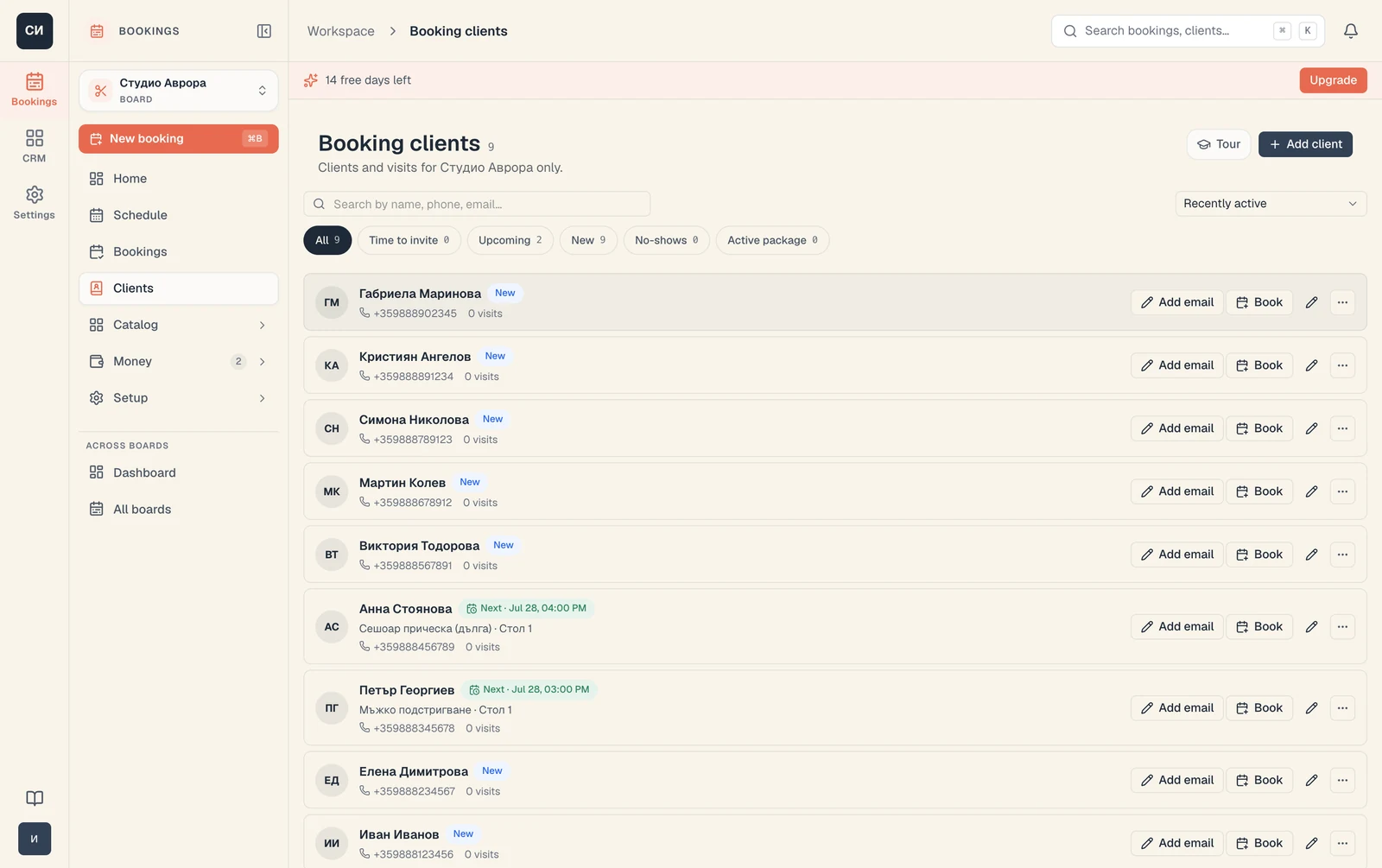
Behind the calendar sits a client record: every client's bookings, payments, packages, notes and tags in one place. For B2B sales there is a separate CRM module (built into Pro, the CRM+ add-on on Start and Growth): contacts and companies, a sales funnel with your own stages, deals and tasks, so an email enquiry or a large corporate request doesn't get lost between conversations. Reviews and ratings are collected after the visit and land right in the client record, next to their history — you see who is happy and who needs attention. Email confirmations and reminders go out automatically on booking, rescheduling or cancellation. This is not a heavy enterprise CRM, but exactly as much as an appointment business actually uses on a Monday morning.
- A client record: bookings, payments, packages and notes
- CRM module: a funnel with your own stages, deals and tasks (Pro or CRM+)
- Reviews and ratings in the client record
- Email confirmations and reminders
Not just who is coming, but how much came in
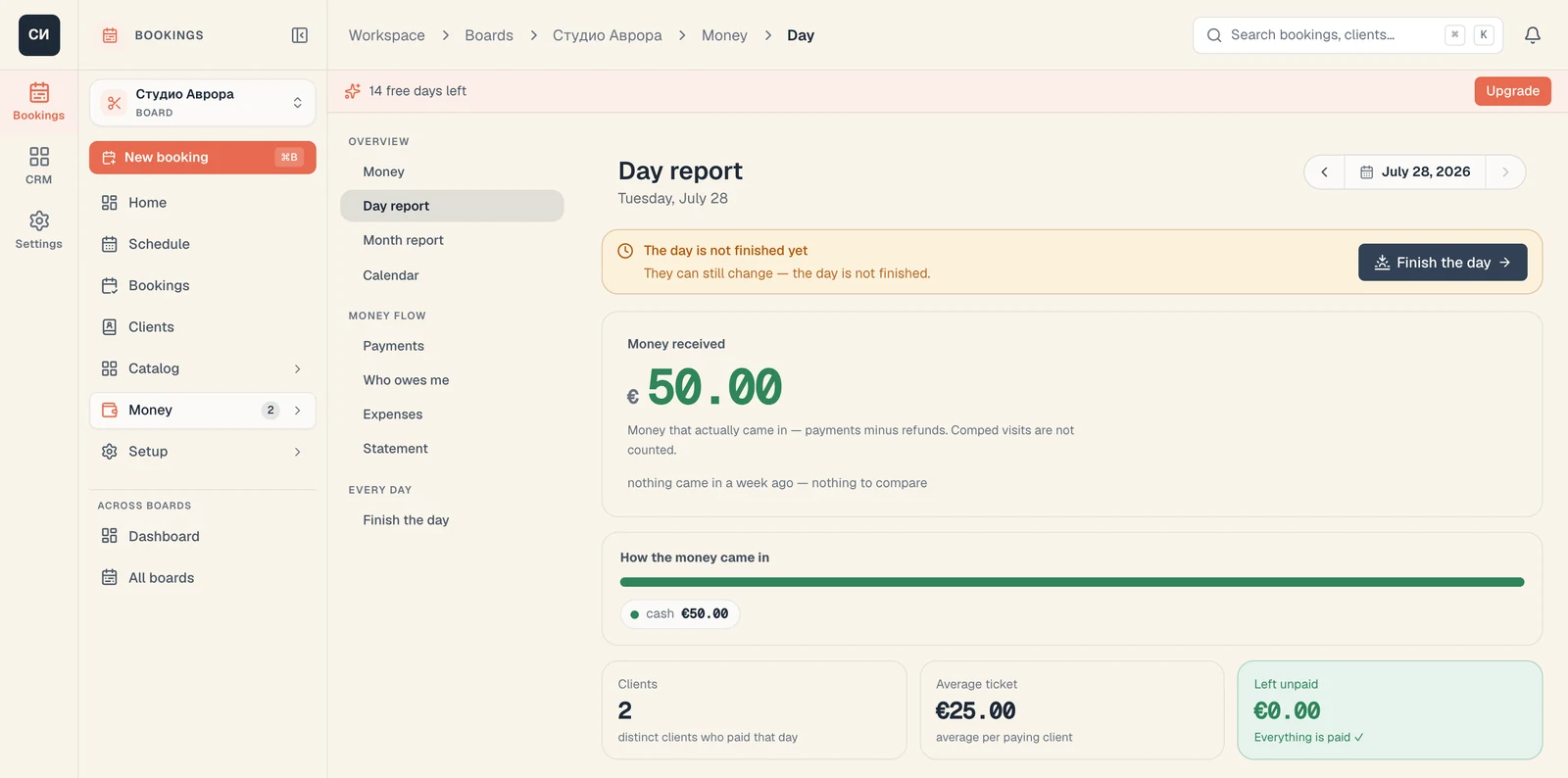
The calendar tells you who is coming. The Money section tells you the rest — how much came in, how it was paid, and what is still uncollected. The day report gives you the money actually received, split by payment method, with the average ticket and the outstanding balance; the month report puts it next to the previous period. The money calendar colours the month day by day, so strong and dead days are visible without a spreadsheet. Who owes me is a list of people and amounts, not a feeling. Expenses live in the same place, so “received − expenses = left” sits on the screen instead of in a notebook. At the end of the day there is Finish the day — a short ritual that sweeps up what was not collected and closes the till. You also sell products at the counter: the sale lands in the same books, and your public page carries a showcase of what the salon stocks.
- Day and month reports: received, by payment method, average ticket
- A money calendar by day and “Who owes me” with names and amounts
- Expenses in the same place — “received − expenses = left”
- “Finish the day” and a statement for the accountant
- Product sales at the counter + a showcase on your public page
Products and stock — in the same system
Selling cosmetics, consumables or sports gear? Products live in Mountify next to your services: the showcase on your public page shows what you offer, an in-person sale lands in the same till and the day report, and product commission flows into the pay run on its own. Stock tracks what's on hand by place — showcase and back bar — with a reorder threshold and a “running low” flag. A supplier delivery is recorded with the invoice number and total, a transfer between places is one operation, and a stocktake shows the difference between expected and counted. Consumables are written off by norm, automatically, when a visit completes, and products with no movement for 90 days get their own list. Mountify is not a cash register and issues no fiscal receipt — it keeps products and stock in order next to your bookings.
- A product showcase on your public page — from Growth
- In-person sales in the same till and day report
- Stock by place with a threshold and a “running low” flag — in Pro
- Deliveries, transfers and stocktakes with a variance report
- Consumables written off by norm · stock export
Pay that is calculated from the visits themselves
Everyone on the team gets a card with a compensation scheme: a base salary (monthly, per shift or hourly), a commission percentage, exceptions for one service or a group, progressive thresholds (“up to 3 000 — 30%, above — 40%”), commission on package and product sales, a bonus for a client they brought in, and overtime. Commission can be calculated after the cost of materials rather than on the full price — for colour work that is the difference between a real number and an invented one. Accruals come in on their own from completed visits and received payments, so the monthly pay run is ready rather than assembled by hand. The draft keeps recomputing until you mark it as paid; after that it is a frozen snapshot — if a back-dated payment arrives, the month gets a “data changed” label and the numbers are never rewritten silently. A paid run becomes an expense in the books, and a file for the accountant downloads with one button.
- Salary (month / shift / hour) + commission with thresholds and exceptions
- Commission after the cost of materials, not on the full price
- Commission on packages, on products, and a referral bonus
- A pay run that recomputes — and freezes when it is paid
- What is paid becomes an expense · a file for the accountant
Here is what it looks like
once it is running
Photographs of the product itself, not illustrations: the week by staff member, the clients, the day's money, the team's pay run, and a client buying a day pass.
Made for Bulgaria — not translated
Five things that keep Bulgarian businesses here: money to you through your own Stripe, a local team and support, prices in euro, EU hosting under GDPR, and a product that speaks Turkish as well as Bulgarian.
Your own Stripe
Money comes straight to you, with Apple Pay. No imposed wallet and no commission on bookings.
Local team
A team in Sofia and support in Bulgarian. We understand the local market and speak your language — you're not a number in a foreign system.
Prices in EUR
Euro, local formats and VAT on a separate line — no currency surprises for the client.
EU hosting · GDPR
Data stays in the EU, processing is GDPR-compliant. Peace of mind for you and your clients.
BG / EN / TR
The admin, the booking page and the emails to your clients — in three languages. Turkish is no small detail in a country where hundreds of thousands speak it at home.
Mountify leaves the money and the clients with you: payments go through your own Stripe, and the booking page is under your brand — in Bulgarian, English or Turkish.
Works anywhere a client books a time slot
The most common industries and what changes in their work. And where the thing sold is not an hour but entry for the day — pool, spa, gym floor, beach, coworking — the day pass covers it. Open yours for a detailed guide.
How exactly does Mountify work?
How does double-booking protection work?+
Do I need an app to take bookings?+
How does the client pay, and do you take a commission?+
How are reminders sent?+
Can I migrate my clients from another system?+
What languages does Mountify work in?+
Can I sell entry for the day instead of a time slot?+
Does Mountify show how much money is coming in?+
Can it calculate the team's pay?+
Start with 14 free days
All features, no card. You keep your brand, your money and your language.