How to Get More Salon Clients: 10 Practical Ideas
How to get more salon clients through Google, Instagram, referrals and online booking. Ten practical ideas and a 30-day plan for beauty salons and nail studios.
On this page
To get more salon clients, make it easy for people to find you, understand why to choose you and book without waiting for a reply. Start with your Google Business Profile, real examples of your work and a clear booking page. Then measure which channels bring people through the door and which clients book again.
Posting more will not fix every problem. If people browse your profile, ask about prices and disappear, the obstacle may sit between interest and booking. If new clients visit once and never return, the next ad will not fix their experience.
This plan is for beauty salons, hairdressers and nail studios. Choose two or three actions that match your current problem. There is a 30-day action plan at the end to help you put them into practice.
Start with the problem: discovery, booking or returning clients?
Look at the last four weeks. Your appointment book and the answers new clients give you are enough for a first check.
| What you notice | What to check first | Where to start below |
|---|---|---|
| Very few new people enquire | Can local people find you and see your actual work? | Google profile, specific posts, local partnerships |
| Plenty of enquiries, few bookings | Are prices, durations and available appointments clear? | Service menu, booking link, mobile check |
| People book but some do not attend | Do they understand the address, time and cancellation process? | Confirmation, reminder, clear terms |
| People visit once and do not return | Do you discuss the next visit and remember their preferences? | Rebooking, consistent service, referrals |
1. Make your salon easy to find on Google
Complete your Google Business Profile with your real business name, an appropriate category, accurate address, opening hours, phone number and services. Add photographs of the entrance and workstations so a first-time client can recognise the salon.
Google says local results mainly depend on relevance, distance and prominence. Complete, current information helps it understand what you offer; it does not guarantee the top position. See Google’s official guidance on local ranking.
Where your profile supports appointment links, add a direct link to your booking page. Google explains the process in managing business links. This is a link to your page, rather than a claim of integration with Reserve with Google.
Today’s task: open the profile as a customer. Check the address, holiday hours and whether the booking link reaches a working page.
2. Promote a specific service you can show
“All your beauty needs” does little to explain why someone should choose you. For a first campaign, choose one service with good examples of your work, available capacity and a clear description.
Use service + real work + location + next step. For example:
“Gel manicures in Lozenets, Sofia. See our latest designs, what’s included and available appointments. Book through the link in our profile.”
This is sample copy, not a claim about campaign performance. Replace the service and neighbourhood with your own. A hair salon could feature a particular cut or colour service; a beauty salon could explain a specific treatment and the appointment experience without making unsupported promises.
Measure: new bookings for the featured service, alongside views of the post.
3. Explain prices and appointment lengths before the first message
People should be able to understand the basics without contacting you. For each service, state what is included, how long it takes, the price and any important extras.
For nails, explain removal of existing product and nail art separately. For hair colour, distinguish options by hair length or the work required. If you need a consultation before giving an exact quote, say so and offer a way to book that consultation.
Compare your Instagram service menu with the one customers see when booking. Different names and prices for the same service create uncertainty.
In Mountify, services have a price and duration, and the client selects a specialist and an available time. Setting up your services provides the foundation for the booking page.
4. Give Instagram visitors one clear route to an appointment
Put a recognisable booking link in your profile. Under relevant posts, tell people what to do next: “See available appointments through the link in our profile.”
The page they reach should feel like the salon: the same name, familiar photographs, your colours and understandable services. A beautiful profile loses its value if the next step makes the desired treatment difficult to find.
Mountify provides a standalone public page at an address such as book.mountify.eu/your-salon, which you can share through a link or QR code. You can adjust its layout, colours and content to suit your business.
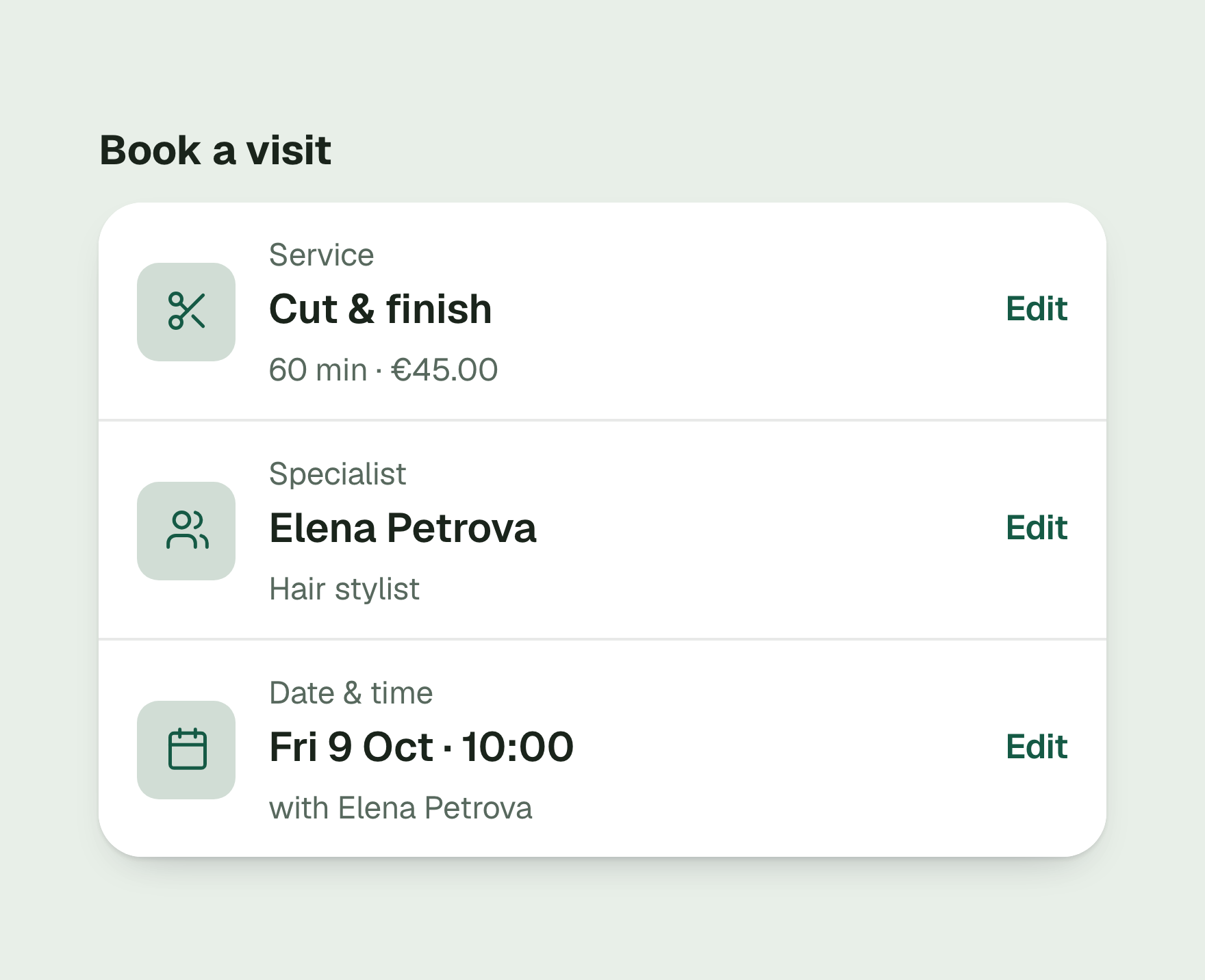
Mobile check: open the profile, follow the link and go as far as confirming a selected service and time. Note every point where you have to guess or look elsewhere for information. Fix those points before paying for traffic.
5. Show the work and the person behind it
Prepare three types of post that answer real questions:
- Work: a finished manicure or hairstyle, with a short description of the service.
- Process: what happens during the appointment and how much time to allow.
- Trust: the specialist, the workspace and an honest answer to a common question.
Use your own photographs and get the client’s permission when featuring them. Before-and-after images should use comparable lighting and angles, without filters that change the result.
For a nail studio: show the design close up and explain which service to choose. For a hair salon: explain whether the result shown includes a cut, colour and styling, so the customer can book the right work rather than guessing from a photograph.
6. Ask for honest reviews after real visits
Reviews help a prospective client understand what to expect. Make it easy to leave feedback and respond calmly to criticism as well as praise.
For Google, use the direct review link or QR code from your Business Profile. Invite feedback consistently rather than selecting only happy customers. Do not offer a gift or discount in exchange for a review; that conflicts with Google’s review guidance.
A Mountify review and a Google review are separate. Mountify can send an email invitation to review a visit booked through the public page, when reviews are enabled and the sending conditions are met. This does not automatically publish a review on Google.
A neutral request might read: “Thank you for visiting. If you would like to share how it went, your feedback helps us and our future clients.”
7. Make referrals easy to pass on
Give a regular client a booking link or a small card with a QR code they can share with a friend. The person receiving the recommendation should be able to find services, prices and available times without first having to work out which salon you are.
Try one local partnership, too: a hairdresser and a makeup artist, a nail studio and a nearby bridal boutique, or a salon and a photographer. Choose a business with a relevant audience and agree on a specific action, such as introducing each other’s services with a booking link.
Ask new clients how they found you. That separates partnerships that bring visits from those that only exchange posts. You do not need an automated referral programme to run this test.
8. Offer the next appointment when it makes sense
At the end of a service, discuss when the client might like to return. Offer a convenient next appointment or share the booking link so they can decide later. Leave the choice with them.
The client card lets you check visit history and saved preferences. That gives the next appointment some context instead of starting again with the same questions.
Passes and loyalty programmes can help when they fit the service and their terms are clear. Start with consistent service and easy rebooking before introducing complicated discounts.
9. Prepare the path to attendance before buying traffic
Before advertising, check that a new client sees the correct address, duration and change or cancellation terms. Booking is an intermediate step; the goal is a person who actually attends.
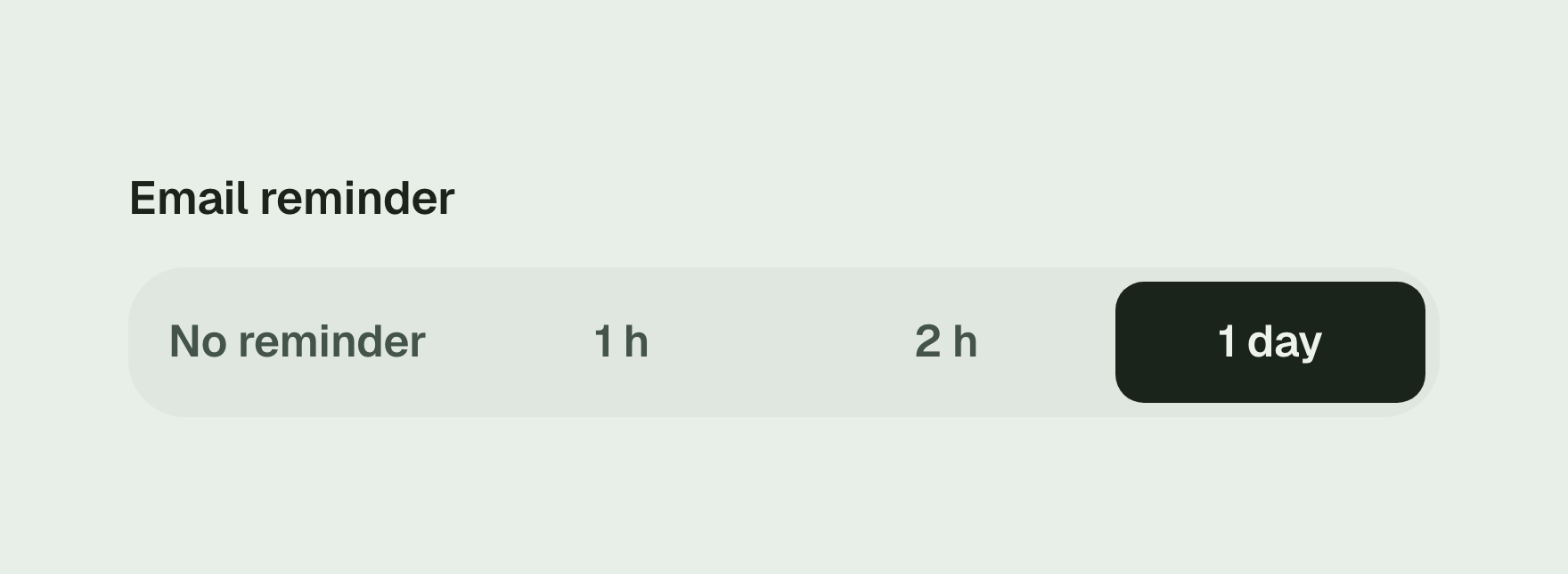
When booking through Mountify’s public page, a client can choose one email reminder: one hour, two hours or one day before the visit, or no reminder. See confirmations and reminders for the conditions. Do not assume an appointment entered by staff sends the same emails.
If long services repeatedly fall empty at the last minute, consider when appointment deposits make sense before increasing advertising spend around the same problem.
10. Run a small test and count new clients who attend
For a first paid test, choose one service, one clear message and the local area you can realistically serve. Set an amount you can afford to spend and a review period in advance. Changing the service, message and booking page simultaneously makes it hard to tell what influenced the result.
Add an optional “How did you first hear about us?” question with short choices: Google, Instagram, referral, partner, other. In Mountify, use a custom booking question and enable it for the relevant services.
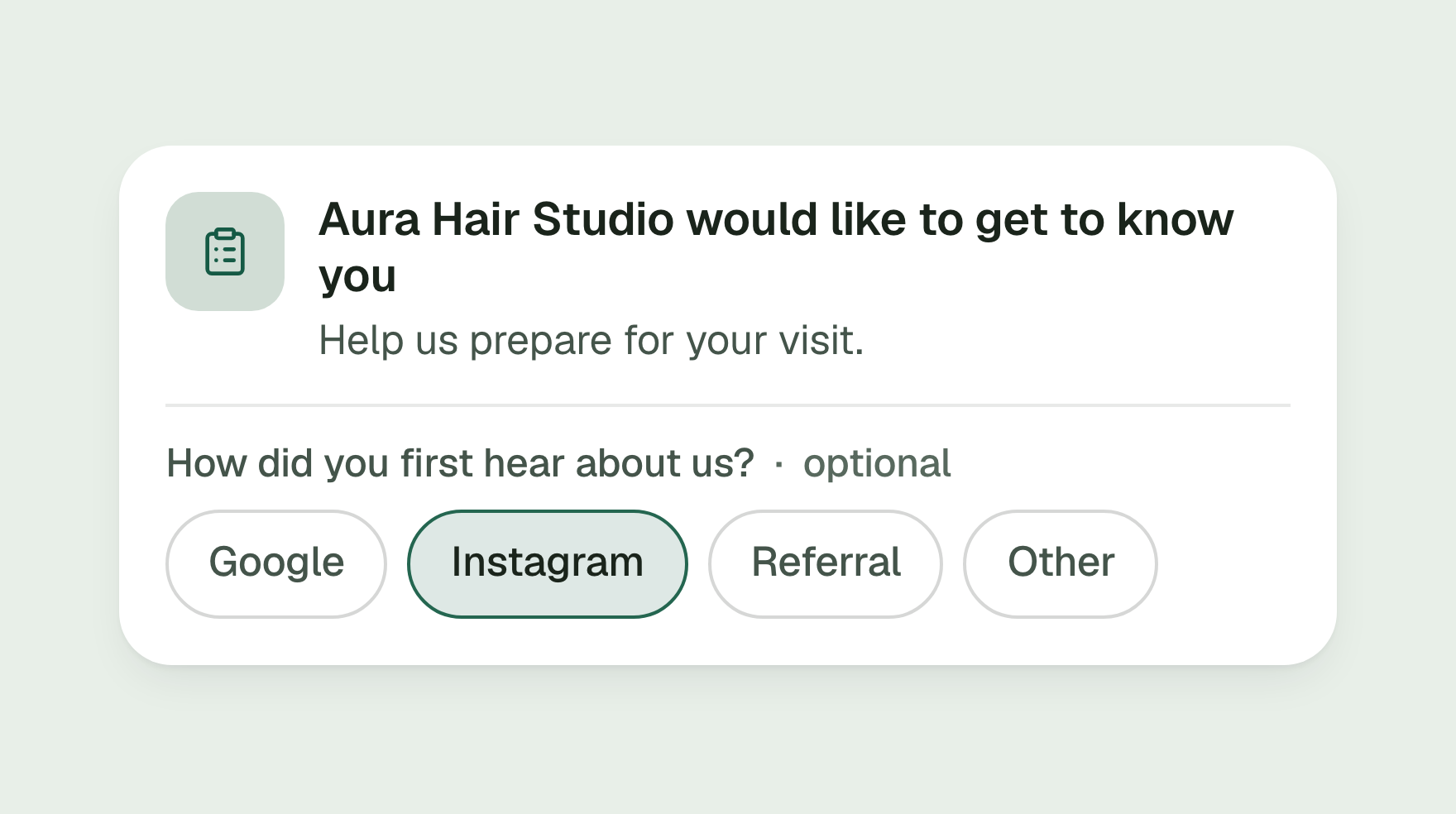
The answer is a useful indication, not complete advertising attribution: someone may discover you on Instagram and later search for you on Google. Do not treat these answers as an automatic campaign report.
Three numbers for your first review
- First-time bookings: people who booked their first visit during the period.
- New clients who attended: how many of those people actually visited.
- With another booking: how many of those attendees have booked again by your review date.
For a paid channel, calculate advertising cost per new attending client = advertising spend ÷ new clients who attended from that channel.
For example, €120 of spending and eight new attendees means €15 per person. This is illustrative arithmetic, not a Mountify customer result or an industry benchmark. Compare that cost with what remains from the service after direct costs; revenue on its own is not profit.
A 30-day salon marketing plan
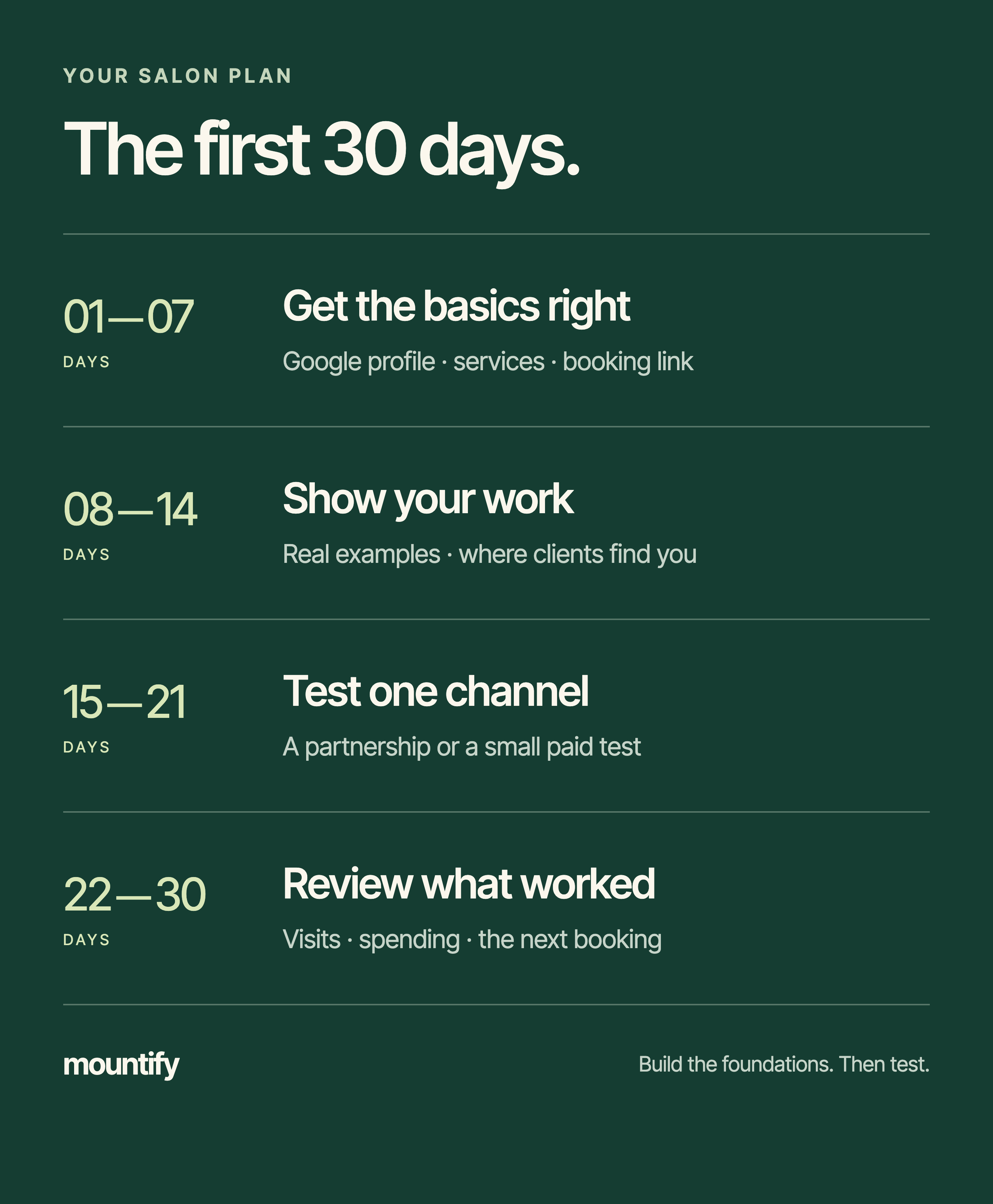
| Period | What to do | What to check |
|---|---|---|
| Days 1–7 | Complete your Google profile, services, prices and booking link | Can a stranger choose the right service on their phone? |
| Days 8–14 | Publish examples of your work and add the source question | Where do first-time bookings come from, and what do people still ask? |
| Days 15–21 | Try one partnership or a small paid test | Does it bring new clients who attend, alongside interest? |
| Days 22–30 | Review visits, spending and subsequent bookings | What should you continue, improve or stop? |
Thirty days is an initial review period. Some services have a longer repeat-visit cycle, so a missing second appointment during the first month does not prove you have lost that client.
Frequently asked questions
How can a new salon attract clients on a small budget?
Start with a complete Google Business Profile, real examples of your work, a clear service menu and a working booking link. Try a partnership with a nearby business and invite honest reviews after real visits. Record how each new client found you.
How do I get more nail clients?
Show specific work, name your area and explain what the service includes: removal, strengthening, nail art, time and price. End the post with a clear route to available appointments instead of leaving every detail for a direct message.
What is the best advertising channel for a beauty salon?
No single channel is best for every salon. Compare Google, Instagram and referrals by new clients who actually attend, the cost of attracting them and their next bookings. Likes alone do not tell you the result.
Do I need a website to offer online booking?
No. You can share a standalone booking page through social media, your Google profile or a QR code. A Mountify page contains your name, services, specialists, prices and available appointments.
How quickly should I expect more bookings?
A booking link and clear service descriptions can immediately help people who already find you. Building visibility and trust takes longer. The 30-day plan is a first review period, not a promise of a particular client count or Google position.
Prepare the page your advertising leads to
Choose one service, set up its specialist and availability, and check the booking experience on a phone. Then put the link where people already find you.
See how Mountify works for beauty salons or create your booking page. If you already have a page, use the plan above to find what is getting in the next new client’s way.