Day and month reports
One 'money received' figure, the six ways it comes in, the week- and month-on-month comparisons, and closing the month.
“How much did I take today?” and “how did the month go?” each have their own screen: the Day report and the Month report. A third screen, the Money calendar, shows the same figures as a map of time — a year, a month, a day. All three read one and the same figure, so they can never contradict each other. This article explains every number, every button and every warning on them.
1. One figure: “money received”
Everything in the Money section revolves around one amount:
Money received = recorded payments minus refunds for the window.
- It counts payments in cash, by card, online, and paid package sales.
- It subtracts refunds.
- It does not count visits marked “on the house” — those are reported separately.
- The window is calendar days in the board’s timezone, not your browser’s.
The app says so right under the figure: “Money that actually came in — payments minus refunds. Comped visits are not counted.”
This figure is not “Revenue (closed)” from the strip above the Schedule. That one counts the price of completed visits whether or not anyone paid. The difference is normal and explained in Money: where everything about money lives.
2. The Day report
Money → Day report. Or: click the Received today tile on the till strip, a day in the calendar, or a bar in the month report’s chart.
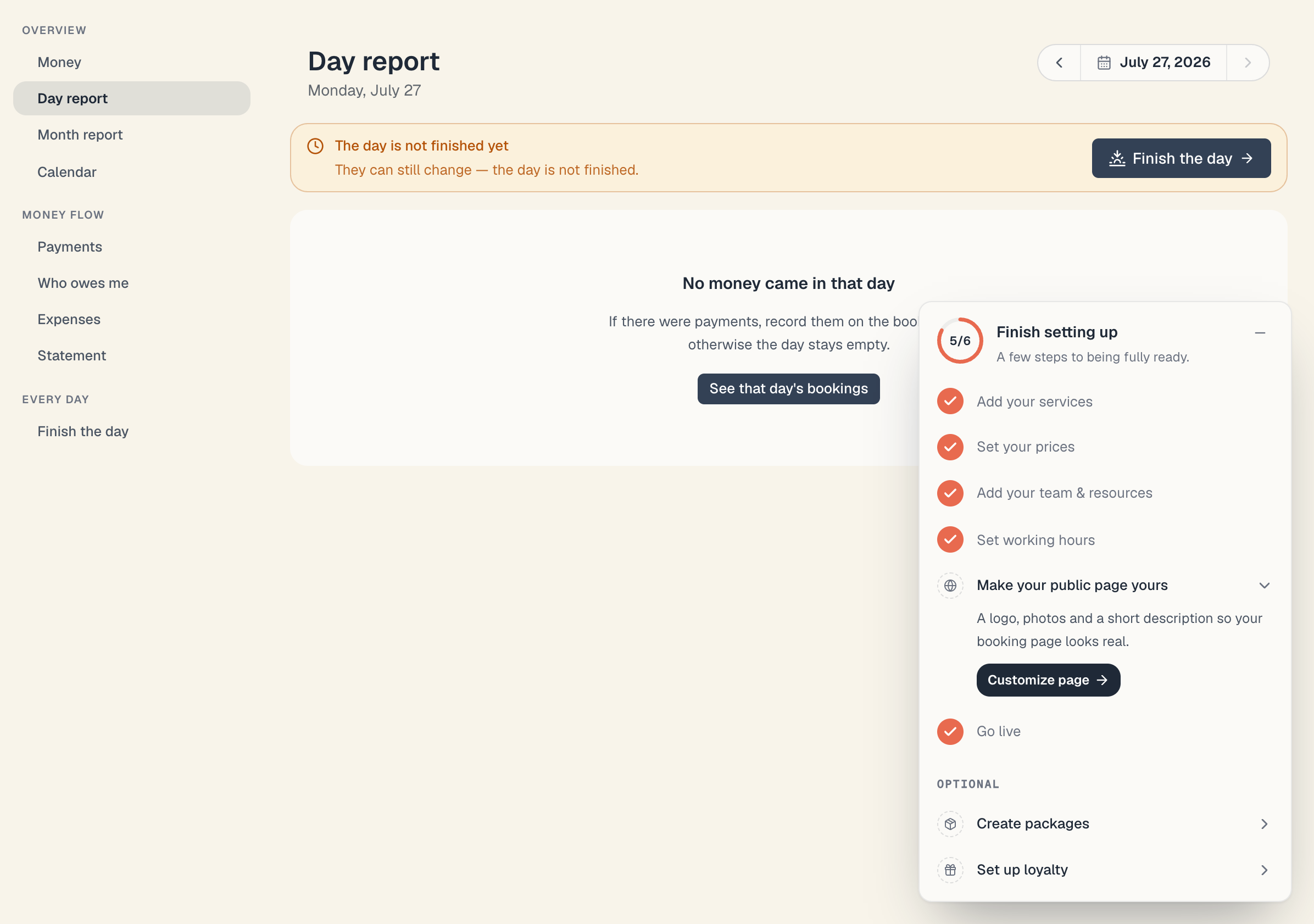
At the top: the title Day report, the day spelled out under it (“Sunday, 26 July”), and on the right a three-part instrument:
- ‹ — the previous day.
- The date (26 July 2026) — click it to open the Money calendar for that month.
- › — the next day. On today it is disabled: tomorrow has no money in it yet.
The day-status bar
| State | What it says | Button |
|---|---|---|
| The day isn’t finished | ”The day is not finished yet” · “They can still change — the day is not finished.” | Finish the day (only for today or a past day) |
| The day is finished | ”Day finished at 20:14” (the time is in the board’s timezone) | Fix the day — takes you back into the ritual, where wrong entries are undone |
If you close days one after another, a flame chip appears under the big figure: “5 days in a row closing the day” (shown from 2 upwards).
The big figure and the comparison
Next to the amount sits a comparison chip against the same weekday a week ago — Tuesday against Tuesday, not against yesterday:
- +18% / −12% / ≈ the same, with the note “vs Sunday a week ago”;
- if nothing came in a week ago: “nothing came in a week ago — nothing to compare”.
”How the money came in”
A horizontal bar plus pills for the six possible ways:
| Pill | When it appears |
|---|---|
| cash | someone pressed Paid cash |
| card | someone pressed Paid card (the terminal at the salon) |
| online | the client paid on the checkout page while booking |
| package | the amount came from a package sale or credit |
| mixed | an imported or system entry with the method “mixed” |
| no method recorded | a payment with no method stored (an old import, or a manual entry without one) |
Only the ways that actually carry money are shown. Two notes may appear underneath:
- “{amount} from package sales.” — how much of the day came from packages rather than visits.
- “{amount} refunded is already subtracted from the figure above, but not from this breakdown.” — the pills are gross; the big figure is net. That is why the pills can add up to more than it.
The three tiles
| Tile | What it counts | Fine print |
|---|---|---|
| Clients | distinct clients who paid that day | a client with no record counts per booking; package buyers count too |
| Average ticket | money received ÷ clients | — if nobody paid |
| Left unpaid | money from that day’s visits that wasn’t collected | amber, with a link to Who owes me; green “Everything is paid ✓” when there is nothing; “at least” in front of the amount when there were too many entries to scan |
“Left unpaid” only counts visits that happened (completed, no-show, walk-in) — a client still in the chair is not a debtor.
”Came in − expenses = left”
If the day has a recorded expense, a strip appears at the bottom with three figures: Came in, Expenses and the big Left, plus a Manage expenses link. “Left” can be negative — rent lands on the 1st, for instance — and is deliberately not colour-coded. With no expenses, the strip isn’t rendered.
If the day is empty
You see “No money came in that day” and “If there were payments, record them on the bookings — otherwise the day stays empty.” with a See that day’s bookings button. If there is still money uncollected, the unpaid tile stays visible — an empty day is not a clean day.
3. The Month report
Money → Month report. Or: the This month tile on the till strip, or a month in the calendar.
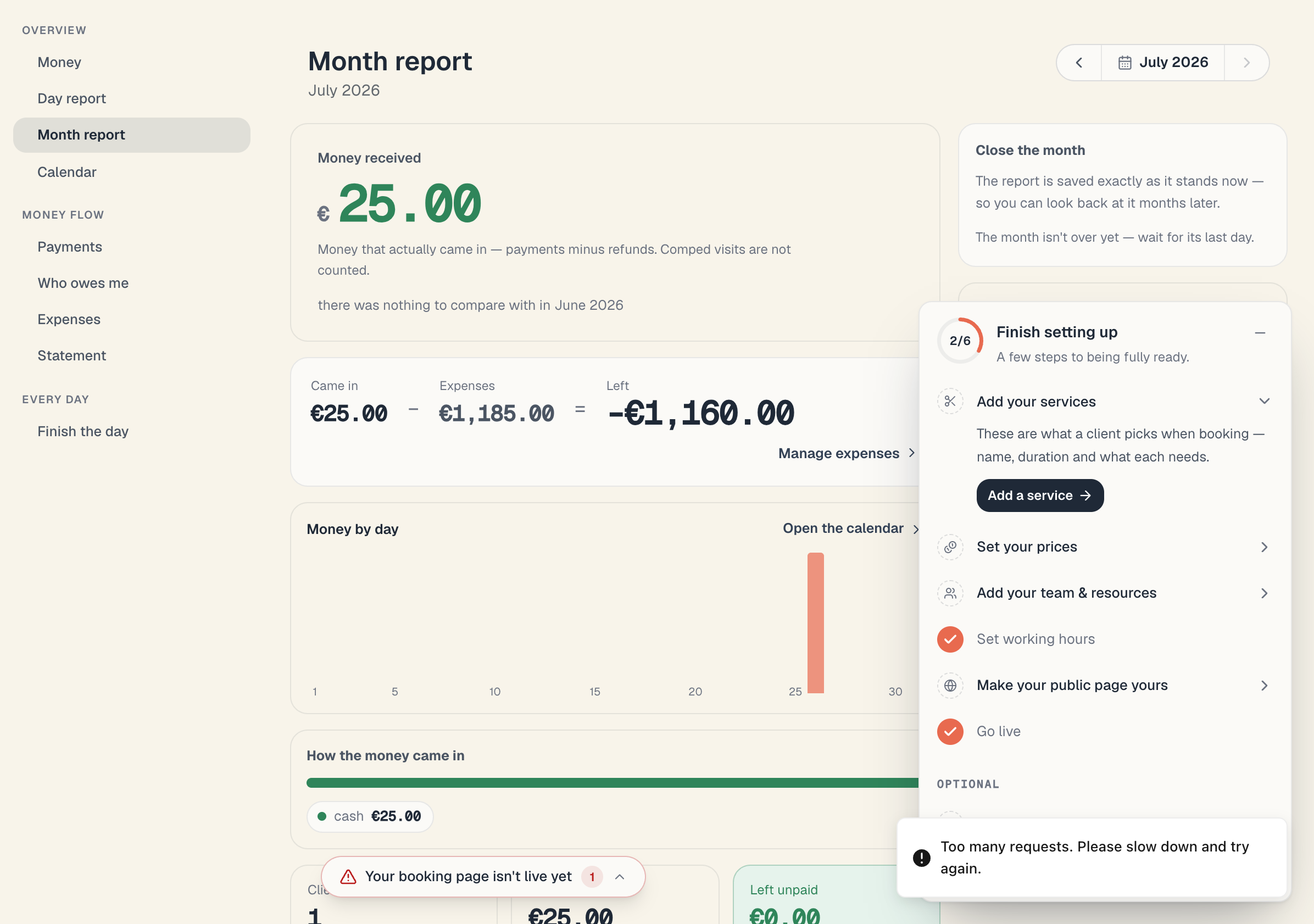
The instrument at the top right works like the day’s: ‹, the month name (click → the calendar), › — disabled on the current month.
The content mirrors the day’s, plus four blocks:
- A comparison with the previous month — “12% more”, “5% less” or “about the same”, with the note “vs June (€3,480.00)”. Here whole months are compared.
- “Came in − expenses = left” — always present here, not only when expenses exist.
- “Money by day” — one bar per day of the month. Every bar is clickable and opens that day’s report. Only the 1st and every 5th day are captioned, so the axis stays readable. Today is highlighted.
- “Which services brought in the most” — up to 5 services with share bars. Under the list: “Package sales are not here — they carry no service.” — which is why the rows don’t add up to the big figure.
- “Expenses” — by category (Rent, Supplies, Salaries, Marketing, Other). With nothing recorded: “You haven’t recorded any expenses for this month yet.” and an Add an expense button.
4. “Close the month” and “Finished months”
On the right (at the bottom on a phone) there are two cards.
Closing
- Open the month you want to close.
- In the Close the month card read the note “The report is saved exactly as it stands now — so you can look back at it months later.”
- Press Finish {month}.
- The dialog “Finish {month}?” says “The figures are saved as a snapshot. If money for this month comes in later, we’ll tell you.” Confirm.
When you can and can’t:
| Month | Allowed | What you see |
|---|---|---|
| A past month (up to a year back) | yes | the Finish {month} button |
| The current month, not on its last day | no | ”The month isn’t over yet — wait for its last day.” |
| The current month on its last day | yes | the Finish {month} button |
| A future month | no | the forward arrow is disabled — you can’t get there |
| Older than a year | not from this screen | the closing card simply isn’t shown |
If the write fails: “We couldn’t close the month. Try again.”
After closing
A green bar appears at the top: “July was finished on 1 August”. If money later lands in that month (say you record an old unpaid visit), the bar adds:
- “Another €120.00 has come in since then.”, or
- “The total has dropped by €40.00 since then.”
That way the snapshot never turns into a quiet lie. You may close the month again — the snapshot refreshes, but the date of the first close does not change.
”Finished months”
A list of the most recently closed months, newest first. The amount on the right is “left” — after expenses (the note says so: “The list shows what’s left after expenses.”). Clicking a month opens its report. Empty list: “No finished months yet.”
5. The Money calendar
Money → Calendar (or the Money calendar button at the top of the till strip).
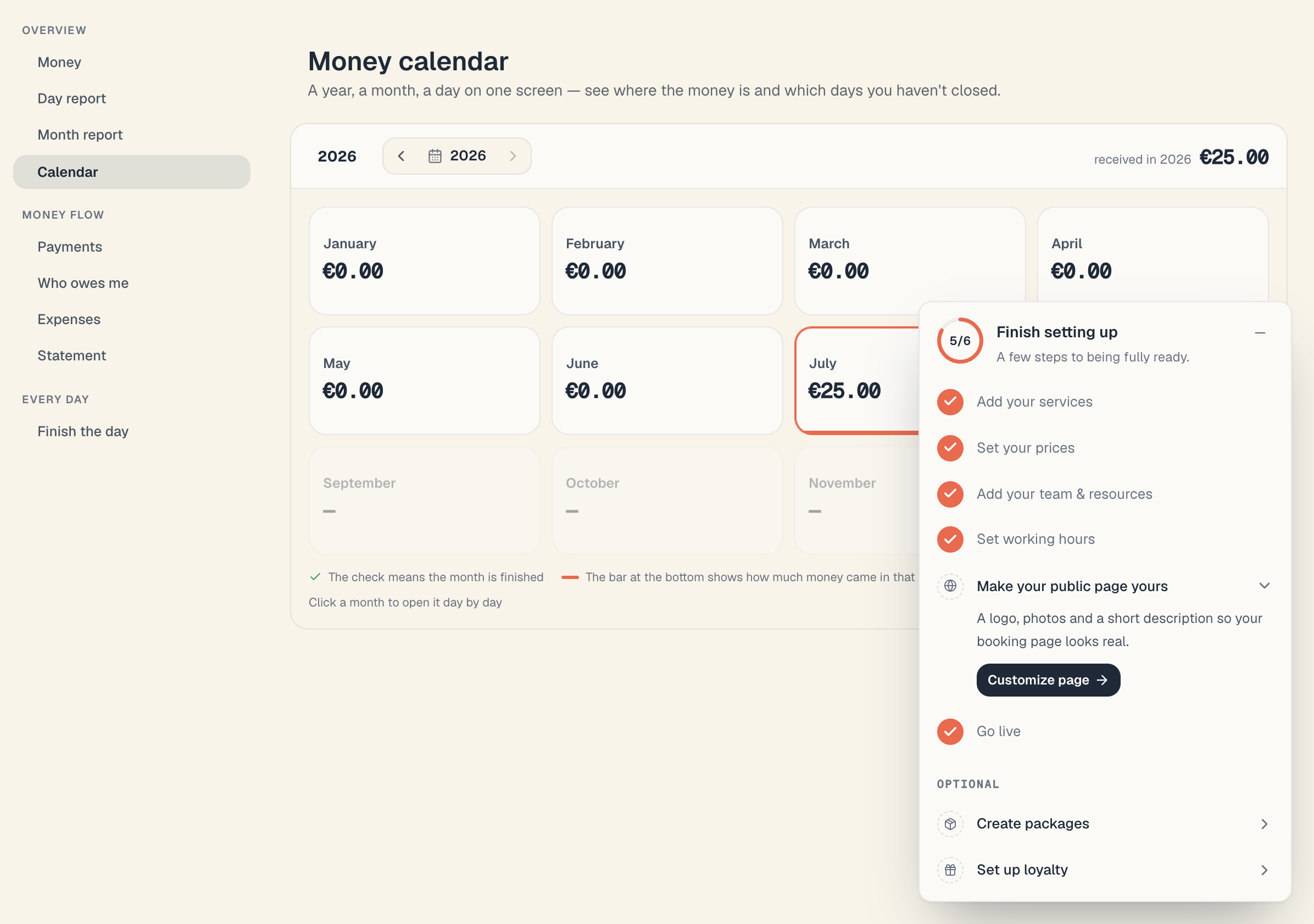
Title Money calendar, subtitle “A year, a month, a day on one screen — see where the money is and which days you haven’t closed.” Two levels:
Year level
- 12 cards. Each holds the month name, the amount received and the change against the previous month.
- Future months are dimmed, show —, and are not clickable.
- The current month is ringed.
- A ✓ in the corner = the month is finished.
- The bar underneath shows how strong the month was against the strongest month of the year.
- Top right: received in 2026 and the whole year’s amount.
- Clicking a month zooms into it.
Month level
- At the top: the month’s amount, the change against the previous month, and an Open the month report link.
- A calendar grid, weeks as rows (starting Monday).
- Each day is a cell with its amount; the dot in the corner means the day is finished; the bar underneath compares the day with the strongest day of the month.
- Clicking a day opens its Day report.
- A breadcrumb at the top left (2026 › July) and prev/next arrows; you cannot step past the current month.
The legend under the grid says exactly this: “The check means the month is finished”, “The bar at the bottom shows how much money came in that day compared with the strongest day of the month”, “Click a day to open its report”.
If nothing came in during the window: “No money came in during July.”
6. Mixed currencies and “at least”
| What you see | What it means |
|---|---|
| ”This period also holds amounts in …” (coin icon under the figure) | the window holds a payment in another currency; nothing is converted — the amounts are added as they are, so the total is approximate |
| ”at least” in front of an amount | the scan hit its cap; the true figure is at least that much |
| ”Too many entries — the numbers may be incomplete.” | the same thing, as a bar above the report |
| ”The report didn’t load.” + Try again | the request failed (connection, or too long a window) |
Every one of these queries is capped at 366 days — the year calendar sits exactly at that ceiling.
Common questions
The day report’s figure differs from “Net revenue” on Payments. It shouldn’t, for the same window. Check: (1) is it the same day; (2) is a filter on in Payments (filters don’t change the cards there, but they do change the rows); (3) is there a package sale in the window — the ledger counts it on the sale date, the report on the date the money actually arrived.
Why do the “How the money came in” pills add up to more than the big figure? Because refunds are already subtracted from the big figure but not from the breakdown. The app states this explicitly under the pills.
Can I see profit after payroll and tax? Not as accounting profit. “Left” is “money in minus the expenses you recorded”. Pay recorded through Mountify’s pay run is added automatically as a Payroll expense; a payment outside the pay run must be added manually. Tax and social contributions are not calculated automatically. See Expenses and what’s actually left.
Can I export a report? Not from this screen. Download a Statement — a CSV of every movement in the window.
Does closing a month lock the figures? No. It takes a snapshot. You can still record and void payments; the report then shows the drift against the snapshot.
Is there a report across several boards at once? No. Every board has its own reports.
What’s next
- Finish the day — the evening ritual that feeds these reports.
- Expenses and what’s actually left — where “left” comes from.
- Statement — a CSV for your accountant — the same data as a file.
- Payments & revenue — the ledger row by row.