Gift cards
A prepaid amount as a gift — denominations, balance and how the recipient claims it.
A gift card is a prepaid money balance the recipient spends on whatever they like. Unlike a credits card the balance is in money rather than visits — each use takes the exact price of the booking off it.
The gift card is the only package designed for someone else. Which is why it has a whole separate path: buyer → activation link → recipient.
1. Creating the definition
- Catalog → Packages → the plus button — Package.
- Section Basics:
- Label — “Gift card”, “Voucher”.
- Currency — there is no Price field here. The board’s currency stands in its place, explained as “The gift card balance is held in this currency.” What the buyer pays is the denomination they pick.
- Expires after — a number of days. See §4.
- Description — “Short summary shown on the public purchase card.”
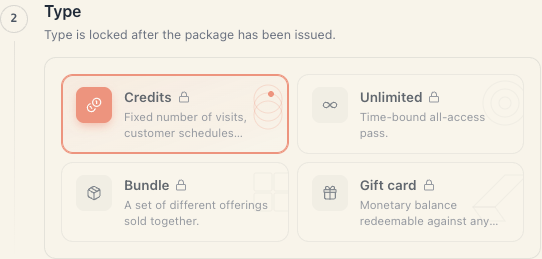
- Section Type → the Gift card card.
- Section Gift card amounts — see §2.
- Create package.
A gift card has no Scope section — it is money, and it is valid for any service.
2. The “Gift card amounts” section
“Quick-pick denominations and an optional custom-amount window.”
Quick-pick denominations
The ready amounts the client sees as buttons: 50, 100, 200… Type a number into the Add… field and press the plus. Each value renders as a chip with the currency and an × to remove it.
Three or four values are plenty. A rule of thumb: the lowest around the price of one service, the highest around three or four.
Custom amount
The Allow customer to enter a custom amount switch. Turning it on reveals:
| Field | What it does |
|---|---|
| Min amount | nothing below is accepted |
| Max amount | nothing above is accepted |
Both are required when the switch is on: “Custom amount window needs both min and max”, and the maximum must be ≥ the minimum.
Validation on save
The save is refused when there is no quick-pick value and custom amounts are off: “Add at least one denomination or enable custom amounts.” In the error summary it appears as Gift-card amounts.
3. How the buyer buys one
On the public page a gift card does not go through the usual “pay now / pay on site” picker. It has its own flow, because it is being bought for someone else. The buyer:
- Picks the card and the amount (a quick-pick value, or their own if allowed).
- Fills in the Gift recipient block — “Share the activation link with the recipient.”:
- Recipient’s email — required. This is the binding: activation only works from that address.
- Recipient’s name — optional.
- Personal message — optional, up to 280 characters; shown on the activation page.
- Ticks the mandatory confirmation I have verified the recipient’s details, warned that “After payment the purchase is final and cannot be changed.” The tick resets whenever any field above changes.
- Confirms.
Buying a gift card is always for someone else. There is no “buy a voucher for myself” path — that’s what credits and subscriptions are for.
4. The recipient claims it
The buyer gets an activation link and shares it (email, copy link, messenger). The recipient opens it and sees who is giving them what.
Security has two layers:
- the link is the first — whoever holds it can see the gift;
- the email is the second — to activate, the recipient must sign in with exactly that address, verified by a one-time code. A leaked or forwarded link doesn’t unlock the gift for a stranger.
If the email doesn’t match, a dedicated “this gift is for a different email” screen appears.
Activation-page states:
| State | What it shows |
|---|---|
| pending | ”X is giving you Y” + a sign-in button |
| already claimed | a clear “this is already activated” screen (not an error) |
| claim window expired | an expired-link screen |
On the activation page the recipient’s email is shown masked (
r***@example.com), because the link can end up in third-party hands.
The validity window is recomputed at activation. If the card is valid for 90 days and the recipient claims it on day 80, they get the full 90 days from the moment of activation — not the remainder. Otherwise a present forgotten for two months would be worthless.
5. How it is spent
- Each booking takes the price of the booking off the balance.
- If the balance doesn’t cover the whole service, the redemption is refused. There is no partial payment — you cannot do “€50 from the voucher + €10 in cash”.
- A cancelled booking returns the amount to the balance.
- An expired card is not redeemed, even with a balance left.
- The card is valid for any service, provided the service accepts package payment.
The balance shows on the client card, Packages tab.
6. Issuing one from the admin
You can also issue a gift card by hand: client → Grant package → pick the card → a Gift card value field appears. It shows a hint with the quick-pick values (“Quick-picks: 50, 100, 200”) or the range (“Range: 20–500”).
If the amount is outside what’s allowed you get “Amount is below the minimum ({min})” or “Amount exceeds the maximum ({max})”.
Careful: like any hand-issued package this counts as a gift money-wise — amount 0 in the statement, never revenue.
7. Money
| Situation | Statement line | Counts as revenue |
|---|---|---|
| Bought online, money not collected yet | Package not paid yet (0) | no |
| Money collected | Package sold (the denomination) | yes, in the period of collection |
| Issued by hand from the client card | Package given away (0) | never |
| Refunded | Package refunded (minus the denomination) | yes |
Spending the voucher is not new revenue — the money was already recognised at the sale. A booking paid with a voucher creates no payment line.
8. Troubleshooting
The client says the link doesn’t work. Three possible causes: already claimed; the link expired; they’re signing in with a different email. Check the state on the client card.
The recipient wants to pass the gift to someone else. Not possible — the binding is the email. If it was mistyped, refund the card (if unused) and issue a new one.
The save is refused — “Gift-card amounts”. There is no quick-pick value and custom amounts are off, or the range is incomplete/inverted.
The list shows the price as “from 50”. Normal — a gift card has no single price, so the lowest possible one is shown.
The client wants to top up the difference. Not supported. A voucher covers the service in full or isn’t used.
What’s next
- Package types — the four types compared.
- Redeeming & balances — deduction, expiry and refunds.
- Packages & memberships — the money rule.
- The client card — where the balance shows.