Package types
Credits (×N), an unlimited subscription, a gift card and a course — when to pick which.
All packages are sold upfront but “spent” differently. The type determines how the balance is counted — which is why it locks after the first issue. This article compares the four types you can create, and explains the fifth one that exists but isn’t created from this screen.
The type is chosen in the Type section of the editor: Catalog → Packages → Add package.
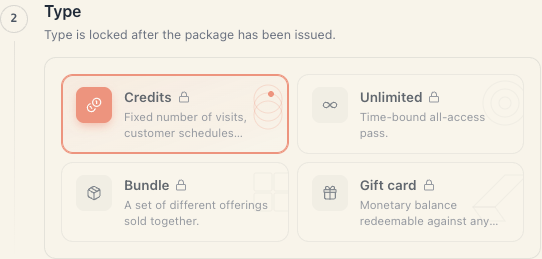
1. Comparison table
| Credits | Subscription | Bundle | Gift card | |
|---|---|---|---|---|
| What it sells | N visits | unlimited access for a period | a set of different services at one price | a money amount |
| How it’s spent | −1 per booking | nothing counts down | −1 from the matching service | the booking’s price comes off |
| Balance | number of visits | just an expiry date | a count per service | money |
| Has a Scope section | yes | yes | no (the bundle is the scope) | no (valid for everything) |
| Price in the editor | total pack price | price for the period | total price | currency only — the buyer picks the amount |
| Typical example | ”10 yoga classes" | "Unlimited yoga for a month" | "Cut + beard + mask" | "€50 voucher” |
2. Credits
“Pre-paid set of N sessions. Counts down on each booking; expires after the validity window.”
The most-used type. The Credits section has one field — Visits: “Number of visits the customer can redeem.” Minimum 1.
- Every booking takes one visit, whatever the service costs.
- When the visits run out, the package is used up.
- A cancelled booking returns the visit.
- Scope is set in the Scope section: All offerings or Specific offerings.
Pick it for: classes, massages, training sessions — anything counted in units.
Step by step: Sell a credit card.
3. Subscription
“Unlimited sessions within the validity period — like a monthly subscription.”
The section is informational — there is no count field. It reminds you: “Unlimited packages have no per-visit cap. Set an expiry in Basics to time-box the pass — otherwise it never expires.”
- There is no counter. The only constraint is Expires after in Basics.
- A subscription with no expiry = eternal unlimited access. Almost always a mistake — set an expiry.
- Scope works as it does for credits.
Important: “subscription” here does not mean an automatic monthly charge. There is no recurring payment against the client. Every new month is a new sale.
Details: Memberships.
4. Bundle
“A set of different services sold as one — fixed combination at one price.”
The Bundle contents section has a Mode with two options:
| Mode | What it does |
|---|---|
| Flex (N visits) | “Fixed number of visits, customer schedules each.” You list how many visits of which service are included — a “service + count” list. |
| Scheduled | ”All bookings are created on purchase. Customer can’t reschedule.” You list concrete bookings — service, date, time. |
In Flex the balance is tracked per service: “2 haircuts, 1 mask”. A deduction is only valid for a service on the list.
In Scheduled nothing is deducted later — every booking is created at purchase. If any of the times is taken, the whole purchase is refused and the client is told exactly which slots conflict.
A bundle has no Scope section — its scope is the list of services itself.
5. Gift card
“Monetary balance the recipient can redeem against any service.”
The Gift card amounts section has:
- Quick-pick denominations — chips with ready amounts (50, 100, 200…). Added with a numeric field and a plus, removed with the ×.
- Custom amount — the “Allow customer to enter a custom amount” switch; turning it on reveals Min amount and Max amount.
Particulars:
- Basics has no Price field — the currency stands there instead, because “The gift card balance is held in this currency.” The amount the client pays is the denomination they chose.
- In the list the price shows as “from {lowest denomination}”.
- The save is refused when there is no denomination and custom amounts are off: “Add at least one denomination or enable custom amounts.” A half-filled range fails too.
- The balance is spent in money, not in units. If the remainder doesn’t cover the whole service, the redemption is refused — there is no partial payment with a voucher.
Details: Gift cards.
6. Course — the fifth type
“A fixed schedule of dated sessions — all reserved on purchase. Best for multi-week programs.”
Course exists in the system and old course packages remain editable. But it is not offered in the picker when you create a new package — the editor shows only the four types above.
If you need “an 8-session course with fixed dates”, the closest thing today is a Bundle in Scheduled mode: the same logic — every booking is created at purchase and the client can’t move them.
7. The type locks
Once a package has been saved and issued, the type cannot change: “Type is locked after the package has been issued.” The cards render disabled with a padlock.
If you picked the wrong type:
- Archive the old package (don’t delete it — delete marks sold instances as refunded).
- Create a new one with the right type.
- If you already sold instances of the wrong type, let them run out.
8. Choosing in ten seconds
| The question you’re asking | Type |
|---|---|
| ”How many times can they come?” | Credits |
| ”They can come as often as they like until month end” | Subscription |
| ”These three services go together at a promo price” | Bundle, Flex mode |
| ”I sell the whole schedule in one go” | Bundle, Scheduled mode |
| ”They’re buying it for someone else” | Gift card |
9. Troubleshooting
I can’t change the type. The package has been issued. See §7.
I don’t see “Course” among the options. Correct — see §6.
The save is refused asking for credits. “A credits package needs a credit count of at least 1. Set it in the Credits section.”
The save is refused over gift-card amounts. “The gift-card amounts aren’t valid — add at least one preset, or a custom range with a valid min and max.”
The bundle won’t save. “The bundle contents aren’t valid — pick the services (flex) or scheduled sessions in the Bundle section.”
What’s next
- Packages & memberships — the big picture and the money rule.
- Sell a credit card — credits step by step.
- Memberships — the unlimited type.
- Gift cards — the gift card end to end.