Group classes
Sessions with several seats and a waitlist — yoga, fitness, workshops — unlike 1:1.
A group class is a service where several people come at the same time — yoga, pilates, HIIT, dance, a workshop, a group lesson. Unlike a 1-to-1 appointment it has a number of seats, and the client does not pick an arbitrary time: they sign up for a specific scheduled session that you put on the schedule.
This is also the most common source of confusion: a class lives in two places in Mountify. The definition (name, price, duration, seats, instructor) is in Catalog → Offerings. The actual dates and times are in Catalog → Programs. A class with no schedule is never visible to clients.
1. Group class vs. 1-to-1 appointment
| Appointment | Group class | |
|---|---|---|
| Type in the editor | Appointment | Group class |
| Who picks the time | the client, from free slots | you — via a schedule; the client picks a session |
| People per slot | 1 | as many as there are seats (minimum 2) |
| When it is full | the slot disappears from availability | the session stays visible with a waitlist invitation |
| Price | per booking | per person |
| How it looks on the schedule | one card per booking | one card per session with a 4/12 counter |
| Instructor required | optional (depends on resources) | yes — every series and every session needs one |
Important: the type is locked after creation. Open an existing offering and the type cards are disabled, with the note “Type is locked after creation. To change — create a new offering of the desired type.” Pick the right type on the very first screen.
2. Group classes are a paid feature
Group classes are not on every plan:
| Plan | Group classes | Add-on price |
|---|---|---|
| Start | add-on | €12/mo |
| Growth | add-on | €12/mo |
| Pro | included | — |
| Custom | included | — |
What it means in practice when the feature is missing:
- the New series and One-off class buttons in Catalog → Programs lead nowhere — the server rejects the write;
- classes you already created disappear from the public page (they are filtered out of the public payload entirely);
- public class sign-up and waitlist joins are refused with “This booking page is not accepting class sign-ups”;
- the admin-side list of classes stays exactly as it is — nothing is lost, and everything comes back the moment the feature returns.
The add-on is bought in Workspace settings → Subscription & billing → Add-ons, the Group classes card. On Pro the same card shows that it is already part of the plan.
About the waitlist: the public plan comparison lists the waitlist as a Pro line. In practice the waitlist is part of the group-class mechanism — if your classes work, the waitlist works. Don’t build a process around “we have no waitlist on Growth”.
3. The two places a class lives
Catalog → Offerings — what the class is:
- name and description;
- how long one session lasts;
- Capacity (seats);
- price per person;
- which resources it needs (instructor, room);
- whether it accepts package payment;
- photos and public-page details.
Catalog → Programs — when it runs:
- series — a repeating pattern (“Tuesday and Thursday, 19:30”) from which the system generates the concrete sessions;
- one-off classes — a single session on a specific date.
Every concrete session (one date, one time) is a separate object: it has its own instructor, its own capacity, its own booked counter, its own customer-facing note, and it can be moved or cancelled without touching the rest.
4. How it looks in the offerings list
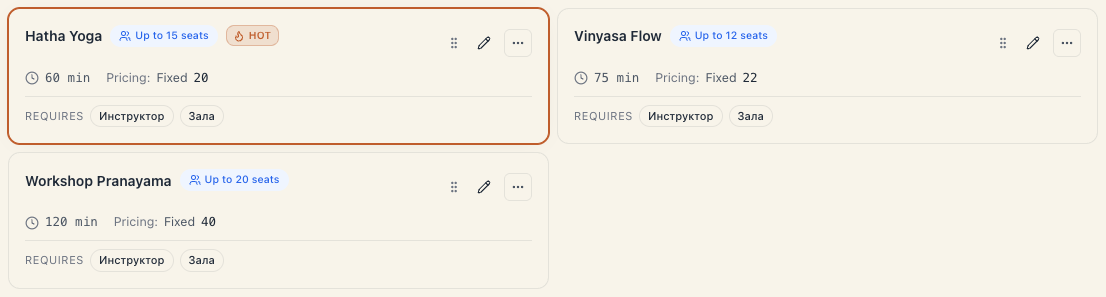
In Catalog → Offerings group classes sit alongside everything else. You recognise them by:
- the badge next to the name — Group (1-to-1 services carry 1-to-1), with the seat count beside it;
- the filter in the toolbar: All / 1-to-1 / Group. The filter reads capacity — anything with capacity above 1 counts as Group;
- the Requires line at the bottom of the card — the resource kinds the class reserves (e.g. “Instructor”, “Room”);
- the readiness chip on the same line: if the class cannot be booked, it says why. The same count appears in the band above the catalog: “{N} services can’t be booked” with a Show them button.
The Catalog landing also has a quick filter Classes {N}, which shows only the group classes, each labelled “{seats} seats · class”.
5. What the client sees
On the public page group classes get their own section. Each card shows the name, duration, price and the next session. The client taps the card and sees the schedule day by day. Every session carries one of these states:
| What the client sees | What it means |
|---|---|
| free seats + a sign-up button | there is room, sign-up is normal |
| ”full” + a waitlist invitation | seats are gone; tapping opens the waitlist join |
| ”cancelled” | you cancelled the session — it cannot be booked |
| ”you’re already booked” | the client already holds a seat on that session |
| ”no upcoming classes” | the class has no future sessions at all |
One sign-up = one seat. Public class sign-up rejects a request for more than one seat with
seats_not_supported_for_class— “we’re coming as a pair” means two separate sign-ups.
6. A class series in one order
A client can sign up for several consecutive dates of one class at once — say, the next four Tuesdays. All the dates go into one order: one booking, one email and, if the confirmation window is on, one confirmation link for all of them.
Two different “series”. In Catalog → Programs a series is the rule you create sessions from. Here we mean the client’s order — several dates booked at once. A client can book a series of one-off classes too, as long as they run at the same time with the same instructor.
What the client does
- They open a session from the schedule. Under it are two buttons: Just {day} (e.g. Just Tue) books only that date, and {N} classes — with the total beside it — books a series.
- The series button opens Book a series (“Choose which sessions to attend”). It lists up to 4 next dates of the same class within 30 days: from the chosen date onwards, from the same series (or with the same instructor at the same time).
- The free dates are ticked in advance. Tapping one unticks it.
- A full date carries a Waitlist tag and isn’t ticked. If the client ticks it, they join that date’s waitlist rather than getting a seat. Dates they already hold carry Booked or On the waitlist.
- They press Continue with {N} classes, fill in their details once and book.
What happens next
- Each date is a separate booking in its own session — with one seat. You see the client in the attendee list of every session.
- One email lists all the dates, with waitlist places listed apart. If every chosen date was full, the client gets a single notice that they’re on the waitlist.
- One confirmation. With the confirmation window on, the link confirms every date at once. The deadline is shared and measured against the first date. If the client doesn’t confirm in time, all of them are released together.
- Cancelling. Each date can be cancelled separately in My bookings. From the booking’s page the client can also Cancel all classes of the series at once.
- The price is the sum of the individual classes. There is no series discount — that’s what packages are for.
- Anti-abuse limit. Each date of the series counts as a separate booking towards the daily limit on online bookings from one client. If the limit is used up, the page says how long until they can try again.
If a date doesn’t go through
The dates are booked one by one, in calendar order. If a session filled up in the meantime (or something else goes wrong), the others are still booked. The form tells the client what happened:
| What the client sees | What it means |
|---|---|
| Some sessions were booked — “Booked 2 of 3 sessions. Retry the rest.” | some of the dates were booked, the rest weren’t |
| ”…; 1 was already booked for you.” | the client already held a seat on that date — it counts as done |
| 1 session wasn’t booked | nothing new was booked: one date failed and the others were already theirs |
The booking button turns into Book the rest. It retries only the dates that didn’t go through and adds them to the same order — the client gets the series email again, now with every date. If the series was already confirmed, the added dates are confirmed straight away.
If the date is still full, it won’t go through again. The client can then join the waitlist for it from the session itself.
7. What a group class does NOT do
These generate the most questions, so let’s be blunt:
- It does not create sessions on its own. Capacity and duration in the editor are only a template. Without a series or a one-off class there is nothing for the client to book.
- It does not show every attendee as a separate schedule card. In Schedule you see one card per session with a
4/12counter. The attendee list lives inside the session. - It never emails a client you booked by hand. Every customer email (confirmation, reminder, review request, “you’re on the waitlist”, “your seat is confirmed”, “the class was cancelled”) is sent only for bookings that came through the public booking page. A booking entered by staff sends nothing, ever — the admin booking form doesn’t even have an email field.
- It does not send SMS or WhatsApp. Email is the only channel to the client.
- It gives no series discount. A series is one order with a separate booking for each date (see §6); the price is the sum of the individual sessions. Volume discounts are what packages are for — see Class passes & memberships.
- It does not move bookings you already have when you edit the series. Changing days or time applies to future dates only.
8. Troubleshooting
I created a class but clients don’t see it. Almost always a missing schedule. The public page shows a group class only if it has at least one upcoming, non-cancelled session. Open Catalog → Programs and add a series or a one-off class.
The class is still missing after I added a series. Check the series’ location. If the series is scheduled at a branch where the offering itself isn’t available, the public schedule shows nothing.
It says there are no upcoming classes. Same situation: the class is visible but has no future sessions. If the series has an Active until date that has passed, it no longer emits classes. If your series suddenly dry up, see §3 of Schedule class series: the system keeps 60 days of sessions materialised and tops them up nightly.
The class vanished from everywhere at once. Check the subscription. If the workspace lost the Group classes feature (trial expired, downgrade, add-on removed), all group offerings are hidden from the public page automatically.
I can’t save a series — a resource error. The series needs an instructor, and the instructor must belong to a resource kind the offering itself requires. Open the class, section Resources & add-ons, and add the kind (e.g. “Instructor”) as the Main resource. Then retry the series.
I typed capacity 1 and it became 12. A group class needs at least 2 seats; on entering the type the field lifts itself to 12 so a one-seat class can never be saved.
The client booked a series and got only one email. That’s by design: a series is one order — one email with every date and one confirmation link.
A date in the series is on the waitlist. That date was full and the client ticked it on purpose (the Waitlist tag). If someone cancels, it moves like any other waitlist — see Capacity & waitlist.
The client sees only 4 dates in the series. The picker shows up to 4 next dates within 30 days and always starts from the session the client opened. For more dates they open a later session and book a series from there.
What’s next
- Set up a class — the editor field by field.
- Schedule class series — how the concrete sessions are created.
- Capacity & waitlist — how a session fills up and what happens next.
- Class passes & memberships — prepaid visits.