Fixed time windows
Instead of free slots — ready windows with their own price, e.g. "The hall 9:00–12:00".
Sometimes you don’t want the client lining up hours themselves — you want to offer a ready block: “The hall, 9:00–12:00”, “Morning session”, “A full day in the studio”. This article explains what Mountify can and cannot do today, and gives three working ways to reach the same commercial result.
Read this first. Mountify has no editor for named time windows with their own price. If you’ve seen such a screen or heard about one, it is not reachable in the admin. A rental is configured with slots and with minimum/maximum consecutive slots. Everything below is how to get the same effect with what exists.
1. Way 1 — a fixed-length block (the closest thing to a “window”)
If you want “rented in 3-hour blocks only”, this is exactly right and it is one field:
- Open Catalog → Offerings and enter the rental.
- Section Rental settings → Slot length = 1 h.
- Booking length: Minimum = 3, Maximum = 3.
- Price per slot = one third of the block price. For a €75 block → €25 per slot.
- Save.
The summary underneath immediately reads “Customer books exactly 3 h”. The client can no longer pick 1 or 2 hours — only a 3-hour block.
| What you want | Slot | Min | Max | Price per slot |
|---|---|---|---|---|
| ”2 hours only”, block €40 | 1 h | 2 | 2 | €20 |
| ”3 hours only”, block €75 | 1 h | 3 | 3 | €25 |
| ”Half day (4 h)”, block €100 | 2 h | 2 | 2 | €50 |
| ”Full day (8 h)”, block €160 | 4 h | 2 | 2 | €80 |
The limit still holds: one reservation cannot exceed 12 hours in total.
What this does not give you: the block has no fixed start. The client may take 9:00–12:00, but also 10:00–13:00. If that’s a problem, see way 3.
2. Way 2 — a different price for different parts of the day
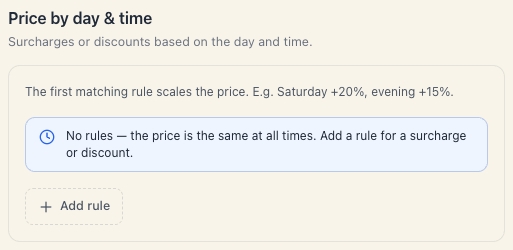
If your problem isn’t “a fixed start” but “mornings are cheaper”, you don’t need windows — you need the Price by day & time section, which is rendered for rentals too.
- In the same editor open Price by day & time.
- Add rule.
- Label (optional): “Morning rate”.
- Days: tick the weekdays (or leave empty — “No selection = every day”).
- Turn on Only at a specific time and set From 08:00, To 12:00.
- Percent: e.g. −20 for a discount.
- Add a second rule for the evening at +15 if you like.
“The first matching rule scales the price” — order your rules from the most specific to the most general.
3. Way 3 — a genuinely fixed start and end
When the block really must start at 9:00 and end at 12:00 — because cleaning follows, say — the only reliable tool today is working hours.
- Open Setup → Working hours.
- Trim the day to the window itself (09:00–12:00), or carve breaks around it.
- Configure the rental so minimum and maximum cover the whole window (way 1).
The result: the only possible start is the beginning of the working window, because the resource is closed before and after it.
For more complex cases (“the hall goes out in three blocks a day”) there is a second approach: create three separate rentals — “Hall, morning block”, “Hall, afternoon block”, “Hall, evening block” — each with its own price, constrained by working hours or by time rules. The rentals list grows longer, but the client sees exactly what you want them to see.
4. Which way to choose
| Your goal | Way |
|---|---|
| ”A 2-hour minimum” | 1 |
| ”Sold only as a 3-hour block” | 1 |
| ”Cheaper in the morning, dearer in the evening” | 2 |
| ”Weekends cost 20% more” | 2 |
| ”The block must start at 9:00” | 3 |
| ”Three different blocks at three different prices” | 3 (three rentals) |
5. What is not possible today
- A named window (“Morning block”) as a separate product inside a single rental.
- A per-window price that isn’t “price per slot × number of slots” (work around it with a percentage rule).
- Windows of different lengths inside one rental (2 h in the morning, 4 h in the evening) — that’s two rentals.
- A daily rental counted in days rather than hours.
If one of those is central to your business, the cleanest answer today is “one rental per block”.
6. Troubleshooting
I set a minimum of 3 and the client still sees single slots. The grid always shows slots; the limit applies at selection — a single slot cannot be confirmed. If you want the block to look like a block, raise Slot length.
My time rule doesn’t apply. Check rule order (the first match wins) and whether Only at a specific time is on — otherwise the rule covers the whole day.
I made three rentals and all three occupy the same resource at the same time. That is correct and intended: the resource is one and cannot be rented twice. Availability is shared across the three offerings automatically.
What’s next
- Rental slots & pricing — the numbers in detail.
- Set up a rental — the whole editor.
- Working hours — how the day is constrained.
- Hourly rentals — the big picture.