Multiple units & availability
Several identical resources (e.g. 4 courts), auto-picking a free one, and double-booking protection.
Many businesses have several identical things — 4 courts, 3 studios, 10 identical bikes, 20 mats. You don’t create a separate rental for each. You create one rental that requires one resource kind, and the kind holds all the units. From there Mountify tracks what’s free.
This article explains the two different mechanisms for “several identical” — and when to use which.
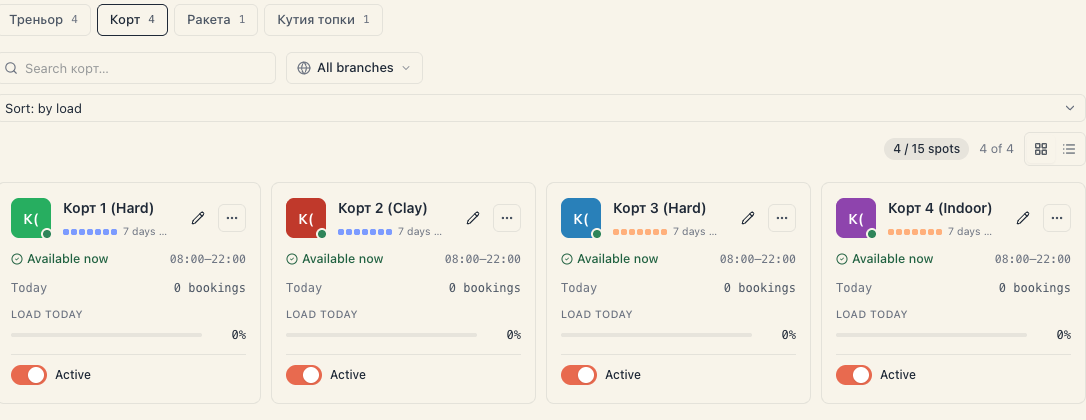
1. The two mechanisms
| Separate resources in one kind | Stock count on one resource | |
|---|---|---|
| What it looks like | ”Court 1”, “Court 2”, “Court 3”, “Court 4” — four rows | one row “Bike”, Stock count = 10 |
| When to use it | when the units are distinguishable and a client may want a specific one | when the units are interchangeable and nobody asks which |
| Can the client pick a specific one | yes, if you enable the choice | no |
| Shown as schedule columns | yes, one column each | no, a single row |
| Constraint | each counts towards the plan’s bookable-spots limit | equipment category only |
| Typical examples | courts, halls, treatment rooms, studios | bikes, mats, rackets, headsets |
2. Mechanism 1 — several resources in one kind
The usual case for courts and rooms.
Setting it up
- Catalog → Resource kinds → open the kind (or New kind if it doesn’t exist).
- Add each unit as a separate resource: “Court 1”, “Court 2”…
- Make sure they are all active for booking — the switch in the list. Inactive ones don’t take part in availability.
- Catalog → Offerings → the rental → Resources & add-ons → Main resource = that kind. The dropdown shows the active count next to the kind’s name (“Court · 4”).
How it behaves afterwards
- The public page shows a slot as free if at least one resource of the kind is free in it.
- On confirmation the system attaches a specific free resource to the booking.
- When all four courts are busy at 19:00 the slot disappears — by itself, with no action from you.
- Double-booking the same court is impossible: the check is atomic, inside the transaction.
Whether the client picks
The Client picks which one switch in the same section:
- off — “The system automatically picks any available resource”: the client only sees times, you save explanations, and load spreads more evenly;
- on — “The booking flow shows a resource picker”: a Resources customers can pick list appears, with chips and a “{selected} / {total}” counter. Tick only the ones a client may request.
The switch stays disabled until the kind has at least 2 resources: “Need at least 2 resources of this kind to enable customer choice.” Turn the choice on and tick nothing and the save is refused.
Details: The client picks a resource.
3. Mechanism 2 — Stock count on one resource
For interchangeable equipment you don’t create a row per copy. You create one row with a count.
- Catalog → Resource kinds → a kind in the equipment category.
- Open the resource (or create one) and find the Stock count section.
- Set the number: “How many units of this equipment you have. Customers will book one from the available pool.”
- The preview on the right shows the effect: “Stock: {N} — can serve up to {N} parallel bookings.”
The field is equipment only: in another category it reads “Stock count only applies to equipment.”
At booking time the system counts how many units are occupied in the overlapping hours and compares against the stock. A booking that would exceed the stock is refused.
Details: Equipment stock & capacity.
4. Which mechanism for what
| Situation | Mechanism |
|---|---|
| 4 tennis courts, clients have preferences | 1 — four resources, client choice on |
| 4 identical massage cabins, nobody asks which | 1 — four resources, choice off |
| 10 rental bikes | 2 — one resource, stock 10 |
| 20 mats offered as an add-on | 2 — one resource, stock 20 |
| 3 halls at different prices | neither — three separate rentals |
5. The plan’s bookable-spots limit
Every active resource takes one bookable spot from the plan. The number shows as a chip on the kind’s page: “{active} / {limit} spots”.
| Plan | Bookable spots |
|---|---|
| Start | 1 |
| Growth | 5 |
| Pro | 15 |
| Custom | unlimited |
Extra spots are bought as an add-on (Extra bookable spot, €7/mo each).
When the limit is reached, the activation switch on a new resource is disabled and reads: “You’ve reached your plan’s bookable-spots limit. Deactivate another resource or upgrade your plan to activate this one.”
That is also the practical advantage of mechanism 2: one “Bike” row with a stock of 10 counts as one resource, not ten. Which is exactly why interchangeable equipment is tracked by count, not by rows.
6. What this does NOT do
- It doesn’t price units differently. Price belongs to the offering. “Court 1 costs more” = two rentals.
- It doesn’t guarantee the same court next time. With choice off, the system assigns whatever is free.
- It doesn’t allow one booking to hop between units. One reservation = one resource for the whole selected span.
- It doesn’t mix the two mechanisms. Stock 3 on each of 4 rows does not give 12 parallel rentals of the main resource — stock is designed for equipment used as an add-on.
7. Troubleshooting
I have 4 courts but only one gets booked and then nothing is free. Check that all four are active for booking. Inactive ones don’t participate.
The client sees no court picker. The Client picks which one switch is off, or the Resources customers can pick list holds only one entry.
I can’t activate the fifth resource. You hit the plan limit. Deactivate another one, or buy a spot / upgrade.
There is no “Stock count” field. The resource isn’t in the equipment category.
Two clients ended up on the same court. That shouldn’t be possible — availability is re-checked at write time. If it happened, most likely one booking was entered by hand on an already-busy resource; such a card carries a warning on the schedule.
What’s next
- Resource kinds & capacity — how kinds are built.
- Equipment stock & capacity — mechanism 2 in detail.
- The client picks a resource — when to allow the choice.
- Bookable-spots limit — how the limit is counted.