Rental slots & pricing
Price per slot, slot length, and how many contiguous slots a client can rent.
A rental differs from a regular appointment in one thing: the client doesn’t pick “a 60-minute service” but how many consecutive slots to rent. So the price uses a different formula, and the grid the client sees depends on a handful of numbers you set. This article is about those numbers.
They all live on one screen: Catalog → Offerings → open the rental → section Rental settings.
1. The formula
total = Price per slot × number of slots chosenThat’s it. There is no separate “hour” and “half hour” price — there is one price per slot and a number of slots.
Example: slot 30 min, price per slot €10.
| The client picks | Slots | Pays |
|---|---|---|
| 30 min | 1 | €10 |
| 1 h | 2 | €20 |
| 1 h 30 min | 3 | €30 |
| 2 h | 4 | €40 |
2. Slot length
The first subsection, with a clock icon. Title Slot length, explanation: “The smallest unit a customer can rent. Pick one or set a custom value.”
| Option | When it fits |
|---|---|
| 30 min | massage cabins, rehearsal rooms, small studios |
| 1 h | courts, halls, studios — the standard |
| 2 h | photo studios, event spaces |
| Custom | everything else: 15, 20, 45, 90, 120… minutes |
Custom opens a numeric field labelled Minutes with the reminder “(between 15 and 240 min)”. Values outside those bounds are clamped automatically.
The tooltip next to the title spells out the trade-off: “Customers see free slots on this grid. Smaller slots = more flexibility but more clicks for the customer.”
Careful when changing it. Raise the slot length and the minimum and maximum are recomputed immediately so a booking can never exceed 12 hours. For instance 4 slots of 30 min (2 h), after switching the slot to 4 h, becomes a maximum of 3 slots (12 h).
3. Booking length
The second subsection, with a calendar icon. Title Booking length, explanation: “How many slots in a row the customer can pick. Each slot = {slot}.”
Two numeric fields:
| Field | What it means | Effect on the client |
|---|---|---|
| Minimum | the smallest number of slots in one reservation | the public page refuses anything shorter |
| Maximum | the largest number of slots | selection stops at this number |
To the right of each field you see the translation into hours. Below, a summary:
- different values → “Customer can book from {min} to {max}”;
- equal values → “Customer books exactly {value}”.
Minimum = maximum is a neat way to sell a fixed block: slot 1 h, minimum 2, maximum 2 = “rented in 2-hour blocks only”.
The 12-hour ceiling
One reservation cannot be longer than 12 hours. The maximum slot count never exceeds 12 and is lowered further when the slot length demands it:
| Slot length | Maximum slots |
|---|---|
| 15 min | 12 (3 h) |
| 30 min | 12 (6 h) |
| 1 h | 12 (12 h) |
| 2 h | 6 (12 h) |
| 4 h | 3 (12 h) |
When the ceiling bites, a warning appears: “Capped at 12 h total — the customer can pick up to {N} slots in a row.”
4. Price per slot
The third subsection, with a coins icon. Title Pricing, explanation: “Charged per slot. Total scales with how many slots the customer picks ({slot} each).”
- A Price per slot field in the board’s currency (the currency isn’t chosen here — it is board-wide).
- Below it, the worst-case sum: “Max booking ({N} × {slot}) = {total} {currency}”.
A price of 0 is allowed — that’s how you publish a free resource that still has to be booked (a meeting room for members, say). The public page shows the rental as free.
5. Price by day & time
The Price by day & time section is rendered for rentals too, and it is the only way to charge differently in the morning and in the evening.
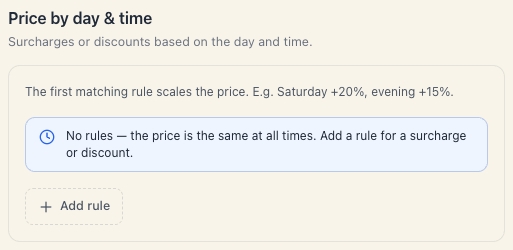
“The first matching rule scales the price. E.g. Saturday +20%, evening +15%.”
Every rule has:
| Field | What it does |
|---|---|
| Label (optional) | a name for your own convenience, e.g. “Weekend evening” |
| Days | day checkboxes. “No selection = every day.” |
| Only at a specific time | a switch; when on, From and To fields appear. “Otherwise the rule applies all day.” |
| Percent | ”Surcharge or discount: from −100% to +200%.” |
For a rental the percent applies to the price per slot, not to the grand total — every slot inside the affected window gets more (or less) expensive and the sum follows.
Rules are evaluated top to bottom and the first match wins — order them from the most specific to the most general. An empty list reads: “No rules — the price is the same at all times. Add a rule for a surcharge or discount.”
6. What you cannot configure here
- A deposit. The Deposit & prepayment block lives inside the Pricing section, and for a rental that section isn’t rendered at all. See Rental deposits.
- A different price per court. The price belongs to the offering, not to the resource. If “Court 1” costs more than “Court 2”, make two rentals.
- A day rate. Daily rental has no editor of its own — you work with hourly slots up to 12 hours.
- A long-rental discount. There is no tiered tariff (“−10% from the 3rd hour”). Pricing is strictly linear.
- A separate price for a fixed window. See Fixed time windows.
7. What the client sees
- The client opens the rental and picks a day.
- They see a grid of slots at your slot length; booked ones are missing.
- They mark the first slot; adjacent ones can be added up to the maximum.
- The total updates live. If a Price by day & time rule is active, the total already reflects it.
- If the selection is under the minimum, they can’t continue.
8. Troubleshooting
The client sees only one slot and can’t select two. The maximum is 1. Raise Maximum under Booking length.
The price doesn’t change when the client picks more hours. Check whether Price per slot is 0, or whether you’re looking at an offering of a different type.
I changed the price and old bookings kept the old total. That’s intended: the amount is frozen onto the booking at creation. The change applies to new ones.
My weekend rule doesn’t apply. Check the order — the first matching rule wins. If an “every day” rule sits above it, that one catches everything.
The grid is empty. That’s not a pricing problem. See Why are there no free times.
What’s next
- Set up a rental — the whole editor.
- Fixed time windows — how to sell “the hall, 9:00–12:00”.
- Multiple units & availability — four courts, one rental.
- The calendar (Schedule) — how rentals look on the schedule.