Resource kinds & capacity
Different resource kinds (staff, chair, court) and several identical ones — how services require them.
Mountify has two different things with almost the same name, and most confusion starts right there. A resource kind is the group — “Stylists”, “Rooms”, “Courts”, “Equipment”. A resource is the concrete unit inside the group — “Anna Petrova”, “Room #2”, “Court 3”. A service requires kinds, never concrete units; the system then finds a free unit of that kind by itself.
This article explains what a kind decides, how parallel capacity is produced, and why the “4 / 15 spots” chip above the list is not the kind’s capacity.
1. Kind vs. resource
| Resource kind | Resource | |
|---|---|---|
| What it is | a group with a name, icon and category | a concrete unit inside the group |
| Example | ”Stylists" | "Anna Petrova” |
| Created in | Catalog → Resource kinds | Catalog → <kind> → Add <kind> |
| What a service requires | exactly this | not directly (see below) |
| Has working hours | no | yes, if the kind’s category is People |
| Counts toward the plan limit | no | yes, if active and eligible for a service |
A kind can hold one resource or fifty. An empty kind is allowed — but a service that requires it won’t be bookable.
2. The four categories
The category is set on the kind, not on an individual unit, and it decides how every unit inside behaves. In the kind dialog it’s the Category field with four options:
| Category | Hint in the dialog | What it’s for |
|---|---|---|
| People | ”Bookable people — masters, instructors, doctors, teachers.” | anyone with their own schedule |
| Places | ”Bookable physical spaces — rooms, courts, cabinets, halls.” | rooms, cabinets, courts, chairs |
| Equipment | ”Movable items, possibly with quantity (cameras, instruments, machines).“ | gear that comes in identical units |
| Things | ”Anything else that doesn’t fit the other three.” | the fallback category |
The differences you actually feel:
- People get the Short bio, About and Working hours sections in the resource editor, and cannot have a home location or a stock above 1 — they rotate by day instead of sitting in one place.
- Places, Equipment and Things get a Home location (on 2+ location boards) and get no personal working hours — they follow the board’s schedule.
- Only Equipment gets the Stock count field — see Equipment stock and parallel capacity.
- Only Equipment can be tied to a place-kind through the Located in field.
Full breakdown: People, places & things.
3. How a service requires kinds
Open Catalog → Offerings → <service> → Edit and find the Resources & add-ons section.
Two different things live there:
- Main resource — the one kind the service always requires. The dropdown shows “<kind> · N”, where N is the number of bookable resources in it (not archived, not hidden, active). If N is 0, an amber line appears right under the dropdown: “This kind has no active ‘<kind>’ yet — the service won’t be bookable until you add at least one.” with an Add <kind> button.
- Add-ons — further kinds the service can occupy at the same time. Each add-on has its own settings: How it appears to the customer, Quantity, Which resource to reserve and Price.
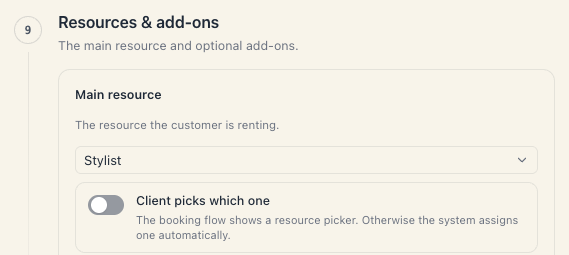
This is why “stylist AND chair” only works through an add-on. The main resource is one kind. If the service must occupy both a stylist and a chair, add the chair as an add-on set to Always included (customer doesn’t see it) — then a slot exists only when both are free. See Add-ons and extra resources.
One more consequence: once a service requires two kinds, both must have a free unit. An empty “Rooms” kind blocks the service even when every stylist is free.
4. Several identical units: two routes
If you have four identical courts there are two legitimate ways to describe them, and they are not equivalent.
| Four separate resources | One resource with Stock count = 4 | |
|---|---|---|
| How it looks | ”Court 1”, “Court 2”, “Court 3”, “Court 4" | "Courts” |
| Allowed categories | all | Equipment only |
| Customer can pick a specific one | yes | no — they’re indistinguishable |
| Own colour / photo / tags | yes, per unit | no, one for all |
| Own schedule columns | yes | no — one column |
| Parallel bookings | 4 | 4 |
| Plan spots consumed | 4 | 4 |
So: parallel capacity and plan cost are identical. The difference is whether the units have an identity. Courts, cabinets and chairs almost always want to be separate resources (customers ask for “court 1”); identical clippers, machines and instruments want one resource with a stock count.
For people the second route is forbidden: a person cannot have a stock above 1.
5. Capacity is per kind and per location
For everything that isn’t People, parallel capacity is the sum of the stock counts of every non-archived resource of that kind at that location. A resource with no stock set counts as 1.
Example: a “Courts” kind with “Court 1” (1), “Court 2” (1) and “Indoor courts” (3) → capacity 5 at the location they sit in.
For People capacity isn’t a sum: a person is one unit, and two bookings on them at the same time are a conflict, not an overflow. That’s why the schedule paints two different signals — see Equipment stock and parallel capacity.
Careful: capacity is per location. With two locations each branch has its own pool. If “Rooms” exist only at the first branch, a service advertised at the second one too will look available and quietly give no times there. That’s exactly what the amber dot on the Locations nav row is warning about.
6. The «Primary» kind — schedule columns only
The kind dialog has a Use as primary kind toggle, with the hint “The primary kind is shown as columns in the calendar by default.”
That is all it does. The primary kind:
- decides which kind the schedule opens by default (its resources become the columns);
- serves as the default pick in a few screens.
It does not:
- give priority when searching for free times;
- affect your plan’s bookable-spots limit;
- make its resources “more important” for availability.
Known quirk: ticking Use as primary kind on a new kind does not untick it on the previous one. You can end up with two “primary” kinds — the system then takes the first in order. If the schedule opens the wrong kind, open the other kind and untick it by hand.
7. What “4 / 15 spots” is NOT
The chip above the resource list is a subscription limit, not the kind’s capacity. It:
- counts active resources across all boards in the workspace, not just the current kind;
- sums equipment stock (one resource with a stock of 4 uses 4 spots);
- ignores archived and inactive resources;
- shows “N / ∞” on a plan without a limit.
Full explanation — Your plan’s bookable-spots limit.
Troubleshooting
The service shows no times but the stylists are free. Check every kind the service requires — including add-ons marked Always included (customer doesn’t see it). An empty kind blocks the whole service; the editor’s wording is ”‘<kind>’ has no entries yet — this add-on will block bookings for the whole service.”
I added a resource but capacity didn’t change. If the resource is Inactive or Hidden from customers, it takes no part in public booking. See Hiding & archiving resources.
One court is free but the system refuses a fifth parallel booking. The kind’s capacity at that location is full. Check whether the fifth court really sits at the same location — the Home location field in its editor.
I want different prices for different rooms. Price lives on the service, not on the resource. For day/time surcharges see Pricing, surcharges & discounts.
I’m trying to change an existing resource’s type and the field is greyed out. Type locks after creation: “Type is locked — delete and recreate to change.” Create a new resource in the right kind and archive the old one.
What’s next
- People, places & things — what the category changes.
- Creating and managing resource kinds — making and deleting a kind.
- Equipment stock and parallel capacity — stock counts and oversell signals.
- Several identical units & availability — the same idea for hourly rentals.