Reviews on your page
Show your reviews on the public page — social proof that lifts bookings.
Reviews are social proof: a hesitating client decides faster once they see other people were already happy. This article covers exactly what a visitor sees on your public page and which two settings control it. Collecting and moderating reviews is a separate topic — see Customer reviews.
1. The two settings — and where they live
Reviews on the public page are driven from two different places. This is the single most common source of confusion.
| Setting | Where it lives | What it does |
|---|---|---|
| Show reviews on your booking page | Setup → Reviews, the block at the very top | Shows or hides the whole review block and the overall rating on the public page. |
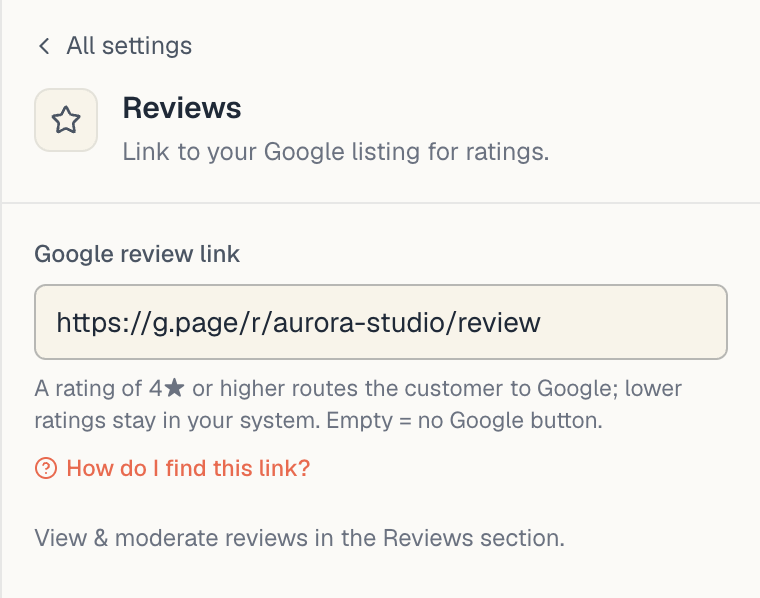
| Google review link | Setup → Public site, the Reviews row in the Business group | Does NOT display reviews. It decides whether a happy client is invited to also post on Google after they’ve already rated you here. |
In short: the first setting is about display, the second about collection.

2. What the client sees when reviews are on
Reviews aren’t a separate page. There are two places a client meets them:
- The About card — on a phone a client opens it by tapping your name, on a computer through About in the top menu. This works in both home layouts, Classic and Sheet.
- A Reviews block on the page itself — only in the Sheet layout, under the booking card, once you have at least 5 published reviews. See Classic or Sheet.
Inside the About card, top to bottom:
- Cover and photos of the venue (from the Photos row of the public site).
- Overall rating — a star, an average to one decimal (e.g.
4.8) and a review count (· 23 reviews). - Your description (the About field).
- Opening hours, contacts, team.
- Last — the review block under the heading Reviews.
Each review in the block shows:
- the stars (1–5),
- the review text in quotation marks,
- the author’s name,
- the date.
The source is never shown publicly. The Manual / Google / Yelp / Customer badge is admin-only.
3. How many reviews show, and in what order
| Property | Behaviour |
|---|---|
| Order | newest first (by the review’s date) |
| About card | the newest 3, with a button that unfolds the rest |
| Reviews block with Sheet | the newest 3 on a computer, 5 on a phone, with a button to see them all; shown only from 5 published reviews |
| Hidden (archived) reviews | never shown, never counted in the average |
| Reviews without text | can’t exist — the text is required on entry |
There is no separate reviews page on your site: the block is a short shop window, and the full list is one tap away.
4. The star next to a specialist is a different thing
Besides the venue’s overall rating, every specialist carries their own. It’s computed from the reviews attributed to that person and shows on their profile in the specialist-picking step.
That rating is recomputed automatically every time a review is added, edited, hidden or restored.
Important: an individual specialist’s rating comes from their own profile record, not from the review block. If you switch off Show reviews on your booking page, the block and the venue rating disappear, but the star next to a specific specialist may remain visible. If you want no ratings at all, hide (archive) the underlying reviews in Setup → Reviews.
5. If you have no reviews yet
When there isn’t a single active review, the block simply doesn’t render. There’s no empty section and no “no reviews yet” caption — the client never learns such a block exists.
So there’s no need to switch the toggle off while you wait for the first ones. Leave it on and the block appears by itself once it has something to show.
6. How to fill the block
Three ways, in order of effort:
- The automatic post-visit email. A client who booked themselves, through the public page, gets a “How was your visit to …?” email roughly 3 hours after the visit ends. Bookings you entered in the admin do NOT trigger it.
- The client’s own account. A signed-in client sees a Leave a review button on their past visit.
- Manual entry. If you have genuine reviews from in person, the phone or Google, enter them in Setup → Reviews → the Add button.
Details in Collect reviews.
7. Troubleshooting
I turned the toggle on and there are no reviews on the page. Check you actually have active reviews — in Setup → Reviews, the Active tab. If they’re all in Archived, there’s nothing to show.
Reviews show but the overall rating is missing. The rating only appears when at least one active review exists. If you just hid the last one, it disappears.
I hid a review and it’s still on the public page. Public data is cached briefly. Reload the page with a cleared cache (Ctrl+F5 / Cmd+Shift+R) after a minute.
I want to reply to a review publicly. There is currently no public-reply field. See Reply to reviews for what you can do instead.
What’s next
- Show reviews on your page — the toggle itself, step by step.
- Customer reviews — the moderation page.
- Collect reviews — the post-visit email.
- Brand your page — name, description and the Google link.