Online Booking Software for Salons: What Actually Matters
How to choose an online booking system that helps your salon sell services, reduce admin work, and prevent scheduling conflicts.
On this page
A customer sends your salon a message late in the evening:
Hi! Do you have any manicure appointments available on Saturday?
The next morning, someone checks the calendar and asks what time works best. The customer replies a few hours later. The original slot is gone, so the conversation starts again.
Now you need to confirm the service, the specialist, the duration, the customer’s name and contact details. Then someone has to copy everything into the calendar and remember to send a reminder.
One conversation like this feels harmless.
Dozens of them turn your front desk into a manual dispatch center.
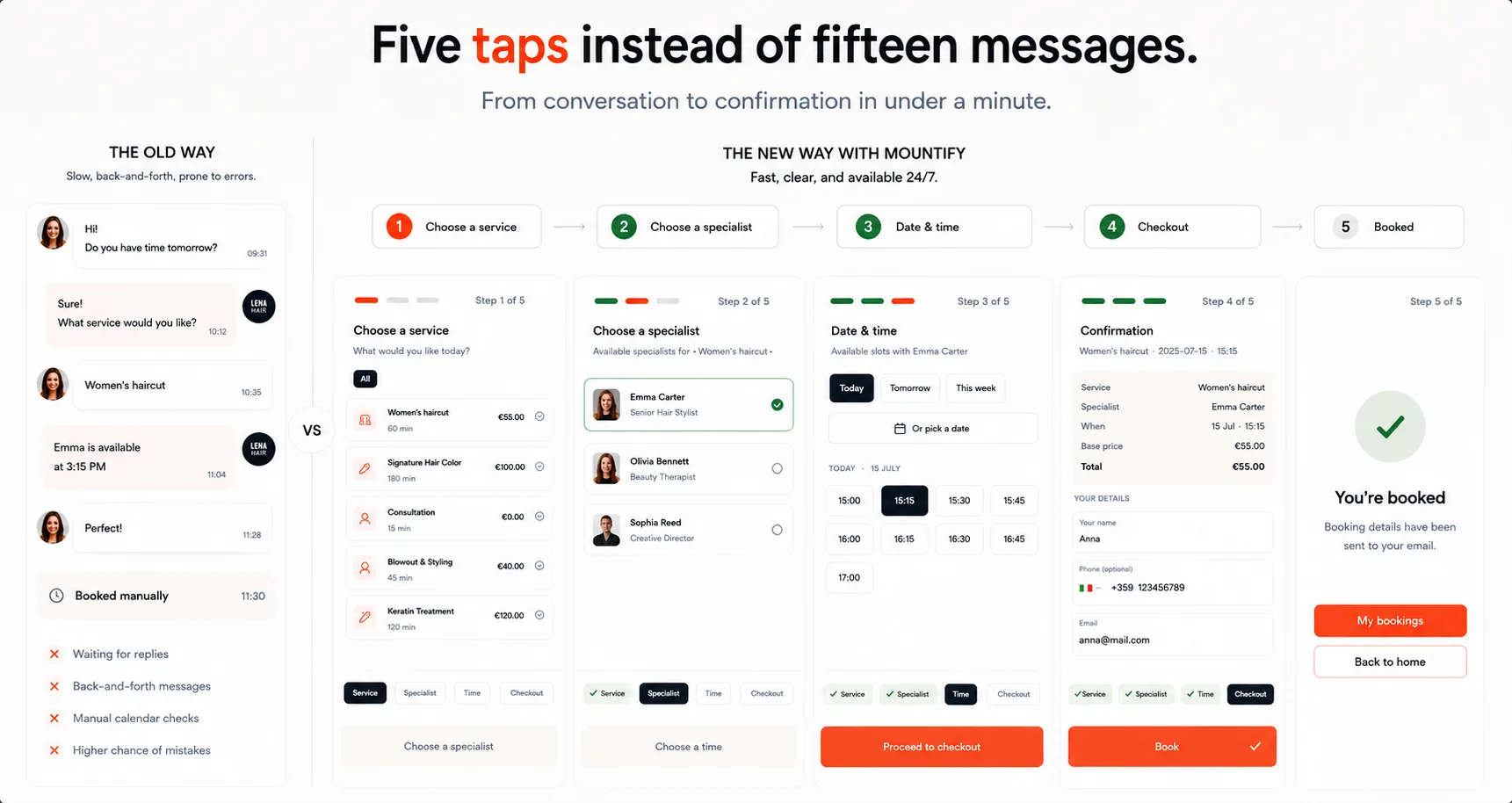
Booking through Instagram, Messenger, Viber, or phone calls works until the business starts growing. After that, messages get lost, availability has to be checked manually, and customers are asked to wait for information that a good booking system could show instantly.
Online booking software should solve that problem. But a calendar with a few available time slots is not enough.
A good platform should help a salon:
- present and sell its services;
- accept bookings without constant staff involvement;
- calculate real availability;
- reduce no-shows and late cancellations;
- manage customers and booking history;
- collect deposits or full payments when needed;
- support packages, memberships, loyalty, and reviews;
- preserve the salon’s own identity.
There is another point that is often treated as secondary, even though it affects the entire customer experience:
Your booking page should feel like part of your brand.
For many customers, it is the first real interaction with your business after discovering you on Instagram, Google, or through a recommendation. It should not look like a generic form hosted by someone else.
Online booking is more than a calendar
A calendar does not sell anything by itself.
What sells is a clear offer, a trustworthy presentation, accurate availability, and a simple path from interest to a confirmed appointment.
For the customer, an online booking system should provide one place to:
- learn about the salon;
- browse services and prices;
- choose a specialist;
- see genuinely available times;
- book without calling or waiting for a reply;
- receive a clear confirmation;
- pay a deposit when required.
For the owner and team, it should provide a practical workspace for schedules, services, staff, resources, customers, payments, and booking history.
If a customer still needs to message an administrator to ask what times are available, that is not really online booking. It is a manual conversation that happens to take place online.
When bookings through messages start holding the business back
Taking appointments through social media and phone calls is completely reasonable when a business is small.
The problem is not the channel itself. The problem begins when the process can no longer handle the volume.
Staff answer the same questions repeatedly
“How much does it cost?”
“How long does it take?”
“Who is working today?”
“Do you have anything after 6 PM?”
When this information is scattered across posts, highlights, old messages, and price lists, customers have to ask and staff have to repeat the same answers.
Appointments get lost
A message can be opened and forgotten. It can disappear under other conversations or remain unanswered until the next day.
The customer is left unsure whether the appointment is actually confirmed.
The schedule lives in several places
Some bookings are written in a notebook, some are stored in a phone calendar, and others stay in the personal messages of individual specialists.
That is how double bookings, missed appointments, and last-minute confusion happen.
Customers want to book when the salon is closed
People search for services in the evening, late at night, and on weekends.
If they have to wait until the next working day to learn whether a slot is available, some will simply choose another business that lets them book immediately.
The owner cannot see the full picture
Without one system, it is difficult to answer basic questions:
- How full is next week?
- Which services are booked most often?
- Which specialists still have open time?
- Which customers frequently cancel?
- Which appointments are unpaid?
- How many customers return?
Online booking should not remove human interaction.
It should remove the repetitive work where a human is not needed.
What good online booking software should do
Do not choose a platform based on the number of features listed on a pricing page.
The better question is whether it supports the whole customer journey — from discovering the salon to returning for another visit. It helps to see the full feature set in one place rather than a marketing checklist.
1. Give the business its own branded booking page
A customer should not land on a blank calendar or a marketplace full of competing salons.
They should land on a page that belongs to the business they already chose.
A strong booking page can include:
- the salon’s name and logo;
- a cover image and photo gallery;
- a clear description;
- address and contact details;
- social links;
- services and prices;
- specialists;
- reviews;
- booking and cancellation policies.
But simply uploading a logo is not enough.
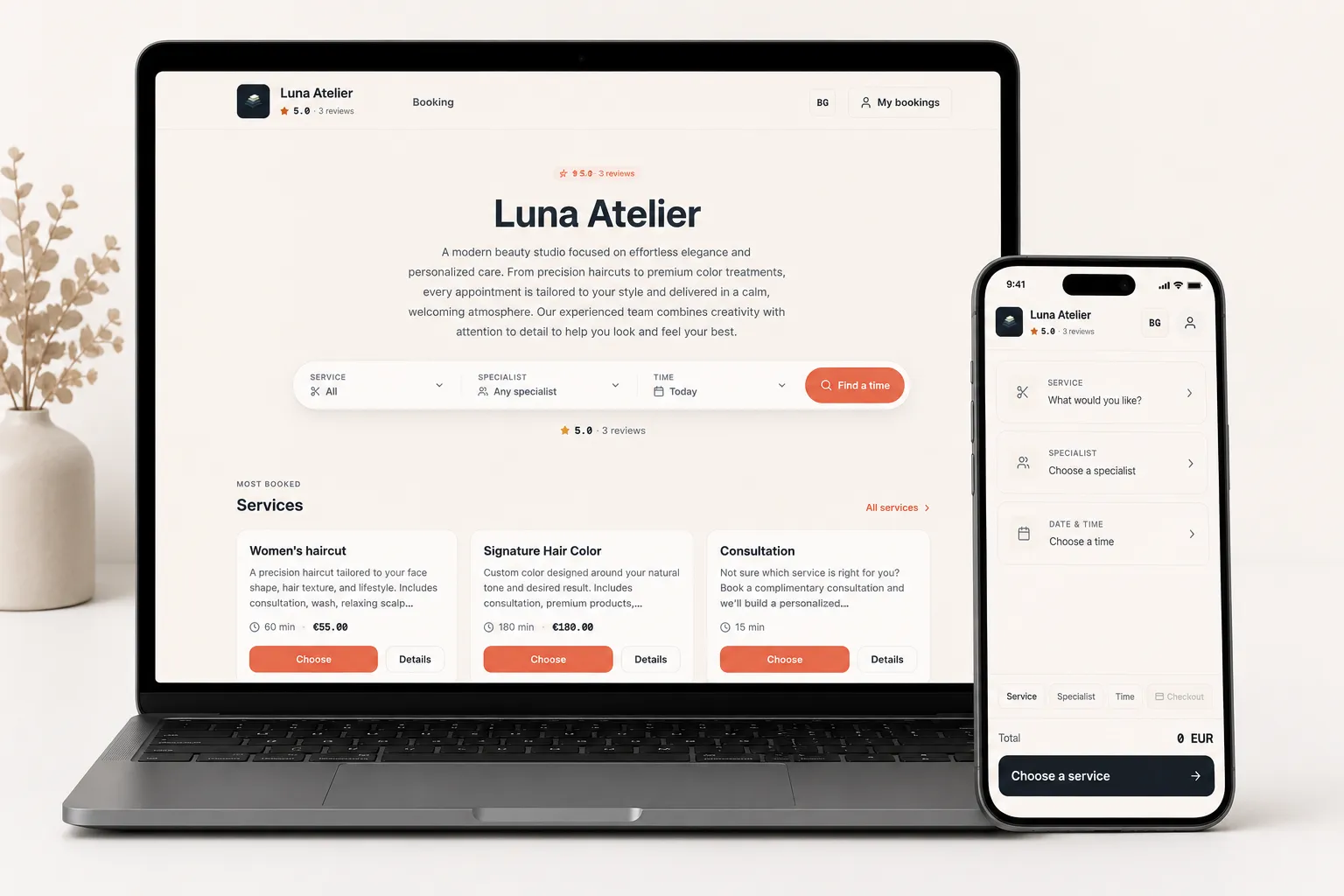
The page should look and feel like a natural continuation of the salon’s brand. Its colors, imagery, typography, layout, service presentation, and tone should support the same impression that the business creates on Instagram, Google, or its own website.
Imagine two experiences.
In the first, a customer discovers a beautifully designed salon profile and then clicks a booking link. They arrive on a generic white page with another company’s logo, default colors, and an interface that looks identical to thousands of other businesses.
In the second, the booking page continues the salon’s visual identity. The colors are familiar. The photography feels consistent. The services are presented clearly. The entire experience feels intentional.
The functionality may be similar, but the level of trust is not.
For many customers, the booking page is one of the most important pages in the sales journey. It is where interest turns into action.
A good booking platform should therefore allow more than superficial branding. Depending on the business, useful customization can include:
- brand colors;
- light and dark appearance;
- different visual themes or moods;
- custom cover images and galleries;
- different hero layouts for desktop and mobile;
- display fonts;
- button and card styles;
- corner, spacing, and shadow choices;
- promotional announcement bars;
- custom text and calls to action;
- control over how services and reviews are presented.
Not every salon needs to adjust every detail. In fact, too many controls can make the setup unnecessarily complicated.
The best systems balance flexibility with speed: strong presets for businesses that want to launch quickly, and deeper controls for those that care about every part of the experience.
A booking page should not look like booking software. It should look like your business.
This matters even more for businesses that do not have a website. A customizable booking page can become their main digital storefront without the cost and delay of a custom website project.
For businesses that already have a site, the booking experience should be easy to embed into it — as an inline section, a button that opens a booking flow, or another format that fits the existing design.
A useful rule is simple:
The platform should be visible to the business owner and almost invisible to the customer.
The customer should remember the salon, not the software used to book it.
2. Present services in a way that helps customers choose
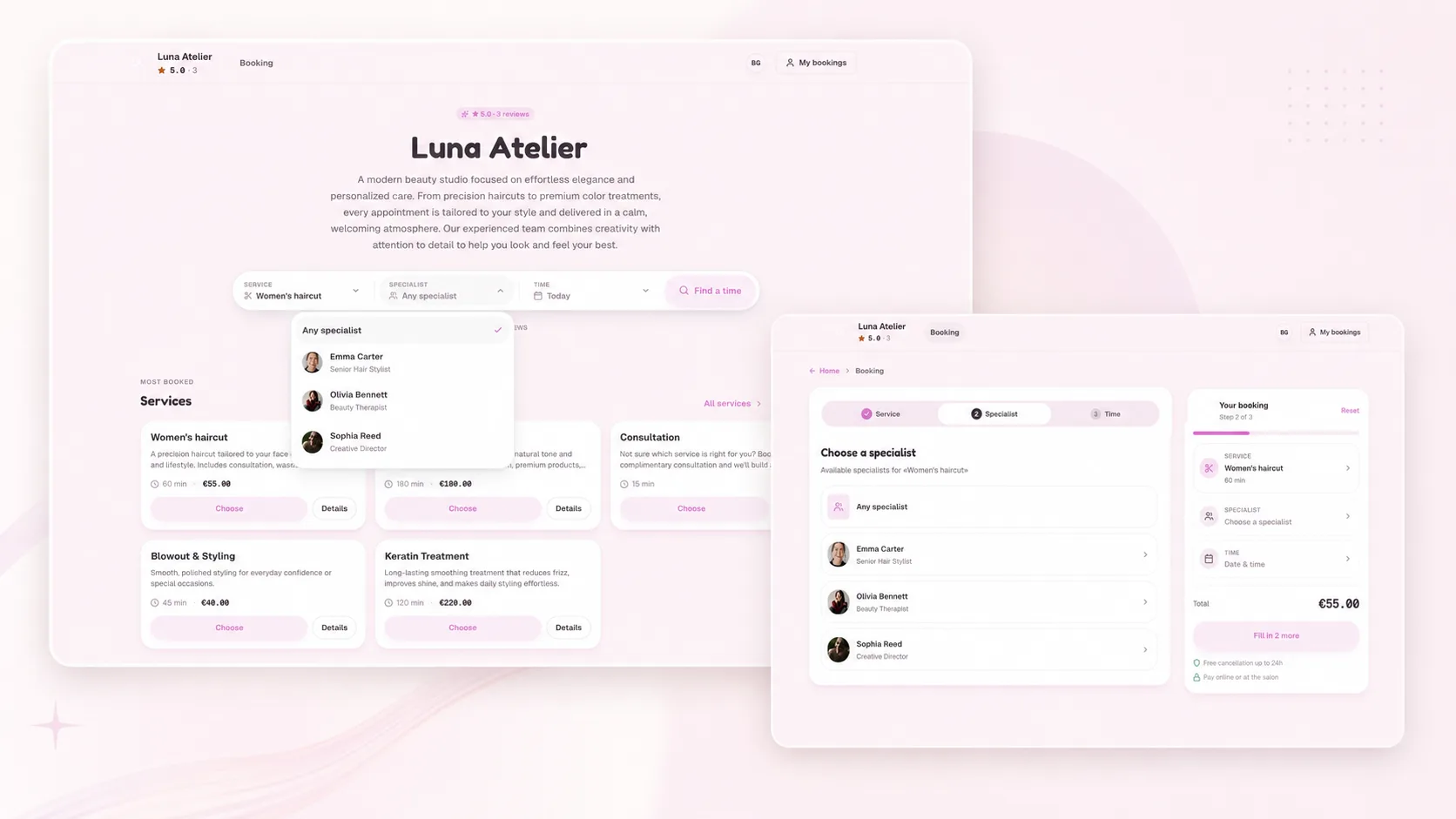
A list containing only a service name and a price is a price sheet, not a storefront.
Before booking, customers may need to understand:
- what is included;
- what result they can expect;
- how long the service takes;
- how much it costs;
- who provides it;
- whether preparation is required;
- what the cancellation policy is;
- whether a deposit is required.
Compare these two examples:
Hair coloring — €80
and:
Personalized hair coloring with a consultation, shade selection, and styling. Approximate duration: two hours. Final price may vary depending on hair length.
The second version removes uncertainty and helps the customer make a decision. Good software lets you describe each service with photos and details, not just a price.
Presentation also matters.
A premium beauty salon may want large editorial photography, refined typography, and generous spacing. A high-energy fitness studio may need a completely different style.
Businesses should not be forced into the same visual template simply because they use the same booking engine.
The service page should support the brand while still making the essentials — price, duration, provider, and availability — easy to understand.
3. Show only genuinely available times
Availability cannot be calculated from opening hours alone.
The system should consider:
- each specialist’s schedule;
- the duration of the selected service;
- breaks;
- holidays and time off;
- existing bookings;
- the availability of rooms, chairs, or equipment;
- the selected location;
- required buffer time between appointments.
Suppose a salon closes at 8 PM, but a treatment takes two hours. The system should not offer a 7 PM start.
Or imagine that the specialist is free but the required treatment room is already occupied. That time should not appear as available either.
The more accurately availability is calculated, the less time staff spend fixing bookings manually.
4. Make booking easy on a phone
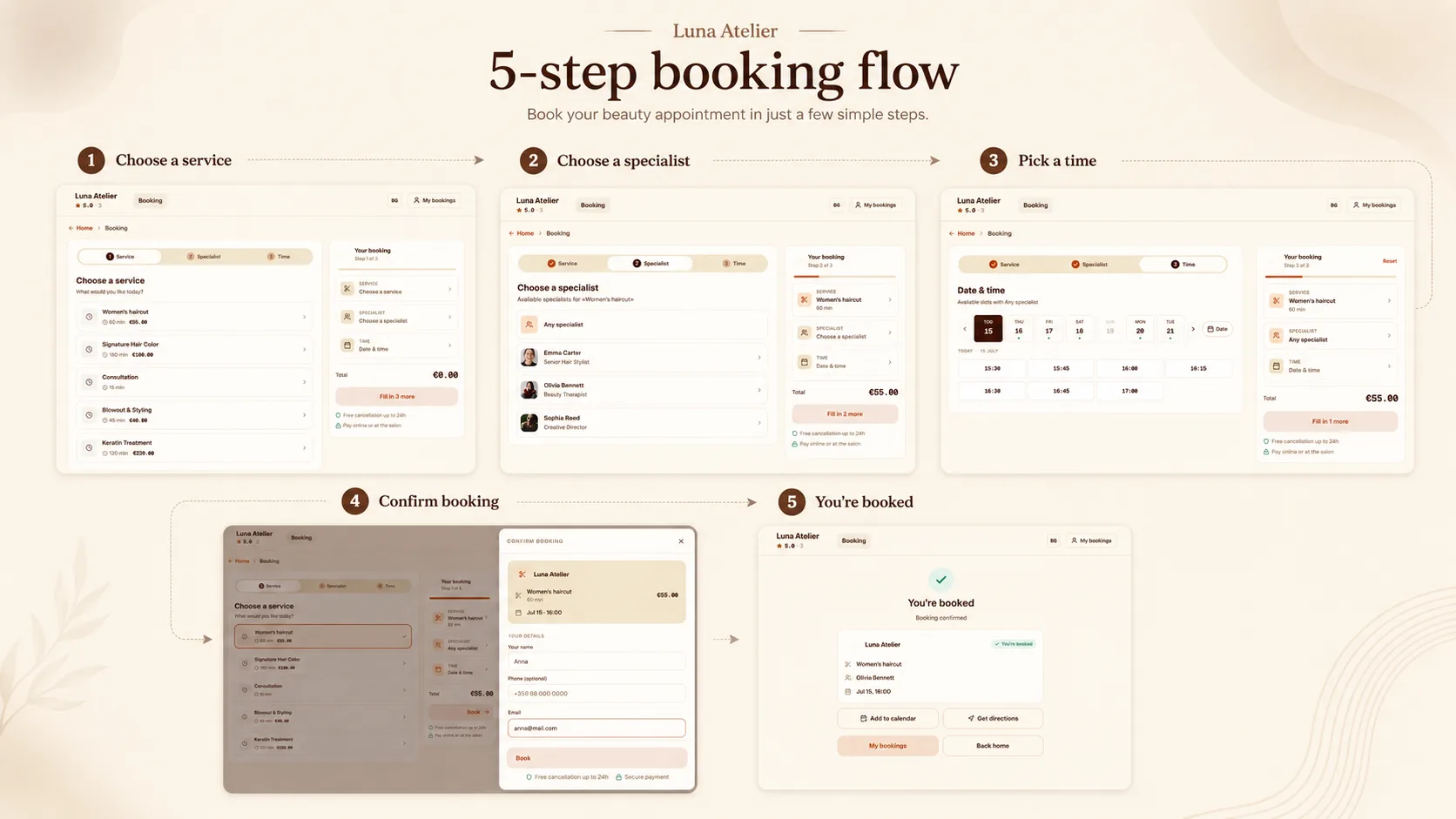
The ideal flow is short:
- Choose a service.
- Choose a specialist, or let the system assign one.
- Choose a date and time.
- Enter contact details.
- Confirm the appointment.
Customers should not be forced to create a complicated account or complete a long form just to book a haircut.
Additional questions are useful only when they are relevant to the specific service. A good system lets you ask the right question per service instead of one long form for everyone.
For example, a salon may ask about hair length before coloring. A clinic may need a short intake question. A rental business may need to know the purpose of the booking.
The same form should not be shown to every customer for every service.
Mobile usability is critical. Most people will open the link from Instagram, Google Maps, or a messaging app.
If the page is difficult to navigate on a small screen, customers will abandon the process.
5. Confirm appointments and send useful reminders
After booking, the customer should immediately understand what happened.
The confirmation should include:
- the selected service;
- date and time;
- specialist;
- location;
- amount due;
- cancellation rules;
- a secure way to manage the booking.
Reminders reduce the chance that the customer simply forgets.
It is also helpful when customers can reschedule or cancel through a secure link. This reduces back-and-forth communication and gives the business more time to fill the released slot.
Notifications should be helpful rather than excessive. A clear confirmation and a well-timed reminder usually matter more than a stream of repetitive messages.
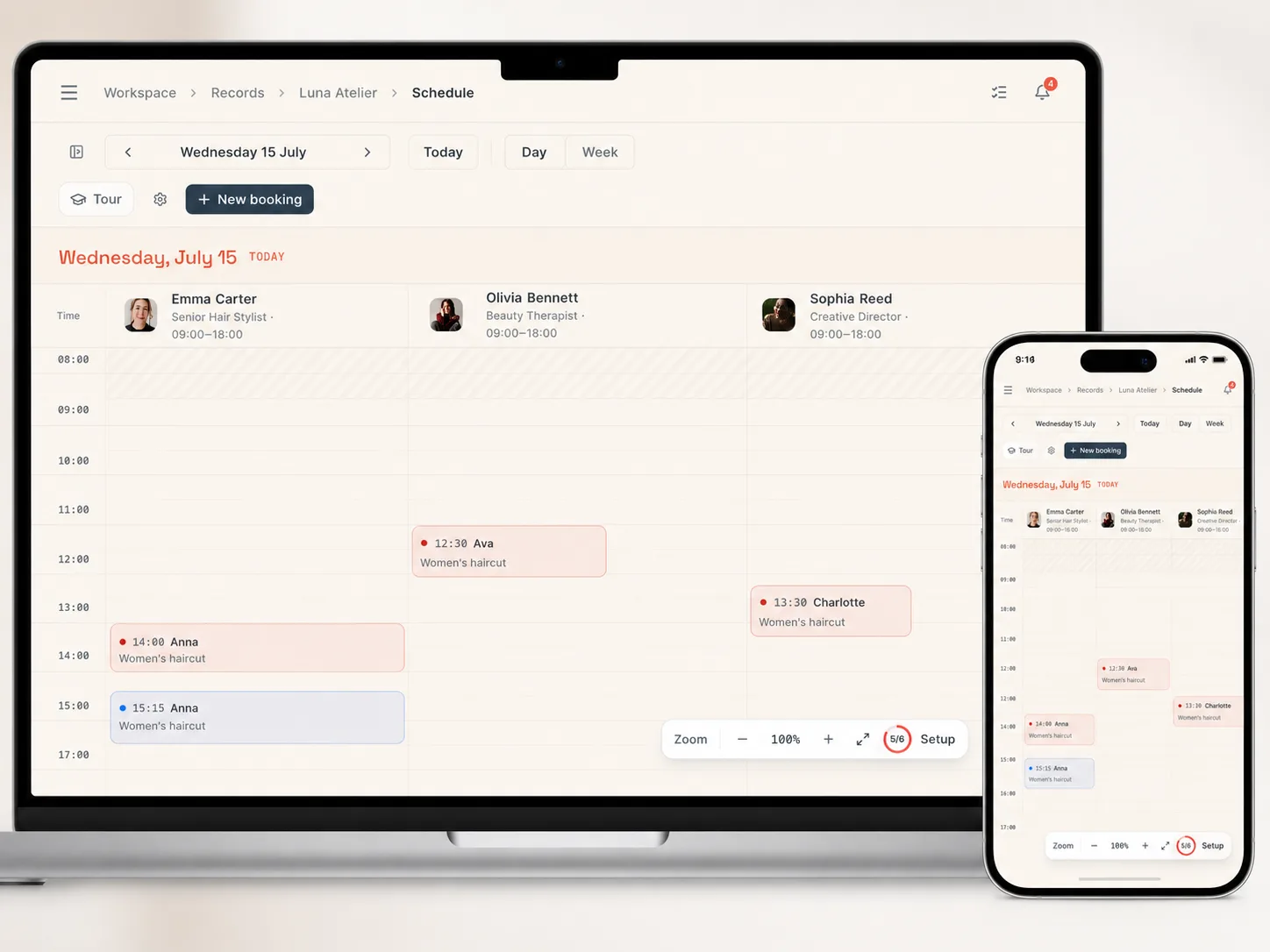
6. Give the team a calendar designed for daily work
The public booking page is only half of the product.
The other half is what the team uses every day.
Staff should be able to see:
- today’s appointments;
- upcoming visits;
- open time slots;
- specialist workload;
- cancelled appointments;
- arrivals;
- completed visits;
- no-shows;
- bookings waiting for confirmation or payment.
From the calendar, it should be easy to:
- open a booking;
- move it;
- assign another specialist;
- mark arrival or record a no-show;
- add an internal note;
- confirm payment.
A focused “Today” view can sometimes be more useful than a large weekly calendar. It gives the front desk a clear list of the appointments and actions that matter right now.
7. Build a customer history, not just a list of appointments
Each booking should improve the customer record.
A useful customer profile can include:
- contact details;
- previous and upcoming bookings;
- favorite or frequent services;
- cancellations;
- no-shows;
- active packages or memberships;
- loyalty progress;
- internal notes.
This gives the team useful context.
If someone repeatedly misses appointments, the business may require a deposit next time.
If a customer books the same treatment regularly, the salon can offer a package.
If someone has not returned for months, the business can identify that from data rather than memory.
8. Support flexible deposits and payments
Prepayment is not necessary for every business or every service — for when it is worth asking and when it is not, see deposits and no-shows.
A short, low-cost appointment may be paid in person. A long coloring session, massage, tattoo, rental, or advanced beauty treatment may justify a deposit.
A flexible system should allow the business to:
- require no prepayment;
- charge a fixed deposit;
- charge a percentage;
- request full payment;
- define refund and cancellation rules.
A deposit is not simply a way to collect money earlier.
It protects time that may be impossible to sell again after a late cancellation.
The business should also understand where the money goes, which payment provider processes it, and how refunds are handled.
9. Help turn first visits into repeat business
The first booking is only the beginning.
Healthy service businesses grow through repeat visits, not only through constant customer acquisition.
Useful retention tools can include:
- prepaid service packages;
- memberships;
- visit passes;
- first-visit promotions;
- promo codes;
- loyalty rewards;
- post-visit review requests.
For example, a customer may buy ten massage credits and use one per appointment.
Or the salon may reward the tenth visit after nine completed appointments.
These programs should remain simple. Customers need to understand what they own, how many visits remain, when the offer expires, and which services are included.
A complicated loyalty program that nobody understands is worse than a simple visit card.
10. Support the business as it grows
A solo specialist may become a team. One location may become three. A single service room may become a network of specialists, rooms, and equipment.
Before choosing a system, check whether it can support:
- additional staff;
- separate schedules;
- services assigned to specific specialists;
- multiple locations;
- rooms and equipment;
- location-first booking flows;
- classes, rentals, or packages if the business expands.
Changing booking systems after years of customer and booking history is harder than choosing a solid foundation early.
What matters for salons in Bulgaria
The core principles of online booking are universal, but local details still matter.
Natural language
Buttons, confirmations, cancellation policies, and payment messages should sound natural to local customers.
Poor translation is especially damaging when someone is asked to share contact information or make a payment.
Correct time and currency
The platform should correctly support the business’s timezone, time format, and currency.
These details feel small until a customer receives a confirmation with the wrong time or sees an unfamiliar price format.
A complete mobile experience
Most customers will arrive through Instagram, Google, a QR code, or a messaging app.
They should not have to install an app, zoom in, or struggle with a desktop interface on a phone.
Suitable payment providers
Before enabling deposits, verify:
- whether the provider is available to the business;
- where funds are deposited;
- how refunds work;
- which fees apply.
Control over the brand and customer relationship
A marketplace can provide additional visibility, but the salon always appears beside competitors and depends on the platform’s rules.
A branded booking page serves a different purpose. It converts the attention the business already earned through social media, search, recommendations, and returning customers.
The two channels do not have to exclude each other.
But loyal customers and owned traffic are usually better sent to a place where the salon’s own identity remains central. You can see how real salons and studios in Bulgaria approach this in the Mountify case studies.
How to compare online booking platforms
Do not make a decision based only on a product landing page.
Test the real experience — and, when you can, compare platforms side by side.
Use it as a customer
Open a demo page on your phone and try to book.
Check whether:
- the next step is obvious;
- services are easy to compare;
- price and duration are visible;
- time selection feels simple;
- unnecessary registration is required;
- the page feels consistent with the business;
- confirmation is clear.
If the process is confusing to you, it will not become easier for customers.
Check how much of the page you can truly customize
Many platforms let you upload a logo.
That does not necessarily mean the page is branded.
Ask:
- Can you use your own colors?
- Can you select a visual style that fits the business?
- Can desktop and mobile presentation be adjusted appropriately?
- Can you add a cover, gallery, announcement, and custom copy?
- Can you control the appearance of buttons, cards, typography, and sections?
- Can the booking experience be embedded into an existing website?
- Does the page feel like your business, or like the software vendor?
Customization is not just decoration. It helps maintain the trust created before the customer clicked “Book.”
At the same time, customization should not require a designer or developer. A good system provides ready-made choices that look polished by default, with deeper controls available when needed.
Use it as an administrator
Create a test booking, move it, cancel it, and mark the customer as arrived.
Check:
- how many actions are required;
- whether the whole team’s schedule is visible;
- how quickly a booking can be found;
- whether phone bookings can be added easily;
- whether conflicts are prevented;
- whether changes remain understandable.
Calculate the real price
A low entry price means little if staff members, locations, messages, payments, or essential features cost extra.
Compare the cost of the setup your business actually needs, not the smallest number on the pricing page. Mountify keeps this transparent on the pricing page.
Check whether you can manage it yourself
A business owner should not need support to change a price or close one day.
Basic tasks should be manageable without outside help:
- adding a service;
- changing working hours;
- adding staff time off;
- updating photos;
- editing cancellation rules;
- enabling a deposit;
- publishing a promotion;
- changing the look of the booking page.
How to launch online booking without a long implementation
You do not need to configure everything on day one. In fact, most salons can go live in a single evening.
Step 1: Set up the business page
Add the business name, description, location, contact details, social links, logo, cover, and gallery.
Choose a visual preset that suits the brand, then adjust colors and other details if needed.
Step 2: Add the main services
Start with the services customers book most often.
Include price, duration, description, provider, and cancellation rules.
Step 3: Add staff and required resources
Connect services to the specialists, rooms, or equipment required to deliver them.
Step 4: Configure working hours
Add regular schedules, breaks, closed days, holidays, and staff time off.
Step 5: Test availability
Try to book every major service and verify that the available times are correct.
Step 6: Configure confirmations, reminders, and deposits
Decide when reminders should be sent and which services require payment in advance.
Step 7: Complete a test booking on a phone
Follow the exact path a customer will use.
Check not only whether it works, but whether it feels consistent with the business’s brand.
Step 8: Publish the link everywhere customers already find you
Share the link on:
- Instagram;
- Google Business Profile;
- the existing website;
- messaging apps;
- QR codes;
- messages to returning customers.
There is no need to ban phone bookings immediately.
Staff can continue adding those appointments to the same calendar. The goal is not to force every customer to change behavior overnight. The goal is to keep all bookings in one reliable system.
How Mountify approaches online booking
We are building Mountify as more than another calendar and more than another marketplace.
We believe the booking page is one of the most important pages a service business owns.
It is where a potential customer decides whether to book or close the tab.
That is why Mountify focuses not only on scheduling and automation, but also on the experience the customer sees.
A business can create a public booking site without hiring a developer, using:
- ready-made visual themes;
- a custom brand color;
- light or dark appearance;
- different hero layouts for desktop and mobile;
- logos, covers, and galleries;
- display fonts;
- configurable button, card, avatar, spacing, corner, and shadow styles;
- announcement banners;
- custom descriptions and social links;
- service, specialist, review, and location content.
The goal is not to make every owner design a website from scratch.
The goal is to provide a fast, guided setup that still results in a page that feels individual.
The preview in the editor matches what customers see, so a business can adjust the page with confidence rather than guessing how it will look after publishing.
If the business already has a website, Mountify can also support embedded booking experiences instead of forcing every customer to open a separate destination.
Behind the page, the business can manage:
- services and prices;
- staff and resources;
- availability and bookings;
- customers and visit history;
- confirmations and reminders;
- deposits and payments;
- packages and memberships;
- loyalty;
- reviews;
- multiple locations.
The customer opens the page, chooses a service, specialist, and real available time, and the booking appears in the team’s schedule.
The booking experience belongs to the business.
The calendar, automation, and infrastructure work behind it.
A salon does not need another generic scheduling tool.
It needs a booking channel that presents its services, earns trust, accepts appointments, and helps customers return — without requiring the front desk to manage every step manually.
That is the problem Mountify is designed to solve.
Ready to create a booking page that feels like your brand?
Frequently asked questions
Does a salon need a separate website for online booking?
No.
A booking platform can provide a complete public page that can be linked from Instagram, Google Business Profile, messaging apps, and QR codes.
If the salon already has a website, the booking experience can be embedded or opened through a dedicated button.
Is customization really important for a booking page?
Yes, because the booking page is part of the customer journey.
Brand colors, photography, copy, typography, and service presentation help the page feel trustworthy and consistent with the business the customer intended to book.
Customization should not make setup difficult, though. Strong presets and a live preview are often more useful than an overwhelming website builder.
Does the salon need to stop accepting phone bookings?
No.
Customers can book online, while staff add phone, message, or walk-in appointments to the same calendar.
The important part is keeping all appointments in one system.
Can customers book while the salon is closed?
Yes.
The page can remain available at any time while only showing slots that match the salon’s hours, staff schedules, existing bookings, and required resources.
Is online payment required?
No.
Some services can be paid in person, while others may require a fixed deposit, a percentage, or full prepayment.
How does the system prevent double bookings?
Before confirming a booking, the platform should verify the availability of the selected specialist and every required resource.
An occupied time should not be offered to another customer.
Is online booking useful for a solo specialist?
Yes.
It reduces interruptions, accepts bookings outside working hours, and keeps the schedule in one place.
If the business grows, additional team members and resources can be added later.
Final thoughts
Choosing online booking software only because it has a calendar is a mistake.
A strong system should:
- present and sell services;
- calculate real availability;
- make booking simple on mobile;
- give the team a practical daily workflow;
- reduce no-shows;
- maintain customer history;
- support payments and repeat business;
- preserve the business’s identity.
The best test is simple:
Does the system make booking easier for the customer and the team — without making the business look like everyone else?
When the answer is yes, online booking stops being another administrative tool.
It becomes a branded sales channel that keeps working while staff are busy, the front desk is offline, and the salon is closed.