Add spots & locations
When and how to add another bookable spot or another location to your plan.
Sometimes you need a bit more than your plan gives — one more specialist, one more branch — but not a whole bigger tier. That’s what add-ons are for: paid extras on top of your current plan. You buy them on the same page, they apply immediately, and they are charged prorated right now, not from next month.
1. The four add-ons
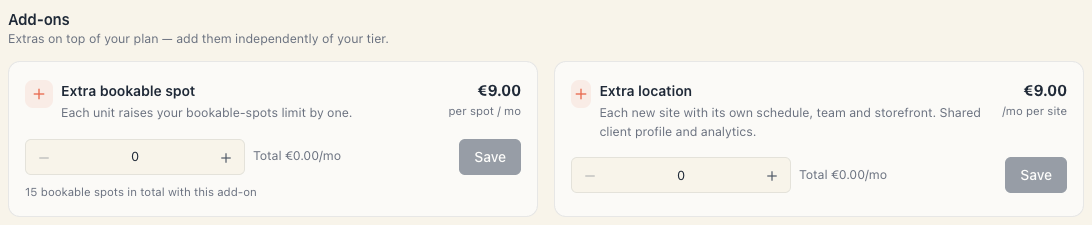
Open Settings → Workspace settings → Subscription & billing and scroll to the Add-ons section. Under the heading: “Extras on top of your plan — add them independently of your tier.”
| Add-on | Price | What it does | How it’s set | Which plans |
|---|---|---|---|---|
| Extra bookable spot | €7/mo per spot | +1 to your bookable-spots cap per unit | stepper 0…999 + Save | “On any plan” |
| Extra location | €9/mo per site | +1 to your locations cap | stepper + Save | “On any plan” |
| Group classes | €12/mo | unlocks classes and groups with seat limits and a waitlist | on/off switch | “Add-on on Start & Growth · included from Pro” |
| CRM+ & campaigns | €15/mo | unlocks CRM: segments, auto-campaigns, birthday greetings | on/off switch | “Add-on on Start & Growth · included from Pro” |
The two “on any plan” add-ons are listed first, then the two that only apply to Start and Growth.
What a “bookable spot” is: every active unit that takes appointments — a person, chair, room, court, piece of equipment. A resource with a stock count of 4 uses 4 spots. The cap covers the whole workspace. Details: Your plan’s bookable-spots limit.
2. The two card types
Stepper (quantity). A card with − / + buttons, the number, a Total {amount}/mo label and a Save button. Nothing happens until you press Save.
The spots card also prints “N bookable spots in total with this add-on” — that’s your new overall cap if you save.
Switch (yes/no). A card with only a toggle and a Total {amount}/mo label. There’s no Save here — flipping it applies straight away (on a paid plan, after a confirmation).
3. Adding on a paid plan (a real purchase)
- Open Subscription & billing and scroll to Add-ons.
- Set the quantity with − / + (or flip the switch).
- Press Save.
- A dialog appears — Update your subscription? — reading: “‘{name}’ — {price}. The change applies to your current subscription right away and a prorated amount is charged now; the exact figure is on your Stripe receipt.”
- Press Confirm change (or Cancel).
- You get an Add-on updated toast and the Your limits block changes to “base + N extra”.
Exactly what happens to the money:
| Action | When you’re charged | What happens to the difference |
|---|---|---|
| Adding / increasing | immediately — Stripe raises an invoice for the rest of the period | you pay a prorated amount |
| Decreasing | recalculated immediately | the unused part becomes credit against future invoices |
| Removing (down to 0) | immediately | same — credit, not a card refund |
The decrease dialog says it outright: “The unused part becomes account credit applied to your future invoices (not refunded to your card).” The removal dialog adds: “on cancellation, unused credit can be refunded on request.”
Important: the add-on only joins your Stripe subscription if the change succeeds there. If the card is declined, the add-on is not activated — so you never get unpaid capacity.
4. Adding during the trial (a draft)
On a trial (and while a subscription is down) add-ons are saved but neither charged nor enforced:
- there’s no confirmation dialog — the change saves instantly with an Add-on updated toast;
- the panel shows “15 + 2 extra”, but you really work with the trial Pro cap (15 spots, 3 locations);
- at checkout the draft is carried into the purchase, if it’s allowed on the plan you pick. Choose Pro with a “Group classes” draft and it’s dropped — Pro already includes it.
Under the cost block it says “Add-ons are added to your subscription in Stripe.”
5. When your plan already includes the add-on
On Pro and Custom the “Group classes” and “CRM+ & campaigns” cards aren’t purchasable — instead of a switch they read Included in your plan.
If you bought such an add-on on Growth and later move to Pro, the paid line is removed automatically so you don’t pay twice.
6. Add-on or a whole new tier?
| Need | With add-ons | Next tier | Cheaper |
|---|---|---|---|
| One more spot on Start (€13) | €20/mo | Growth €29/mo | add-on |
| Three more spots on Start | €34/mo | Growth €29/mo (5 spots) | next tier |
| One more branch on Growth (€29) | €38/mo | Pro €49/mo (3 locations, 15 spots) | depends how many spots you need |
| Group classes + CRM on Growth | €56/mo | Pro €49/mo | next tier |
Rule of thumb: past 2–3 add-ons the next tier almost always wins.
7. Checking your limit after the purchase
The Your limits block in the side panel is where the result shows:
- Bookable spots — “15 + 2 extra”
- Locations — “3 + 1 extra”
- ∞ means no limit (Custom)
On a resource-kind page (Catalog → {kind}) the “N / M spots” chip shows how much of the cap is used. For branches the same chip reads “N / M locations” in Catalog → Locations.
8. Common questions
Does buying a location create the branch too? No. The add-on raises the cap; you create the location afterwards — see How to add a location.
Can I buy a spot before I hire the person? Yes. Your cap may be higher than what you use.
If I switch a specialist off, does a spot free up? Yes — only active resources count. You can switch one off and activate another with no new add-on.
Can I buy “Group classes” on Pro? No, it’s included there. The card will read Included in your plan.
Is there an add-on for more users? No — users are free and unlimited. See Does adding a teammate cost extra?.
Is there an add-on for another board? No, and you don’t need one — boards are unlimited.
Who can buy add-ons? Only someone with the Manage workspace settings permission.
9. Troubleshooting
| What you see | Why | What to do |
|---|---|---|
| “Set up a paid subscription in Stripe to add extras.” | The workspace is active but has no real Stripe subscription (complimentary) | Start a paid subscription, or contact support |
| The Save button is disabled | You haven’t changed the number, or you lack the permission | Change the quantity; for permissions see Who can manage it |
| An error on confirm and the add-on snapped back | Stripe refused the change (card, limit) | Fix the card in Manage billing and retry |
| I flipped the switch but the feature is still locked | Waiting for the sync | Reload the page after a few seconds |
| I bought a spot but the resource still won’t activate | The resource may be archived, not just switched off | Un-archive it first, then activate |
| I bought an add-on on trial and the cap didn’t move | On a trial add-ons are drafts | It takes effect when you pay |
| I reduced an add-on and expected money back on my card | A reduction gives credit, not a refund | The credit is applied to your next invoice |
What’s next
- Plan limits and what gets locked — the two numbers and which features are plan-gated.
- Change your plan — when add-ons stop being the cheaper option.
- How to add a location — after you’ve raised the cap.
- Payment & invoices — where the add-on invoice lives.