What a board is
A board is one booking workspace — when you need one and when you need several.
“Board” sounds technical, but it’s a simple thing: one place clients book into. A single board keeps working hours, resources, services, the calendar, the till and the public booking page together. For most businesses one board is all they’ll ever need.
Where the boards live
In the left rail, under the ACROSS BOARDS group, press All boards. The page is titled Boards, subtitled “Your booking spaces — salons, studios, kids centers and more.”.
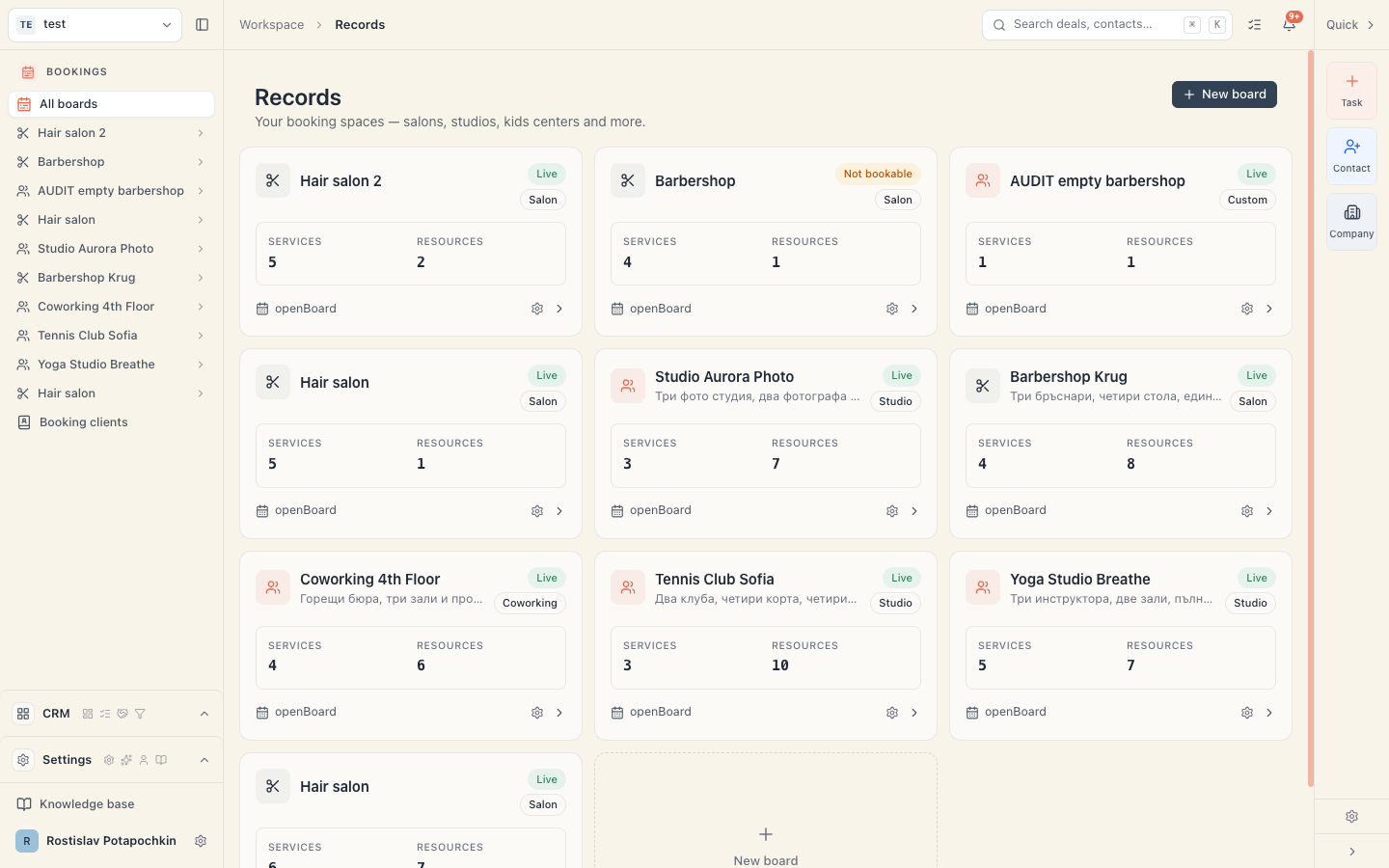
Each board is one card. The last card is dashed — New board.
How to read a board card
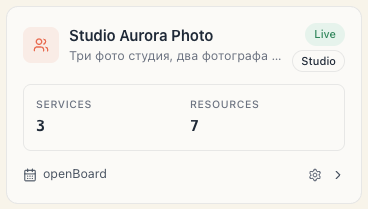
| Part of the card | What it means |
|---|---|
| Icon + name | Clicking opens the board |
| Line under the name | The short description, if you set one |
| Upper label on the right | Status — see the table below |
| Second label on the right | Board type: Salon, Studio, Kids center, Clinic, Coworking or Custom |
| Services | How many services the board has |
| Resources | How many resources (people, chairs, rooms, equipment) |
| Open board (bottom left) | A hint label — the whole card is clickable |
| Cog (bottom right) | Board settings — goes straight to the settings |
The three statuses
| Status | When it shows | What it means for the client |
|---|---|---|
| Live | Online booking is on and at least one service can genuinely be booked | The client can book |
| Not bookable | Online booking is on, but not a single service can be booked | The client sees an empty page — this is a warning, not a win |
| Draft | Online booking is off | The page is hidden |
Careful with “Not bookable”. It means the page is public but empty — most often because a service requires a resource kind for which you have no active resource. Open the board: the Needs attention card on the Home page names the exact cause. See also Find out why a service shows no free times.
What a board contains
Everything on this list belongs to that board only and is invisible to the others:
- Working hours and days off, including the country’s public holidays;
- Currency — every price and every payment on the board is in it;
- Time zone — decides which day counts as “today” for the schedule, the reports and the till;
- Resource kinds and the resources themselves (masters, chairs, rooms, courts, equipment);
- Services, classes and rentals, with prices and durations;
- Locations (branches) with their own addresses and their own hours;
- The calendar with every booking;
- The clients who booked at this board;
- The till: money received, payments, debts, closing the day;
- Packages, loyalty rules, banners, reviews, client questions;
- The public page with its own address, logo, photos and mood;
- Online payments — the Stripe connection is per board. Two boards = two separate connections.
What is NOT on the board
This is where the expensive misunderstandings are born:
| Belongs to the workspace, not the board | Consequence |
|---|---|
| Team and permissions | A person’s access applies to every board. You cannot give a staff member access to only one salon. |
| The subscription and what you pay Mountify | One subscription for the whole workspace, however many boards. |
| The limits — bookable spots and locations | Counted workspace-wide, not per board. Three boards do not give you triple the spots. |
| The country | Comes from the workspace and is inherited when a board is created. |
| Your language and appearance | Personal to your account, and they apply everywhere. |
“Can a colleague see only one of my boards?” — No. This is a structural question the product answers with a firm no. See Can I limit someone to one salon?
When one board is enough
Almost always. One board is enough when:
- you have one place, or several branches with the same services and the same team (branches are built with locations inside the board, not with new boards);
- you want one link for clients and one public page;
- you want one till and one report.
When you need a second board
A second board makes sense when one of these must be different:
| What differs | Does a second board solve it? |
|---|---|
| Currency or time zone | Yes — both live on the board |
| The public page (separate brand, separate link) | Yes |
| Services and prices are completely different | Yes |
| The calendars must not mix | Yes |
| A separate Stripe account per venue | Yes — the connection is per board |
| Team access must be split | No — boards don’t solve this (you’d need a second workspace) |
| Only the address differs | No — create a location inside the same board |
The full decision table, covering locations and second workspaces, is in Workspace, board, location.
How to switch boards
- Enter any board.
- At the top of the menu (under the product picker) sits the tile with the current board’s name.
- Click it. A list titled Boards opens, with a check on the current one.
- Pick another board — or All boards at the bottom to return to the grid.
The app tries to keep you on the same page in the new board: if you were in the schedule, you land in the other board’s schedule.
Creating, renaming, hiding
- Create — Boards → New board. Four steps: The setup wizard.
- Rename — inside the board: Setup → Settings, the Profile section, the Name field, then Save changes (a “Save board changes?” confirmation appears). Clients see this name on the public page.
- Currency and time zone — same page. Changing the currency raises a confirmation stating exactly how many payments already exist in the old one; amounts are not converted. See Your venue’s currency.
- Hide from clients — don’t delete the board. Turn off Online booking at Setup → Public site; the status becomes Draft and the data stays.
The number of boards is not capped by your plan. What’s capped is active bookable spots and locations — and those are counted across the whole workspace. See Plan limits and what gets locked.
Common questions
Does a second board cost more? Only indirectly. The board itself isn’t billed. You pay if it brings you more active bookable resources than your plan includes, or more locations. See Does adding a teammate cost extra?
Two branches — two boards or two locations? If the services and the team are the same, make locations in one board: one link, one calendar with a branch filter, one till. Take separate boards when the venues are run as separate businesses.
Will my clients appear on both boards? No. The Clients list belongs to a specific board. Someone who booked at the other venue won’t be in this list.
Can I move a service from one board to another? No. Services live on their board; on the other one you create them again.
What if I no longer need a board? Don’t delete it if it holds bookings and payments — turn off Online booking and it becomes Draft: hidden from clients, history intact. When in doubt, ask support before deleting anything.
What’s next
- Workspace, board, location — the decision table.
- Tour of the admin — what’s inside a board.
- Locations overview — branches inside a board.
- Can I limit someone to one salon? — why the team is shared.