What Mountify is
Mountify in short: an online booking page, calendar, payments and loyalty for service businesses — all in one place.
If you’ve been taking bookings by phone, in a paper diary or over DMs, Mountify does one main thing: it gives your clients their own page on the internet where they pick a service, a specialist and a free slot themselves — and it gives you an admin panel where all of it lands in one place: schedule, clients, money, team.
This article is an overview. It doesn’t ask you to click anything — it explains what the product is made of, where each part lives, and, just as importantly, what Mountify does not do. If you already know all that and want to start, jump straight to Create your account & workspace.
The two sides of Mountify
The easiest way to think about the product is as two sides of the same thing.
The public side is a booking page on the internet. Your client opens it on their phone at any hour, picks what they want, who should do it and when, and books themselves — without calling you and without waiting for a reply. That page has an address (you choose the last part of it) and you style it from the admin: logo, name, photos, mood, colours.
Your side is the admin panel, which you sign into with an email and password. Clients never see it. A board’s landing page is called Home and shows today at a glance:

There are five numbers in that strip, each answering one question: Bookings today, Checked in, Received today (money that actually came in, not money expected), No-show and Waitlist.
What the product is made of
Inside the admin there are three separate product areas. You switch between them from the narrow left-hand rail:
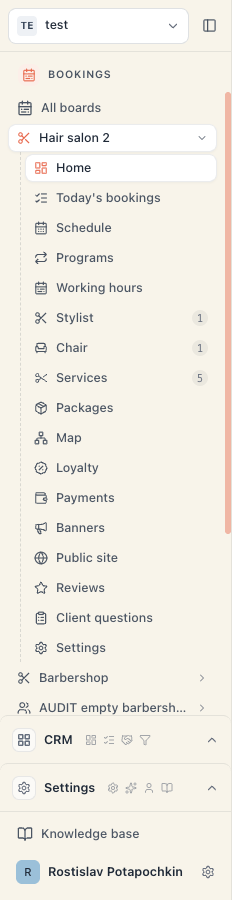
| Area in the left rail | What’s inside | Included? |
|---|---|---|
| Bookings | Everything about bookings: Home, Schedule, Bookings, Clients, plus the three hubs Catalog, Money and Setup | Yes, on every plan |
| CRM | Deals, pipelines, companies, contacts, tasks, files — for businesses that also run a sales process alongside bookings | No — it carries a crown icon and unlocks on the Pro plan (or as an add-on on the lower plans) |
| Settings | Workspace settings, team and permissions, subscription, and your personal account | Yes |
Important: the CRM area and the Clients page inside Bookings are different things. “Clients” are the people who book with you — that page is part of the core product. “CRM” is deals and pipelines for B2B selling and is a paid feature. If you see “CRM is available on the Pro plan — upgrade to unlock it.”, you’ve clicked the locked area.
What Mountify does
Each of these has its own article — this is the map so you know what exists:
- Booking page — your public page with logo, photos, services and prices. Configured at Setup → Public site; changes save themselves and go live immediately. See Your booking page.
- Schedule — the calendar with every booking, by specialist or by resource (chair, room, court), for a day or a week. See The calendar.
- Catalog — what you sell and what delivers it: services, resource kinds and the resources themselves, locations, class programs, packages. See Services overview.
- Money — the till: money received, who owes you, payments, closing the day. See Money: where everything about money lives.
- Online payments — a client can leave a deposit or pay in full by card. The money goes straight into your own Stripe account. See Connect Stripe.
- Email notifications — confirmation and reminder to the client, review request. See Confirmations and reminders.
- Loyalty and promotions — stamps, promo codes, automatic discounts, banners on your public page.
- Team and permissions — colleagues with their own login and precisely defined rights. See Invite your team.
You don’t have to switch everything on at once. To take your first online booking you only need working hours, one resource and one service — that’s one evening’s work.
What Mountify does NOT do
This list saves most of the disappointments. Read it before you promise something to your accountant or to a client.
| Doesn’t do | What that means in practice |
|---|---|
| Doesn’t issue fiscal receipts | Mountify is not a cash register and doesn’t talk to the tax authority. Recorded payments are internal bookkeeping — the fiscal part stays with your till and your accountant. |
| Doesn’t send SMS | Every client notification is email. There is no SMS channel. |
| Doesn’t email about a booking YOU entered | Confirmations, reminders and review requests go out only for bookings that came through the public page. If you type a slot in by hand in the admin, the client gets nothing — call them. |
| Doesn’t send a payment link for an existing booking | Online payment happens at the moment of booking on the public page. There is no button that emails a payment link to someone already booked. |
| Doesn’t refund automatically | Nothing applies a “cancellation policy” on your behalf. Every refund is a manual action you take. |
| Isn’t a neutral middleman on refunds | Contrary to the common assumption: when you refund an online payment from Mountify, that is a real Stripe refund — the money leaves your account immediately. See Refunds and cancellations. |
| Doesn’t support a custom domain | Your page lives on a Mountify address; you choose only the last part of it (for example my-salon). There is no forwarding from www.your-salon.com. |
| Doesn’t keep a separate team per board | A person’s access is workspace-wide. You cannot give a staff member access to only one salon. See Can I limit someone to one salon? |
| Isn’t accounting software | The reports answer “how much came in and how much went out”; they don’t replace an accounting package. |
The three structural levels
Three words repeat all over this help centre. Here they are, outside in:
- Workspace — your business in Mountify. The team, the permissions and the subscription hang off it. One is usually enough.
- Board — one bookable place with its own schedule, its own services, its own public page, its own currency and time zone. The Boards list shows all of them.
- Location — a branch inside a board. Locations have their own working hours and address, and they are capped by plan (beyond the cap they’re a paid add-on).
Which structure you need has its own article with a decision table: Workspace, board, location.
Who it’s for
Mountify is for any business where the client arrives at an appointed time. The ready-made presets in the new-board wizard cover: hair salons and barbershops, nail studios, beauty and cosmetology, brow and lash, tattoo and piercing, massage and spa, yoga, pilates, dance, martial arts, CrossFit, personal training, tennis and padel clubs, climbing gyms, dental and medical clinics, physiotherapy, vets, pet grooming, photo studios, coworking, car washes and auto service, tutoring, language and music schools, driving schools, escape rooms, karaoke, VR arcades, board game cafés, cleaning services and handymen. If your trade isn’t there, the Custom preset carries an Empty badge — you start from a blank sheet.
What it costs
There are four plans, billed in euros, excluding VAT (Stripe adds VAT at checkout): Start, Growth, Pro and Custom (talk to us). The price depends mainly on your number of bookable spots — how many active bookable resources (person, chair, room, court, equipment) you have. Bookings, clients and services are unlimited on every plan.
You start with 14 free days with everything Pro can do, and no card. In detail: Trial & going live and Plans and billing.
Common questions
Do I need a developer or an integrator? No. Everything is set up by clicking in the admin. There’s no code, unless you decide to embed the booking form on your own website — and then it’s two lines you copy.
Do my clients need an account to book? Not necessarily. Booking works without registration; the client gets an email confirmation.
Can two bookings end up on the same slot? On the public page a client only ever sees genuinely free times. In the admin, though, you outrank the rules: the system allows you to stack two bookings and merely flags the conflict. See The calendar.
Does it work on a phone? Yes. The admin has a mobile layout with a slide-out menu; the public page is built phone-first.
What languages does it come in? The admin is Bulgarian, English and Turkish — each teammate picks their own. So are the sign-in and registration screens, even though they come from the separate sign-in system.
What’s next
- Create your account & workspace — registration step by step.
- Tour of the admin — where everything lives.
- Go live in one evening — the shortest path to a first booking.
- Workspace, board, location — how to structure your business on day one.