Trial & going live
How the free trial works and what happens when you're ready to go live on a plan.
Mountify starts with a free trial so you can set everything up at your own pace and walk a real booking flow before paying anything. Here are the actual numbers and — more importantly — exactly what happens when the trial ends.
The short version:
| Question | Answer |
|---|---|
| How long | 14 days |
| What’s included | Everything on the Pro plan |
| Does it need a card | No |
| How many times | Once per person — a second workspace gets no trial |
| Does Mountify email before it ends | No. The only warning is the in-app strip |
| What stops at the end | The public page for clients, and access to your boards in the admin |
| Is any data lost | No |
Where the subscription is managed
Navigation: Settings → Workspace settings → Subscription & billing.
Shortcut: the monogram tile at the top of the narrow rail → Billing.
The page is titled Subscription & billing, subtitled “Pick a plan by your number of bookable spots and manage invoicing.”

The whole point of the page is the right-hand panel. Top to bottom:
- Current plan — the plan name and a status label (Trial, Active, Past due, Canceled, Expired).
- During a trial: “N days left in your trial”, a thin progress bar, and under it Day X of 14 and Ends
. - Your limits — two numbers: Bookable spots and Locations. With add-ons the number reads like “15 + 2 extra”.
- After your trial — what you’ll be paying: a line for the plan, a line per add-on, and Total. Under it: “All prices exclude VAT — Stripe adds it at checkout.”
- A big Continue with
— button.
What you get during the 14 days
The trial grants the Pro plan’s capabilities, no matter which plan you intend to take afterwards. In practice: up to 15 bookable spots, up to 3 locations, group classes, waitlist, packages and memberships, banners and promo codes, the CRM area unlocked, team roles and import.
That’s why the plans section says: “You’re trying Pro free for 14 days. Pick the plan to continue with — nothing is charged until checkout.”
Mind your expectations. If you build the trial around something Pro-only (group classes, say) and then take Start, that feature locks. See what each plan includes below.
How to pick a plan
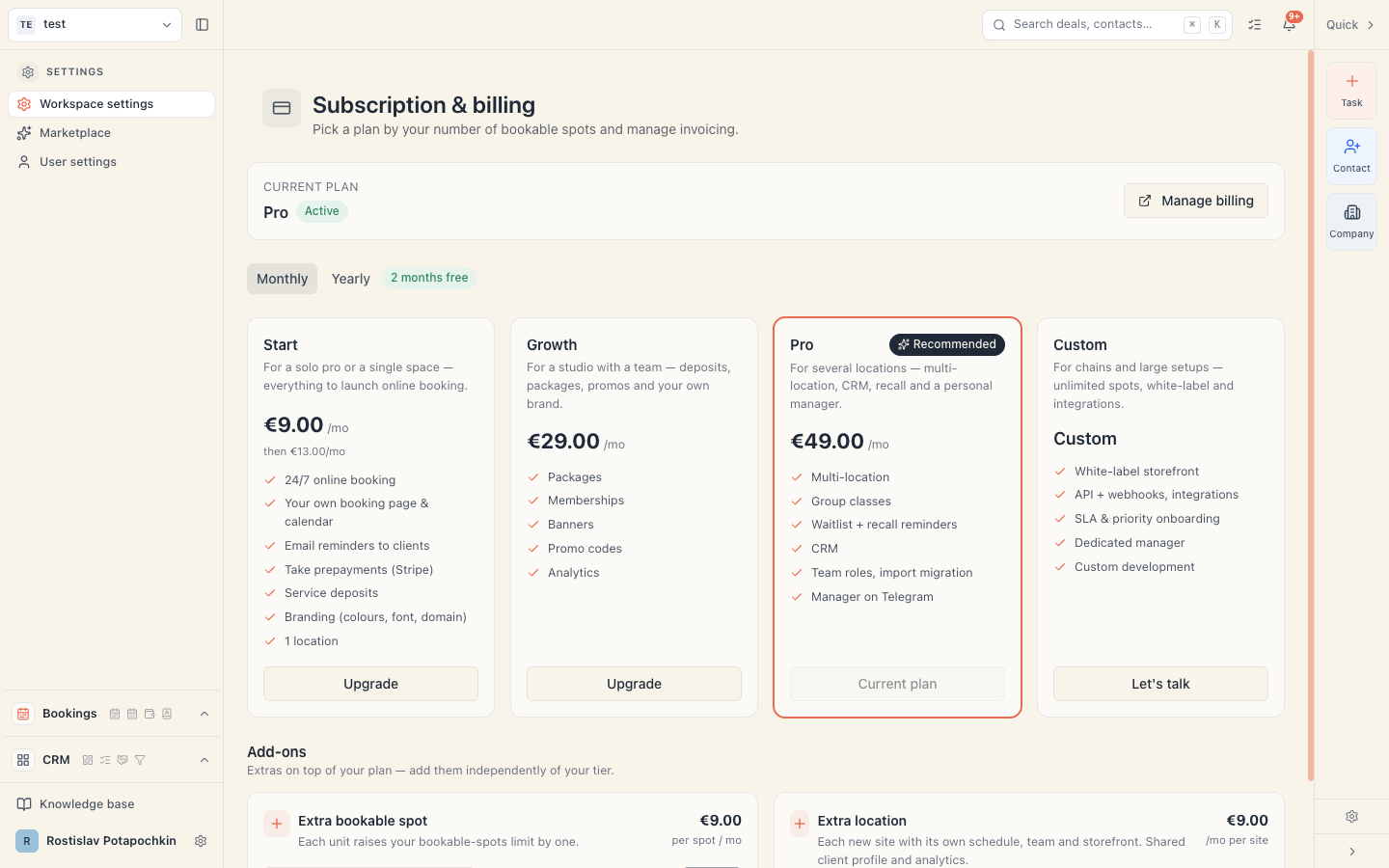
- At the top is a Monthly / Yearly toggle with a 2 months free badge. Yearly = pay for 10 months, use 12.
- There are three plan cards plus a strip for Custom:
| Plan | Monthly | Yearly | Bookable spots | Locations |
|---|---|---|---|---|
| Start | €13 | €130 | 1 | 1 |
| Growth | €29 | €290 | 5 | 1 |
| Pro (Recommended) | €49 | €490 | 15 | 3 |
| Custom | Custom price — a Let’s talk button | — | Unlimited | Unlimited |
- During the trial the cards are selectable: click one and it reads Selected. The Pro card carries a Your trial plan label.
- Selecting instantly recalculates the right-hand panel (“After your trial” and Total).
- When you’ve decided, press Continue with
— . From there the payment happens in Stripe — you enter the card there, and VAT is added there.
All prices are in euros, excluding VAT. Under the plans are links to Terms, Privacy Policy and DPA — starting a paid subscription accepts them.
What each plan includes
- Start — 24/7 online booking, your own page and calendar, email reminders, prepayments via Stripe, service deposits, branding, 1 location.
- Growth — everything in Start plus packages, memberships, banners, promo codes and analytics.
- Pro — everything in Growth plus multi-location, group classes, waitlist and recall reminders, CRM, team roles and import migration, a manager on Telegram.
- Custom — unlimited spots, white-label storefront, API and webhooks, SLA, a dedicated manager.
Add-ons
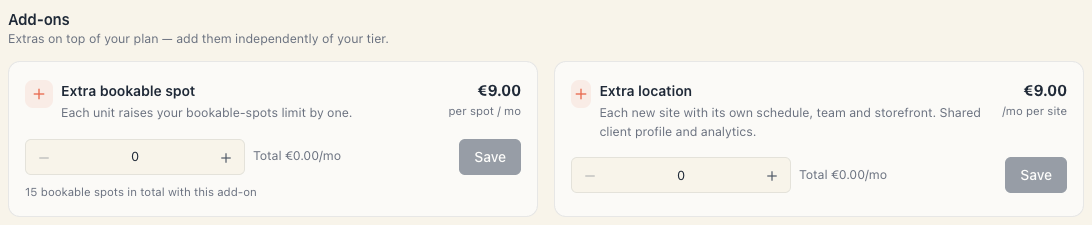
There are four add-ons, bought on top of your plan:
| Add-on | Price | Type | Which plans |
|---|---|---|---|
| Extra bookable spot | €7/mo per spot | stepper | On any plan |
| Group classes | €12/mo | on/off switch | Add-on on Start & Growth · included from Pro |
| CRM+ & campaigns | €15/mo | on/off switch | Add-on on Start & Growth · included from Pro |
| Extra location | €9/mo per site | stepper | On any plan |
Under the bookable-spot card it shows “N bookable spots in total with this add-on” — what your total becomes.
During the trial, add-ons are drafts. You switch them on freely, they apply immediately and nothing is charged — they’re only part of the “After your trial” figure. Once you’re on a paid subscription, every change asks for confirmation and is charged prorated straight away. See Add spots and locations.
On a yearly cycle an add-on is yearly too — its price is multiplied by 10 (two months free, like the plan).
What happens when the trial ends
This is the part no email announces. Take it seriously.
While it runs: a thin strip sits under the app’s top bar reading “N free days left” with an Upgrade button. In the last three days the tone escalates: “Only N days left in your trial — pick a plan to keep bookings running”.
When it expires (the check runs once a day) the status becomes Expired and:
- The public page stops working. Clients can’t book online.
- Boards lock in the admin. Instead of the content you get an Your trial has ended screen reading “Pick a plan to open this board and keep accepting bookings.” with a Choose a plan button.
- Changes are blocked. You can’t create or edit bookings, services or resources.
- Reading still works. You can see and export your data; settings and billing stay reachable.
- The top strip changes to “Your trial has ended — bookings are paused. Pick a plan to continue.”
Everything you set up — boards, resources, services, clients, bookings, payments — stays intact. Activate a plan and you continue from the same place.
All the states in detail: What happens if the subscription stops.
A second workspace gets no trial
The free 14 days are granted once per person. Create a second workspace on the same account and it is created straight into Expired: the boards inside are locked until you pick a plan. That’s the intended behaviour, not a bug.
If you genuinely need a second workspace, plan for it being billed separately. Before you create one, read Workspace, board, location — very often what you actually need is a second board or just a new location, and those are free (locations, within your limit).
Who can do all this
Managing the subscription requires the Manage workspace settings permission. Without it the page is view-only and says: “Read-only — you can’t manage the subscription. Contact an Owner or Admin.”
Note that this is a different permission from Install integrations (connecting Stripe to take payments from clients). One is “I pay Mountify”, the other is “clients pay me”. See Who can manage the subscription.
Troubleshooting
| Symptom | Cause and fix |
|---|---|
| The Continue with … button does nothing | You lack the Manage workspace settings permission. |
| I can’t see Manage billing | That button only appears on a live paid subscription. During a trial the checkout button stands in its place. |
| I paid and the plan didn’t change immediately | Normal — Stripe’s confirmation arrives with a delay. The panel shows “Updating your subscription…” and refreshes itself. |
| The board says “Your trial has ended” | The trial expired. Pick a plan. |
| The board says “Subscription canceled” | A paid subscription was cancelled. See What happens if the subscription stops. |
| I can’t activate one more resource | You’ve hit your bookable-spots limit. Deactivate another resource or buy a spot. |
| ”Billing isn’t available yet.” | Billing is temporarily unreachable. Try again later. |
Common questions
Will something be charged automatically on day 15? No. There’s no card on file — you simply lose access until you pick a plan.
Can I get a trial extension? Not from the interface. Write to support.
Can I change plan afterwards? Yes, but not from this page — on a live paid subscription changes go through the Stripe portal. See Change your plan.
Where are the invoices? In Stripe, not in Mountify. The Manage billing button opens the portal, which holds the invoices and the card. See Manage payment and invoices.
And if I take a plan lower than Pro? Features outside that plan lock, and the limits tighten. If you have more active resources or locations than the new plan allows, you’ll meet limit messages. See Plan limits and what gets locked.
What’s next
- Plans and billing — plans and prices in detail.
- What happens if the subscription stops — every state and its consequences.
- Monthly or annual, and VAT — the numbers before you sign.
- Go live in one evening — so the trial doesn’t expire while you’re still setting up.